Liveness Spoofing Explained: How Biometric Attacks Work
Definition
Liveness spoofing is an attempt to trick a liveness detection system into accepting a fake biometric sample as a real, live person. It targets security checks used in facial recognition, fingerprint scanning, or voice verification, especially during digital onboarding and biometric login.
Liveness spoofing is a type of biometric presentation attack. The goal is to bypass the system and gain access to an account or service by imitating a genuine user.
How liveness spoofing works
Attackers use artifacts or techniques that mimic real biometric signals. Common approaches include:
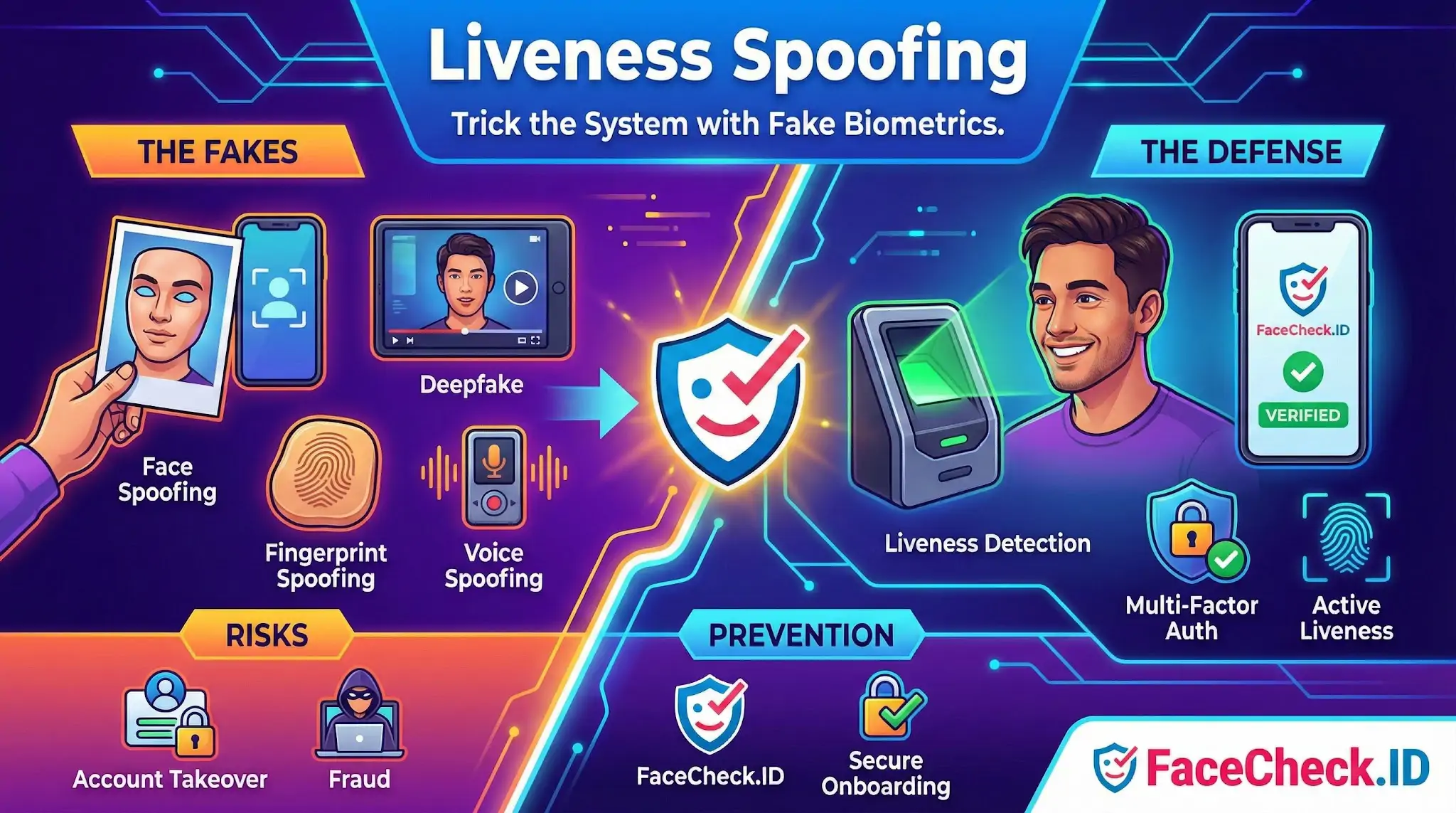
- Face spoofing using printed photos, replayed videos, screen displays, or masks to fool face liveness checks.
- Deepfake based spoofing where synthetic video or audio is generated to impersonate someone in real time or near real time.
- Fingerprint spoofing using molded fingerprint replicas made from silicone, latex, or gelatin.
- Voice spoofing using recorded audio, text to speech, or voice cloning to pass voice liveness or speaker verification.
Some attacks are simple and cheap, such as holding a photo in front of a camera. Others are advanced, such as combining a deepfake with device emulation to imitate camera behavior and bypass anti spoofing controls.
Why liveness spoofing matters
Liveness spoofing can lead to:
- Account takeover by bypassing biometric login
- Fraudulent onboarding and synthetic identity fraud
- Unauthorized transactions in banking and payments
- Compliance and reputation risk for businesses handling sensitive data
As more services rely on biometric authentication, liveness spoofing has become a key threat in identity verification and fraud prevention.
Where liveness spoofing happens
Liveness spoofing attempts are most common in:
- Remote identity verification for KYC and onboarding
- Mobile banking and fintech apps
- Crypto exchanges and high risk account creation flows
- Employee access control and secure work apps
- Consumer devices using Face ID style authentication
Remote checks are especially targeted because the attacker does not need physical access to a secure facility.
Typical signs and risk factors
Signals that often correlate with spoofing attempts include:
- Repeated failed liveness checks followed by a successful pass
- Unusual device and network patterns such as emulators, VPNs, or mismatched geolocation
- Low quality camera feeds, screen glare, moire patterns, or unnatural reflections
- Behavioral anomalies such as abnormal blink patterns or rigid head movement
- Inconsistent biometric traits across sessions
These signals are often used alongside liveness detection to strengthen fraud scoring.
How to prevent liveness spoofing
Effective mitigation usually combines multiple layers:
- Active liveness with guided actions like turning the head or following prompts
- Passive liveness that analyzes texture, depth cues, and motion without user prompts
- Challenge variation to reduce replay attacks
- Device and session security such as emulator detection, jailbreak detection, and secure camera capture
- Human review for high risk cases
- Multi factor authentication to reduce reliance on a single biometric factor
No single control stops all attacks. Strong anti spoofing programs use liveness detection plus risk based authentication and ongoing monitoring.
Liveness spoofing vs related concepts
- Liveness detection is the defensive technology that checks whether the biometric sample comes from a real live person.
- Spoofing is a broader term that includes non biometric attacks like SMS spoofing or IP spoofing.
- Deepfakes are one method of spoofing that can be used to attack face or voice systems.
- Presentation attack is the formal biometric security term for submitting fake artifacts to a sensor.
FAQ
What does “Liveness Spoofing” mean in the context of face recognition search engines?
Liveness spoofing is the use of non-live or manipulated media—such as a printed photo, a screen replay, a mask, or a deepfake—to make a face-recognition system treat the input as a real, present person. In face recognition search engines (open-web face search), it most often shows up when someone uploads a screenshot or edited image and then misreads the results as evidence of a real-world identity or real-time presence.
Can liveness spoofing “fool” a face recognition search engine into returning the wrong person?
Yes. If the query image is spoofed or heavily manipulated (deepfake, face-swap, aggressive beautification filters, AI upscales), the extracted facial features can shift toward a different person’s facial signature, producing wrong-person matches or mixed results. Even when the engine is working correctly, it is still searching for visual similarity—not proving the image is authentic or that the person was physically present.
What are common liveness spoofing techniques that impact face-search investigations?
Common techniques include: (1) screen replay (capturing a profile photo or video call frame and re-uploading it), (2) printed-photo or “photo-of-a-photo” capture, (3) deepfake or face-swap portraits, (4) AI-enhanced selfies (beauty filters, reshaping), and (5) composite images (splicing a face onto a different body or scene). These can create convincing images that still produce misleading face-search matches.
How can I reduce liveness-spoofing risk when using a face recognition search engine like FaceCheck.ID?
Use the highest-quality, least-manipulated source image you can: avoid screenshots of video calls, avoid heavily filtered/beautified images, and prefer well-lit front-facing photos with natural texture. If you suspect spoofing, run searches using multiple different images of the same person (from different dates/angles) and look for consistent overlap in results. When reviewing FaceCheck.ID (or any face search tool) results, treat hits as leads and verify by cross-checking context (original upload dates, repeated reuse patterns, and whether multiple independent sources corroborate the same identity).
Does liveness spoofing matter if face search engines don’t perform liveness detection?
It still matters because the user can misinterpret search results. Open-web face search is typically not trying to confirm that a person is live in front of a camera; it’s matching a face-like image to other images on the internet. A spoofed query can (a) produce false matches, (b) create a misleading “trail” to unrelated profiles, or (c) incorrectly suggest a real person is behind an image that was generated or altered. The safest approach is to validate authenticity and provenance separately from the face-match output.