Credential Fraud Explained: Types, Examples & Prevention
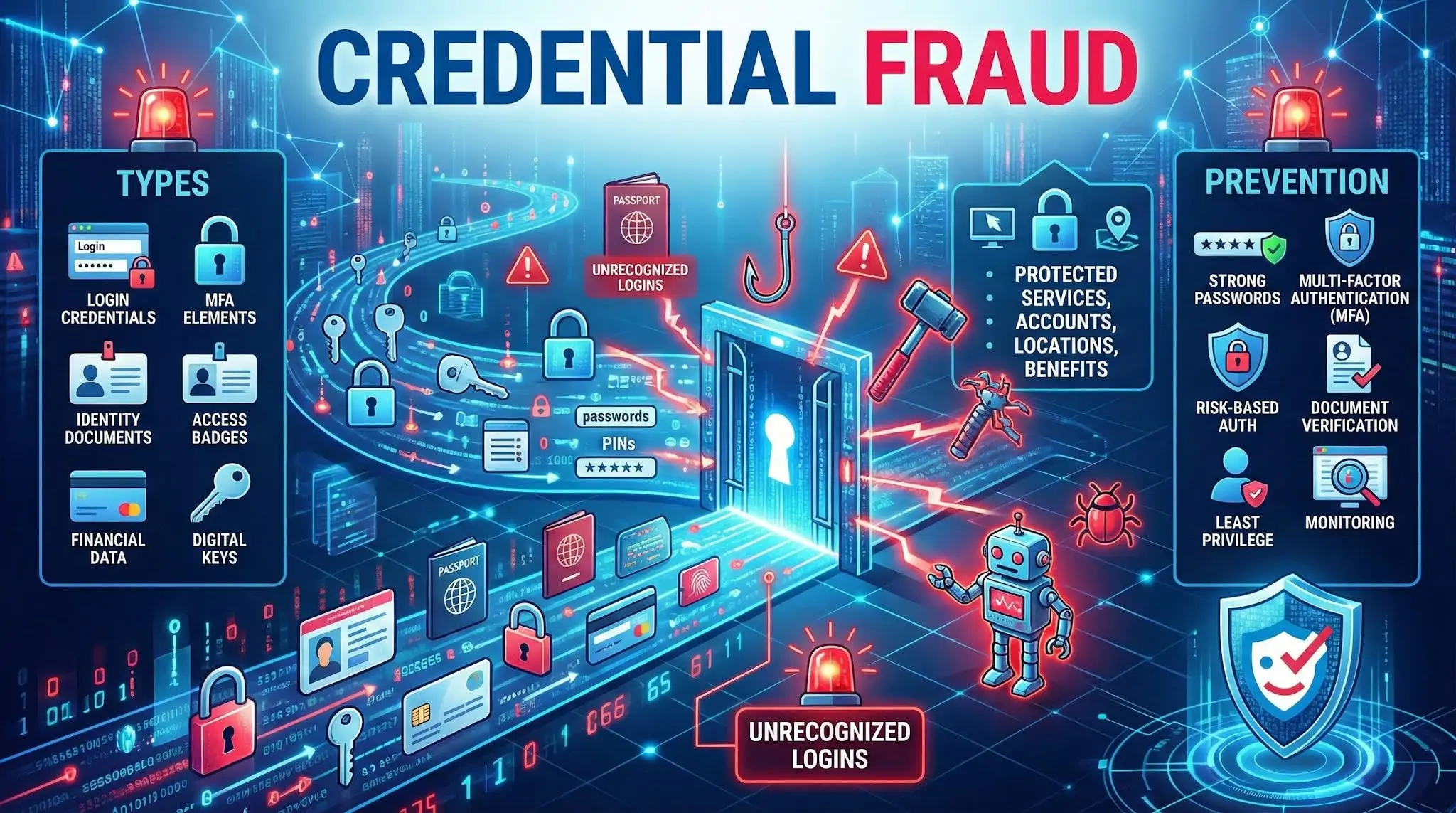
Credential fraud is the use of stolen, fake, altered, or illegally obtained credentials to impersonate someone or gain access to protected services, accounts, locations, or benefits. Credentials can include usernames and passwords, government IDs, employee badges, certificates, digital tokens, or any proof of identity and authorization.
What counts as a credential
Credential fraud can involve many types of identity and access proof, such as:
- Login credentials: email and password, PINs, security question answers
- Multi factor authentication elements: one time passcodes, push approvals, backup codes
- Identity documents: passports, driver licenses, national IDs, residence permits
- Work and facility access: employee IDs, badges, key cards, visitor passes
- Financial and customer access: card numbers, online banking logins, loyalty accounts
- Digital certificates and keys: API keys, OAuth tokens, device certificates, signing keys
- Education and professional credentials: diplomas, certifications, licenses
How credential fraud happens
Common methods include:
- Phishing and social engineering to trick people into sharing passwords or codes
- Credential stuffing using leaked username and password pairs from data breaches
- Brute force and password spraying to guess weak or reused passwords
- Malware and keylogging that captures credentials from infected devices
- SIM swapping to intercept SMS based verification codes
- Fake or altered documents using image editing or forged templates
- Insider theft where employees misuse access or copy sensitive data
Common examples
- Logging into someone’s email or bank account using a breached password
- Creating an account with a synthetic identity and fake documents
- Using a stolen employee badge to enter a restricted building
- Presenting a forged certificate to obtain a job, license, or enrollment
- Taking over a customer account and changing the email, phone, or payout details
Why credential fraud is harmful
Credential fraud can lead to:
- Account takeover and financial loss through unauthorized transactions
- Identity theft and long term damage to victims’ credit and reputation
- Data breaches when attackers move from one account to broader systems
- Compliance and legal exposure for organizations handling regulated data
- Operational disruption due to incident response, lockouts, and recovery work
Warning signs to watch for
- Unrecognized login attempts or new device sign ins
- Password reset emails or MFA prompts you did not request
- Changes to account details like email, phone, shipping address, or payout info
- Unusual location, time, or velocity of logins
- Repeated failed logins across many accounts in a short period
How to prevent credential fraud
Good defenses combine user habits, technical controls, and monitoring:
- Use unique, strong passwords and a password manager
- Turn on multi factor authentication, preferably app based or hardware keys
- Monitor for breached credentials and force resets when exposure is detected
- Add risk based authentication like device fingerprinting and anomaly detection
- Implement rate limiting and protections against automated login attacks
- Use document verification and liveness checks when onboarding users
- Apply least privilege access and regularly review permissions
- Train staff to recognize phishing and social engineering attempts
Credential fraud vs related fraud types
- Credential fraud vs identity theft: credential fraud focuses on misuse of access proof, while identity theft is broader and includes misuse of personal data in many contexts.
- Credential fraud vs account takeover: credential fraud is often the cause, account takeover is the outcome when an attacker gains control of an account.
- Credential fraud vs document fraud: document fraud is a subset focused on forged or altered documents, while credential fraud also includes digital logins and tokens.
FAQ
What is “Credential Fraud” in the context of face recognition search engines?
Credential Fraud is the use of stolen, forged, or misrepresented identity credentials (e.g., ID cards, passports, employee badges, professional certificates) to pretend to be someone else. In face recognition search engines, it often shows up when a profile photo or document photo is linked online to multiple identities, suggesting possible impersonation, document misuse, or recycled images across accounts.
How can a face recognition search engine help detect possible Credential Fraud without proving it?
It can surface where the same face (or a very similar face) appears across the open web, helping you spot patterns like the same headshot used on different names, companies, or locations, or the same “ID-style” photo reused across multiple accounts. These findings are investigative leads—not proof of fraud—because reposts, look-alikes, and scraped content can create misleading connections.
What result patterns are common red flags for Credential Fraud when reviewing face-search matches?
Common warning patterns include: (1) the same face tied to multiple names or bios, (2) repeated use of an “ID photo” or badge-like image across unrelated sites, (3) clusters of new or low-credibility accounts reusing the same images, (4) mismatches between the face image and consistent personal details (age, location, employer timeline), and (5) results that appear only on repost, archive, or scam-report pages rather than stable primary sources.
If a tool like FaceCheck.ID returns matches that suggest Credential Fraud, what should I do next?
Treat the match as a lead and verify using independent steps: open each source page and check whether it’s a repost or the original; compare multiple photos from the same claimed identity (not just one headshot); look for consistent identifiers (username history, linked accounts, long-lived domains, employer pages); and document contradictions carefully. If this is a hiring, finance, or safety situation, use a proper identity verification process (and follow applicable privacy laws) rather than relying on face-search results alone.
How can I reduce the risk of falsely accusing someone of Credential Fraud based on face-search results?
Avoid making a conclusion from a single match or a single site. Cross-check with multiple independent sources, require consistent biographical details across time, and assume errors are possible due to look-alikes (doppelgängers), image reposting, or mislabeled pages. When possible, confirm identity through legitimate channels (platform verification, direct contact using trusted methods, or formal KYC/IDV workflows) and keep face-search findings as supporting context—not a final determination.