Document Verification Explained: Checks & Process
Document verification is the process of confirming that a document is real, valid, and belongs to the person presenting it. It is commonly used to prevent fraud, meet compliance requirements, and approve access to services such as banking, payments, crypto, insurance, healthcare, travel, and online marketplaces.
Document verification often works alongside identity verification to ensure the document details match the user’s information.
What document verification checks
Document verification can include several checks, depending on the document type and risk level:
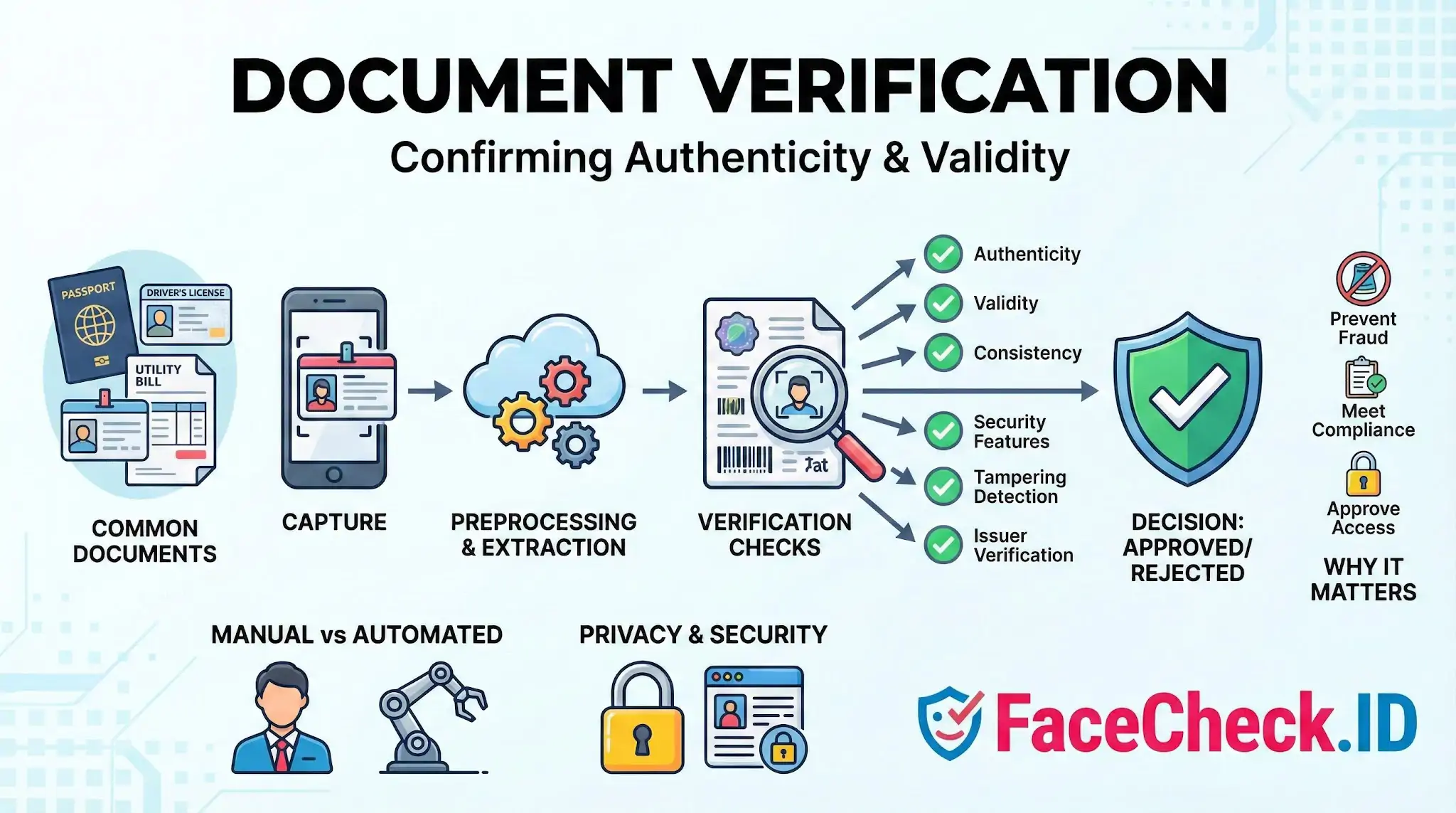
- Authenticity checks to confirm the document is not fake or altered
- Validity checks to confirm the document is not expired and meets format rules
- Data consistency checks to confirm names, dates, and numbers follow expected patterns
- Security feature checks such as holograms, microprint, MRZ, barcodes, and digital signatures
- Tampering detection to spot edits, overlays, missing elements, or image manipulation
- Issuer verification to confirm the document matches a real issuing authority
Common documents verified
Organizations verify many types of documents, including:
- Government ID cards
- Passports
- Driver’s licenses
- Residence permits and visas
- Utility bills for proof of address
- Bank statements
- Tax documents
- Business registration certificates
- Proof of income documents such as pay stubs
How document verification works
Most modern document verification follows a simple flow:
- Capture: The user uploads images or scans the document using a phone or webcam.
- Preprocessing: The system improves image quality, detects edges, and checks readability.
- Data extraction: Text is captured using OCR and machine-readable zones or barcodes when available.
- Verification checks: The system evaluates security features, integrity, and document format rules.
- Decision: Results are approved, rejected, or flagged for manual review.
Some providers add liveness checks and face matching to confirm the person is physically present and matches the ID photo.
Manual vs automated document verification
Manual verification involves trained reviewers inspecting the document. It can handle edge cases but is slower, more expensive, and harder to scale.
Automated verification uses software and machine learning to validate documents in seconds. It improves speed and consistency and is often combined with manual review for uncertain cases.
Why document verification matters
Document verification helps organizations:
- Reduce identity fraud and account takeovers
- Prevent synthetic identities and forged documents
- Meet regulatory requirements such as KYC and AML
- Lower chargebacks and financial losses
- Build trust with customers during onboarding
- Protect platforms from fake sellers, renters, or borrowers
Key accuracy and quality factors
Results depend heavily on document and image quality. Common factors include:
- Blurry photos, glare, shadows, or low lighting
- Cropped corners or missing pages
- Unsupported document types or countries
- Worn or damaged documents
- Mismatched personal details across submitted documents
Clear capture instructions and real-time camera guidance can significantly improve pass rates.
Document verification in compliance and onboarding
Document verification is a core step in many onboarding and compliance flows, especially in regulated industries. It is frequently used in:
- Customer onboarding for banks and fintech apps
- Age verification for restricted products
- Travel and hospitality check-in
- Employment right-to-work checks
- Tenant screening and rental applications
- High-value e-commerce and marketplace seller onboarding
Privacy and security considerations
Because documents contain sensitive personal data, strong controls are essential:
- Data encryption in transit and at rest
- Strict access controls and audit logging
- Data minimization and retention limits
- Secure storage and secure deletion policies
- Compliance with relevant privacy and security rules where applicable
FAQ
What does “Document Verification” mean when discussed alongside face recognition search engines?
Document Verification (DocV) is the process of checking whether an identity document (e.g., passport, driver’s license) appears authentic and consistent (format, security features, data integrity) and whether the document’s portrait plausibly belongs to the person presenting it. A face recognition search engine, by contrast, searches the open web for visually similar faces; it can support investigations but does not verify a document’s authenticity or legally confirm identity.
Can a face recognition search engine be used to verify the authenticity of an ID document?
Not by itself. Open-web face search can sometimes help spot signals like reused portraits, impersonation, or a portrait that appears widely under unrelated names, but it cannot validate document security features, issuing authority records, or whether the document was altered. True document verification typically requires dedicated document forensics (and often database or issuer checks) plus a controlled face comparison between the selfie and the document photo.
How can face recognition search results help detect potential document-photo reuse or synthetic identities in a document verification workflow?
Face search results can provide investigative leads: (1) the same portrait appearing across many unrelated profiles, marketplaces, or scam reports, (2) the portrait matching stock-photo, model, or influencer images, (3) multiple “persona trails” tied to the same face, or (4) inconsistent geography/biography cues across sources. These patterns can justify escalations (manual review, requesting stronger proof, or rejecting the session), but they should not be treated as proof of fraud on their own.
What is a safer way to use FaceCheck.ID (or similar tools) during document verification without exposing unnecessary personal data?
Use only the portrait portion needed for face matching (crop tightly to the face), and avoid uploading full documents that contain document numbers, addresses, MRZ lines, barcodes, signatures, or other sensitive fields. Prefer a clean capture of the document photo area or a separate selfie (depending on your risk model), and treat matches as leads to corroborate with independent checks (issuer validation, selfie-vs-document comparison, and liveness controls where applicable).
What are common failure modes when using open-web face search to support document verification decisions?
Common pitfalls include: (1) look-alike matches leading to mistaken suspicion, (2) edited, filtered, AI-upscaled, or face-swapped portraits producing misleading matches, (3) incomplete indexing (a real person may have no searchable footprint), (4) repost ecosystems that make a legitimate photo look “overused,” and (5) over-reliance on similarity scores without cross-checking context (names, dates, source credibility, and whether the page is a repost). For DocV, results should be documented as supporting evidence for escalation—not used as the sole basis to confirm or deny identity.


Recommended Posts Related to document verification
-
Social Catfish Review: Is It Actually Worth Your Money in 2026?
ID Verification is a $397 one-time fee and includes name/location verification, email and phone checks, username and document verification, unlimited image searches, criminal record search, a consultation call, IP tracker results, and a bonus guide.