Image Fingerprinting Explained: How It Identifies Images
Definition
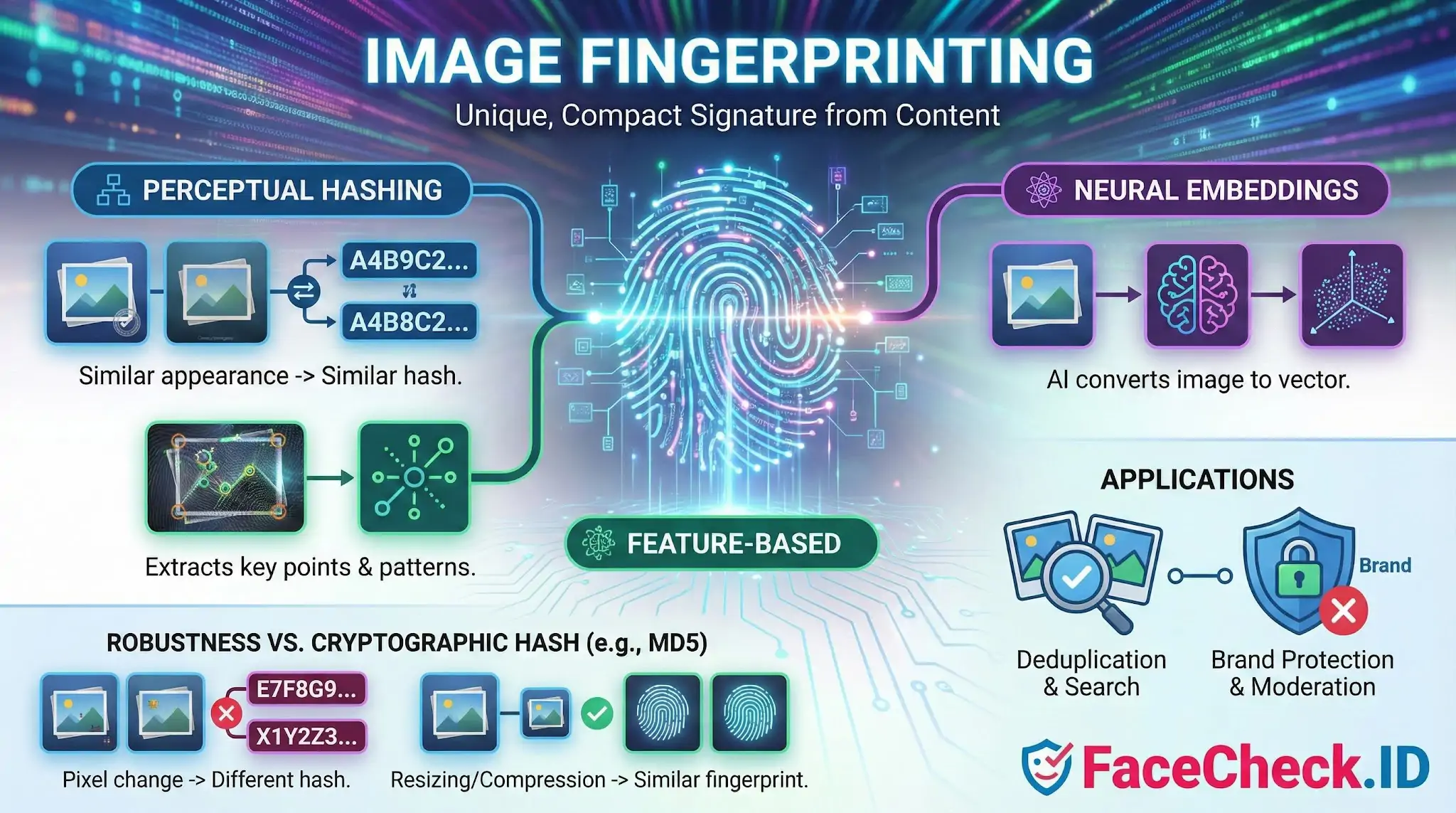
Image fingerprinting is a method of creating a unique, compact signature for an image so it can be identified later. The fingerprint is a short piece of data derived from the image content, not the file name or metadata.
How image fingerprinting works
Image fingerprinting turns visual information into a stable identifier using algorithms that focus on what the image looks like. Common approaches include:
- Perceptual hashing: Creates a hash based on the overall appearance of an image, so similar looking images produce similar hashes.
- Feature based fingerprints: Extracts key points or patterns from an image, such as corners and textures, to match images even when they are edited.
- Neural embeddings: Uses a machine learning model to convert an image into a vector that can be compared to other vectors for similarity.
Fingerprints are designed to be compact so they can be stored and searched quickly across large image libraries.
Why it matters
Image fingerprinting helps you:
- Detect duplicates and near duplicates across websites, marketplaces, or internal asset libraries
- Protect brand assets by spotting unauthorized reuse of logos, product images, and creatives
- Support content moderation by recognizing known illegal or harmful imagery
- Improve digital asset management by grouping variants of the same visual
- Enable fast visual search by finding images that look similar to a query image
Image fingerprinting vs hashing
Standard cryptographic hashing like MD5 or SHA produces a different hash when any pixel changes. Image fingerprinting, especially perceptual hashing and feature based methods, aims to stay similar even if an image is resized, slightly cropped, recompressed, or color adjusted.
Common use cases
- Copyright enforcement and takedown workflows
- Stock photo and media library deduplication
- Product catalog cleanup in ecommerce
- Social media and UGC moderation
- Detecting reposted memes or altered images
- Matching images across different file formats and resolutions
What changes can still match
Depending on the method and settings, image fingerprinting can often match images that have been:
- Resized or resampled
- Recompressed from PNG to JPG or vice versa
- Lightly cropped or padded
- Adjusted in brightness, contrast, or color
- Watermarked or overlaid with small text
Heavy edits like large crops, major rotations, or strong filters may require feature based or embedding approaches instead of simple perceptual hashes.
Accuracy and limitations
Image fingerprinting can produce:
- False positives when different images look similar
- False negatives when the same image is heavily edited
Systems usually tune similarity thresholds and may combine multiple fingerprints to improve reliability.
Privacy notes
Image fingerprinting identifies images, not people, but it can still be sensitive when used on user generated content. Good practice includes clear policies, limited retention, and secure storage of fingerprints.
FAQ
What is “Image Fingerprinting” in face recognition search engines?
In face recognition search engines, “Image Fingerprinting” usually means generating a compact, searchable signature from an image. This can refer to (a) a perceptual fingerprint of the whole image (useful for finding near-duplicate files) and/or (b) a face-specific fingerprint derived from the detected face region (often a face embedding used to find the same or similar faces across different photos).
How is image fingerprinting different from a face embedding (faceprint) when doing face search?
An image fingerprint often describes a signature for the entire picture (background, layout, colors), which is good for near-duplicate image matching. A face embedding is computed from the face area and is designed to represent facial features while ignoring many non-face details. Face recognition search engines typically rely on face embeddings for “same person” searches, while whole-image fingerprints may help with deduplication, finding reposts, or grouping visually similar uploads.
What kinds of edits can break or weaken an image fingerprint in face-search contexts?
Whole-image fingerprints are commonly affected by heavy cropping, overlays, borders, captions, large watermarks, strong color changes, and collage-style recompositions. Face-specific fingerprints (embeddings) can be weakened by low resolution, motion blur, extreme angles, occlusions (masks, hands), strong beauty filters, face swaps, or AI-generated alterations that change key facial geometry. Many systems try to be robust to small resizes or mild compression, but major transformations can still reduce match quality.
How do face recognition search engines use image fingerprinting in their search pipeline?
Image fingerprinting can be used to (1) deduplicate identical/near-identical images, (2) cluster multiple reposts of the same photo, (3) speed up retrieval by filtering candidates before deeper face-matching, and (4) help rank results (for example, prioritizing exact/near-duplicate image matches vs face-only matches). In practice, a tool may combine whole-image similarity with face-embedding similarity to produce more useful result groups.
Does image fingerprinting create privacy risks in face recognition search engines (e.g., FaceCheck.ID)?
Yes. A fingerprint (especially a face-derived fingerprint/embedding) can function like a persistent identifier: it can enable linking the same face across different sites or photos even when the images are not exact duplicates. If a service stores fingerprints, uploaded images, or search logs, that can increase privacy risk. When using face-search services such as FaceCheck.ID or similar tools, it’s safer to review their retention/opt-out policies, avoid uploading unnecessary sensitive images, and treat results as leads rather than definitive identity proof.


Recommended Posts Related to image fingerprinting
-
TinEye Review: We Tested It 16 Times and It Failed 10
This is image fingerprinting, not facial recognition. TinEye's image fingerprinting catches crops, resizes, and watermark additions. Its image fingerprinting technology is specifically built for this.
-
Free Reverse Image Search Tools That Actually Work (2026)
It works differently from Google and Yandex by using image fingerprinting rather than visual similarity.
-
TinEye Review: What It Does Well and Where It Falls Short
TinEye's image fingerprinting technology is more precise than Google's visual similarity matching.
-
Find & Remove Deepfake Porn of Yourself: Updated 2025 Guide
StopNCII is a free global tool to block intimate images on partner platforms by uploading an image fingerprint; your actual photo never leaves your device.