Document Verification
When someone shows up online with a polished photo and a story that does not quite add up, document verification is one way platforms try to confirm the person behind the account is real. It often works alongside face search and face matching, since a passport scan or driver's license alone proves little if the photo was lifted from someone else's social profile.
How document verification connects to face search
Document verification confirms an ID is authentic and belongs to the person presenting it. Face search works on the other side of the problem: it takes a face image and looks for where that same face appears across the public web. The two checks complement each other in fraud investigations.
A scammer might submit a real-looking ID with a stolen or AI-generated photo. Document verification can catch tampering, expired fields, or invalid security features. Face search can catch reuse, showing whether the same face appears on unrelated dating profiles, scam reports, or stock-photo sites. When a submitted ID photo also turns up on a dozen unrelated accounts under different names, that is a much stronger signal than either check alone.
What document verification actually checks
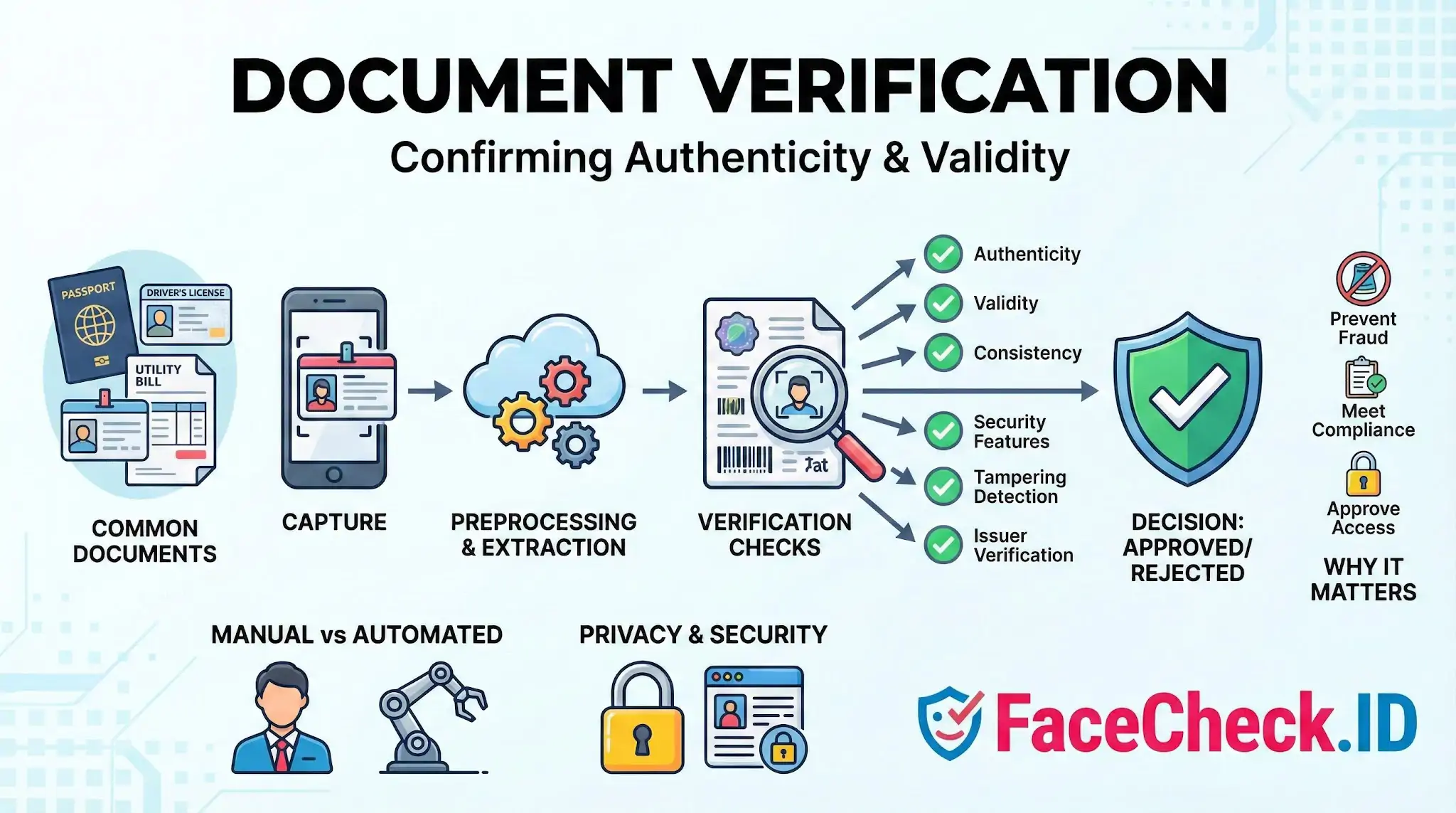
Most automated verification flows run several layers of analysis on a captured image:
- Authenticity checks for forged or altered documents
- Validity checks for expiration and correct format
- Security feature checks such as holograms, microprint, MRZ lines, and barcodes
- Tampering detection for overlays, splices, or edited fields
- Issuer verification against known templates from a real authority
- Data consistency between the printed text, the MRZ, and any chip data
Common documents include passports, national ID cards, driver's licenses, residence permits, and supporting documents like utility bills or bank statements for proof of address. Each has its own template and security features, which is why coverage varies across providers and countries.
How it fits into onboarding and investigations
A typical flow runs in seconds. The user captures the document with a phone camera, the system runs OCR and security checks, and many providers add a selfie step with liveness detection to confirm the person is physically present and matches the ID photo. That selfie comparison is a one-to-one face match against the document portrait, not a search across the wider web.
This is where face search adds something different. One-to-one matching answers "is this the same person as the ID photo." Face search answers "where else does this face appear, and under what names." For investigators looking into romance scams, fake sellers, or suspected catfishing, a clean ID match does not rule out impersonation. Running the same face image through reverse image search can surface earlier accounts, news stories, or scam databases that the document check has no way to see.
Image quality factors that affect both checks
Document verification and face search share many of the same quality problems. Blurry photos, harsh glare on a laminated ID, low lighting, cropped edges, and heavy compression all degrade results. A face cropped from a small thumbnail on a driver's license rarely produces strong face-search matches because the resolution is low and the pose is fixed. A clear, front-facing portrait works better for both ID matching and reverse image search across indexed pages.
Similarly, worn documents, partial captures, and screenshots of screenshots reduce confidence on the document side, while filtered, edited, or AI-enhanced images reduce confidence on the face-search side.
What document verification cannot prove
A passing document check is not proof of honest intent. It confirms the document looks valid and that the person holding it resembles the photo on it. It does not confirm:
- Whether the same face is being used on other accounts under different names
- Whether the photo on the ID was reused from someone else's public profile
- Whether the person has prior scam reports tied to the same image
- Whether a real person is fronting an account on behalf of someone else
For trust and safety work, treat document verification as one input among several. Pair it with face search to check for reuse across the public web, look at account history and behavior, and reserve human review for cases where any single signal looks off. Strong fraud detection rarely depends on one check passing in isolation.
FAQ
What does “Document Verification” mean when discussed alongside face recognition search engines?
Document Verification (DocV) is the process of checking whether an identity document (e.g., passport, driver’s license) appears authentic and consistent (format, security features, data integrity) and whether the document’s portrait plausibly belongs to the person presenting it. A face recognition search engine, by contrast, searches the open web for visually similar faces; it can support investigations but does not verify a document’s authenticity or legally confirm identity.
Can a face recognition search engine be used to verify the authenticity of an ID document?
Not by itself. Open-web face search can sometimes help spot signals like reused portraits, impersonation, or a portrait that appears widely under unrelated names, but it cannot validate document security features, issuing authority records, or whether the document was altered. True document verification typically requires dedicated document forensics (and often database or issuer checks) plus a controlled face comparison between the selfie and the document photo.
How can face recognition search results help detect potential document-photo reuse or synthetic identities in a document verification workflow?
Face search results can provide investigative leads: (1) the same portrait appearing across many unrelated profiles, marketplaces, or scam reports, (2) the portrait matching stock-photo, model, or influencer images, (3) multiple “persona trails” tied to the same face, or (4) inconsistent geography/biography cues across sources. These patterns can justify escalations (manual review, requesting stronger proof, or rejecting the session), but they should not be treated as proof of fraud on their own.
What is a safer way to use FaceCheck.ID (or similar tools) during document verification without exposing unnecessary personal data?
Use only the portrait portion needed for face matching (crop tightly to the face), and avoid uploading full documents that contain document numbers, addresses, MRZ lines, barcodes, signatures, or other sensitive fields. Prefer a clean capture of the document photo area or a separate selfie (depending on your risk model), and treat matches as leads to corroborate with independent checks (issuer validation, selfie-vs-document comparison, and liveness controls where applicable).
What are common failure modes when using open-web face search to support document verification decisions?
Common pitfalls include: (1) look-alike matches leading to mistaken suspicion, (2) edited, filtered, AI-upscaled, or face-swapped portraits producing misleading matches, (3) incomplete indexing (a real person may have no searchable footprint), (4) repost ecosystems that make a legitimate photo look “overused,” and (5) over-reliance on similarity scores without cross-checking context (names, dates, source credibility, and whether the page is a repost). For DocV, results should be documented as supporting evidence for escalation—not used as the sole basis to confirm or deny identity.


Recommended Posts Related to document-verification
-
Social Catfish Review: Is It Actually Worth Your Money in 2026?
ID Verification is a $397 one-time fee and includes name/location verification, email and phone checks, username and document verification, unlimited image searches, criminal record search, a consultation call, IP tracker results, and a bonus guide.