Face Search API for AI Agents (x402)
FaceCheck now lets AI agents search the internet by face using the x402 protocol.
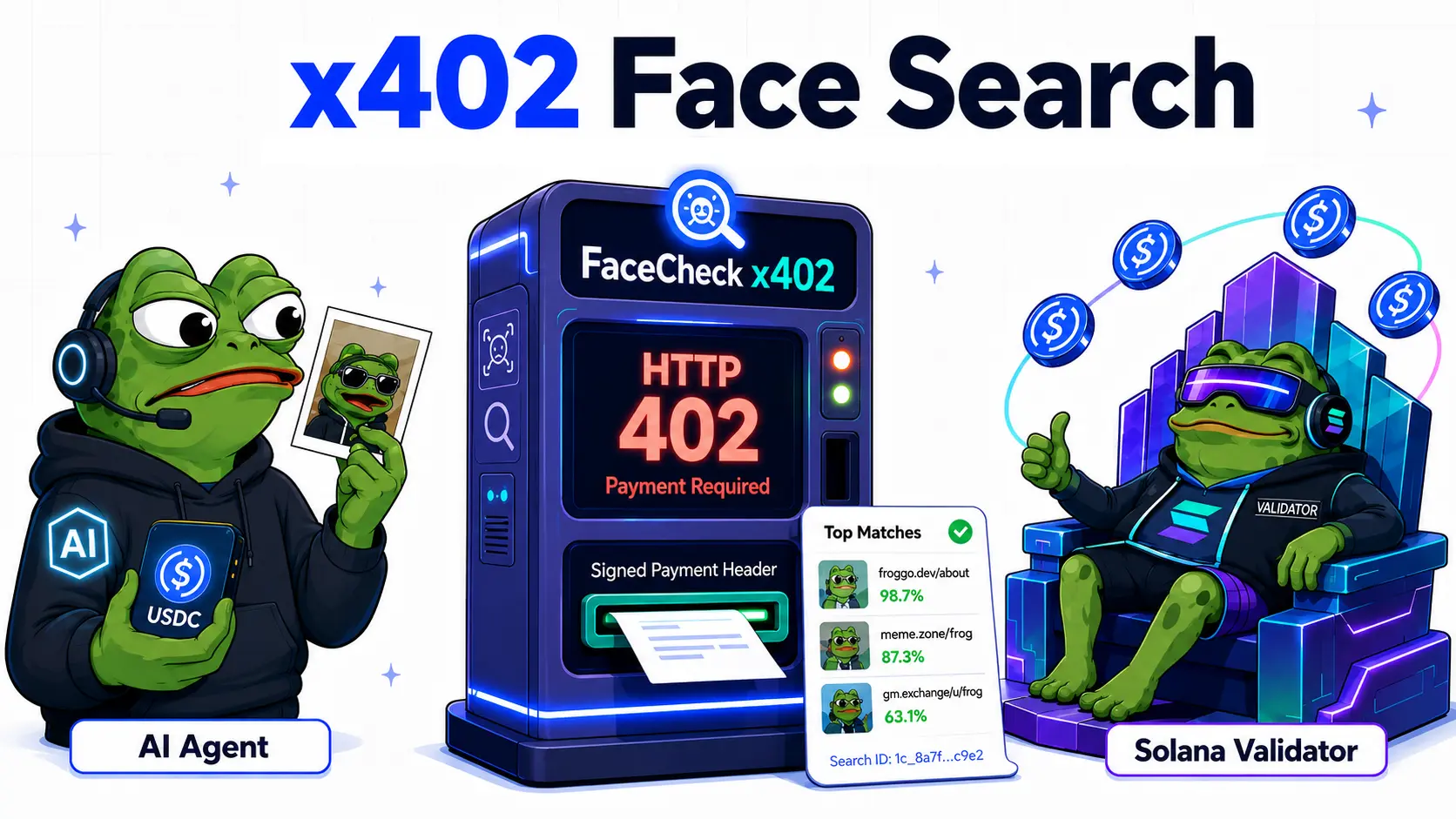
An agent can submit a face image, pay for the search in USDC on Solana, and receive matching webpages, thumbnails, and confidence scores — without an account, signup, API key, or prepaid credits.
What is x402?
x402 is a payment protocol for APIs.
It lets an AI agent discover the price of an API request, pay for it, and receive the result through a normal HTTP request — using the long-reserved HTTP 402 Payment Required status code.
For FaceCheck, this means an agent can run a reverse face search on the open web without needing a FaceCheck account, API key, or prepaid credits.
What Can Agents Do With This?
AI agents can use FaceCheck’s x402 endpoint to:
- search the internet for matching faces
- find webpages where a face appears
- retrieve matched URLs
- get base64 thumbnails
- receive confidence scores
x402 Endpoint
https://facecheck.id/x402/reverse-face-searchHow It Works
Pricing
The x402 endpoint costs more per search than the standard REST API because it includes on-chain payment handling and requires no account setup.
The current price is always shown in the 402 Payment Required response before the agent pays.
That 402 response is the source of truth for pricing.
Example HTTP Flow
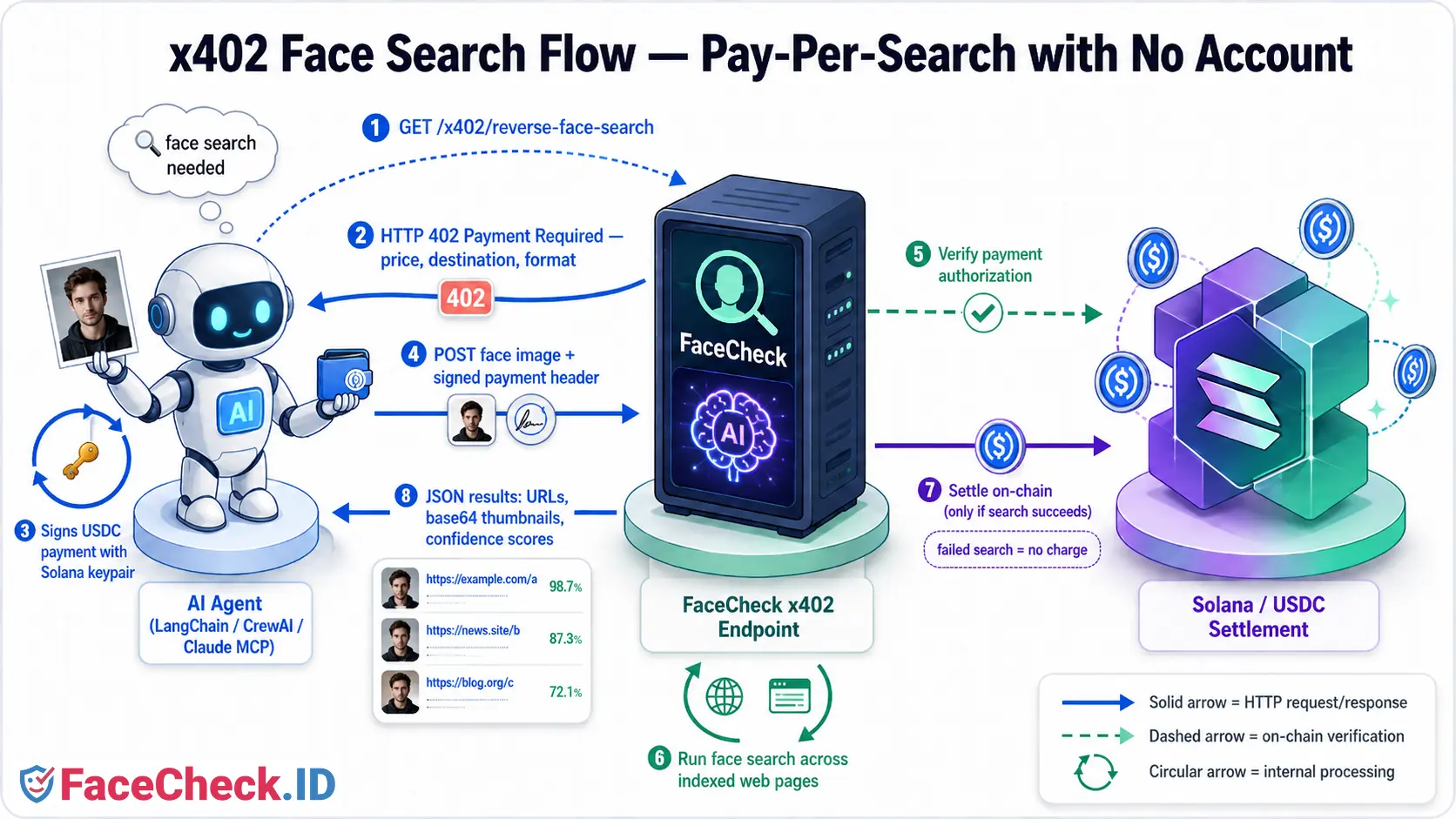
The raw HTTP flow has three steps: discover the price, sign the payment, and submit the image.
1. Discover the Price
curl https://facecheck.id/x402/reverse-face-search

# Response:
# HTTP 402 Payment Required
# Includes price, payment destination, and request details
2. Sign the Payment
The agent signs the payment using its Solana keypair. In production, this signing step is usually handled by an x402 client library.
3. Submit the Image
curl -X POST https://facecheck.id/x402/reverse-face-search \
  -H "X-PAYMENT: <base64-encoded signed payment>" \
  -F "images=@daniel.jpg"

# Response:
# JSON search results
# Payment settles only if results are found
Response Format
A successful search returns JSON with a list of matches:
{
  "match_count": 3,
  "took_ms": 4127,
  "matches": [
    {
      "url": "https://example.com/page-where-face-appears",
      "score": 92,
      "thumb_base64": "iVBORw0KGgoAAAANS..."
    }
  ]
}
Each match contains the source URL, a confidence score, and a base64-encoded thumbnail of the matched face.
Using a Client Library
In practice, use an x402 client library to handle the full flow automatically:
- discover the price
- sign the payment
- retry the request with payment attached
- receive the search results
Example using x402-solana:
"""
Search the internet by face via FaceCheck's x402 endpoint.
Pays per call in USDC on Solana — no account, no API key.

Setup:
    pip install requests "x402[svm]"
    export SOLANA_KEYPAIR=<your base58 Solana secret key>
"""

import base64
import os
import requests
from x402 import x402ClientSync, parse_payment_required
from x402.mechanisms.svm import KeypairSigner
from x402.mechanisms.svm.exact.register import register_exact_svm_client

URL = "https://facecheck.id/x402/reverse-face-search"
IMAGE = "face.jpg"

# Set up the x402 client with your Solana wallet
client = x402ClientSync()
signer = KeypairSigner.from_base58(os.environ["SOLANA_KEYPAIR"])
register_exact_svm_client(client, signer)

# Step 1: GET the endpoint to discover price and payment destination.
payment_required = parse_payment_required(requests.get(URL).json())

# Step 2: Sign a USDC transfer authorization with your Solana keypair.
payload = client.create_payment_payload(payment_required)
payment_header = base64.b64encode(
    payload.model_dump_json(by_alias=True).encode()
).decode()

# Step 3: POST the image with the signed payment attached. The server
# verifies, runs the search, and only settles on-chain if results are found.
image = open(IMAGE, "rb").read()
r = requests.post(URL, data=image, headers={
    "Content-Type": "image/jpeg",
    "PAYMENT-SIGNATURE": payment_header,
})
result = r.json()

# Step 4: Iterate the matches (each has a base64-encoded thumbnail)
print(f"found {result['match_count']} matches in {result['took_ms']}ms")
for m in result["matches"]:
    thumb = m["thumb_base64"][:30]
    print(f"  score={m['score']}  thumb={thumb}...  {m['url']}")
/**
* Search the internet by face via FaceCheck's x402 endpoint.
* Pays per call in USDC on Solana — no account, no API key.
*
* Setup:
* npm install x402-solana @solana/web3.js bs58
* export SOLANA_KEYPAIR=<your base58 Solana secret key>
*
* Run:
* npx tsx test_client_minimal.ts
*/
import { createX402Client } from 'x402-solana/client';
import { Keypair, Transaction, VersionedTransaction } from '@solana/web3.js';
import bs58 from 'bs58';
import { readFileSync } from 'fs';
const URL = 'https://facecheck.id/x402/reverse-face-search';
const IMAGE = 'face.jpg';
async function main() {
// Wrap a Node-side keypair in the WalletAdapter shape x402-solana expects
const keypair = Keypair.fromSecretKey(bs58.decode(process.env.SOLANA_KEYPAIR!));
const wallet = {
publicKey: keypair.publicKey,
signTransaction: async <T extends Transaction | VersionedTransaction>(tx: T): Promise<T> => {
if (tx instanceof VersionedTransaction) tx.sign([keypair]);
else tx.partialSign(keypair);
return tx;
},
};
// x402 client auto-handles the 402 → sign → retry flow
const client = createX402Client({
wallet,
network: 'solana', // mainnet
maxPaymentAmount: BigInt(5_000_000), // safety cap: max $5.00 USDC per call
});
// POST the image; client handles payment transparently
const response = await client.fetch(URL, {
method: 'POST',
headers: { 'Content-Type': 'image/jpeg' },
body: readFileSync(IMAGE),
});
const result = await response.json();
console.log(`found ${result.match_count} matches in ${result.took_ms}ms`);
for (const m of result.matches) {
console.log(` score=${m.score} thumb=${m.thumb_base64.slice(0, 30)}... ${m.url}`);
}
}
main().catch(console.error);Client libraries may differ. Check the documentation for your chosen x402 library for the latest method names and usage.
Compatible Agent Frameworks
The x402 endpoint works with any AI agent or workflow system that can make HTTP requests and sign Solana payments.
Common options include:
- LangChain — agent workflows in Python or JavaScript
- CrewAI — multi-agent task orchestration
- Microsoft AutoGen — multi-agent conversations and workflows
- Claude MCP — tool-calling through the Model Context Protocol
- Coinbase AgentKit — agent tooling built for crypto payments
- AutoGPT, Dify, and n8n — workflow-style agent builders
The agent framework decides when to use the face search tool. The x402 client handles payment discovery, signing, and request retrying.
x402 vs REST API
FaceCheck.ID supports both the REST API and the x402 protocol.
| Feature | x402 Endpoint | REST API |
|---|---|---|
| Best for | AI agents and one-off searches | Apps and long-running integrations |
| Main use case | Reverse face search without signup | Face search from an app or backend |
| Setup | Solana wallet with USDC | Account, API key, and prepaid credits |
| Payment | Per successful search | Prepaid credits |
| Currency | USDC on Solana | FaceCheck credits via Bitcoin / Litecoin / Solana |
| Failed searches | Not charged | Not charged |
| Best client | AI agents and HTTP tools | Backend servers and apps |
| Speed | Priority over all searches | Priority over free searches |
| Cost | 1.00 USDC | ~ $0.30 USD |
When to Use x402
Use the x402 endpoint when you want:
- AI agents to perform reverse face search on the open web
- no signup flow, API key, or prepaid credits
- pay-per-use access
- autonomous agents that can pay for tools directly
- occasional or one-off face lookups
- fastest priority searches
Use the REST API when you want:
- a traditional API key
- prepaid credits
- predictable app integrations
- backend server usage
- higher-volume or long-running integrations
Frequently Asked Questions
Is the x402 endpoint free to try?
No. Every successful search is paid in USDC on Solana. The price is returned in the 402 Payment Required response before the agent pays, so the agent always knows the cost up front.
What happens if no matches are found?
You aren’t charged. The on-chain payment only settles if the search returns results.
Do I need a Solana wallet?
Yes. The agent needs a Solana keypair with USDC to sign payments. No FaceCheck account is required.
Why USDC instead of fiat?
USDC on Solana settles in seconds with very low fees, which makes it practical for agents that pay per API call without human intervention.
Can I use x402 from a regular app instead of an AI agent?
You can, but the REST API is usually a better fit for traditional apps and backends. x402 is optimized for autonomous, pay-per-call usage.
Does x402 work with Claude, ChatGPT, or other LLM agents?
Any agent framework that can make HTTP requests and sign a Solana transaction can use the endpoint — including tool-calling setups via Claude MCP, LangChain, CrewAI, AutoGen, and others. See the Compatible Agent Frameworks section above.
Further Reading
- FaceCheck REST API documentation
- Swagger specification
- Reverse image face search tips
- x402 protocol overview
- USDC on Solana
All FaceCheck searches are subject to the terms of use.