Social Engineering Explained: Tactics, Examples & Defense
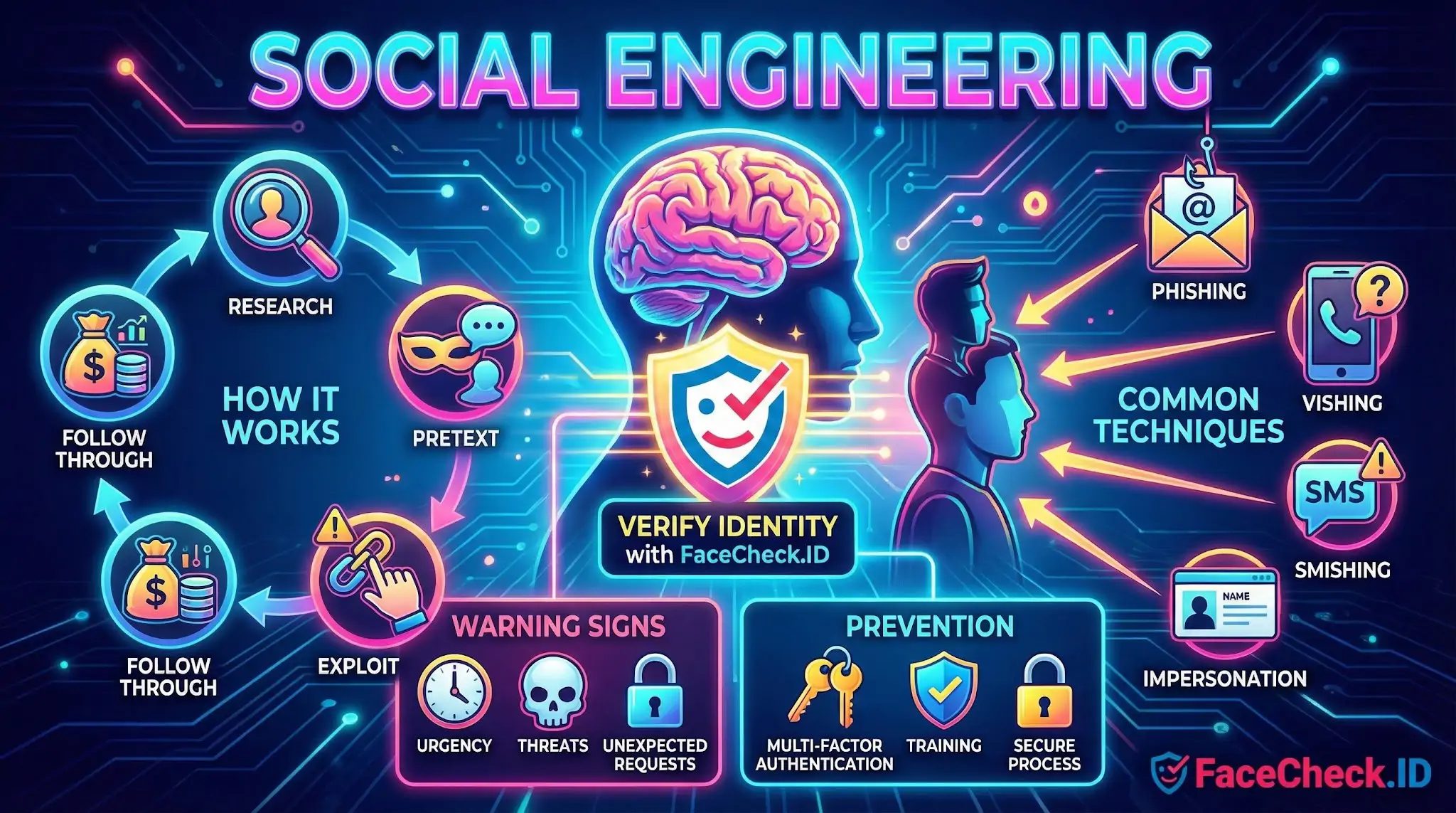
Social engineering is a type of manipulation where an attacker tricks people into giving up sensitive information, transferring money, or granting access to systems. Instead of breaking technical security, social engineering targets human behavior, like trust, fear, curiosity, or urgency.
Social engineering is common in cybersecurity, fraud, and identity theft. It can happen through email, phone calls, text messages, social media, or even in person.
How social engineering works
Most social engineering attacks follow a simple pattern:
- Research: The attacker collects details about the target, such as job role, coworkers, recent events, or suppliers.
- Pretext: They create a believable story, like posing as IT support, a bank, a manager, or a vendor.
- Pressure: They use urgency or authority to push quick action, like resetting a password or approving a payment.
- Exploit: The victim shares credentials, clicks a link, opens a file, or provides confidential data.
- Follow through: The attacker uses the access to steal data, move money, or spread malware.
Common social engineering techniques
Phishing
Fake emails or messages that try to get you to click a link, open an attachment, or enter login details on a fake website.
Spear phishing
A targeted version of phishing aimed at a specific person or team using personalized details.
Whaling
A spear phishing attack aimed at senior leaders, executives, or finance decision makers.
Business email compromise (BEC)
An attacker impersonates an executive or supplier to request urgent wire transfers, invoice changes, or gift card purchases.
Vishing
Voice phishing over phone calls, often pretending to be a bank, government agency, or internal IT.
Smishing
Phishing over SMS text messages, often using fake delivery alerts, security warnings, or account notifications.
Pretexting
The attacker invents a scenario to gain trust, like needing access to files for an audit or claiming a system issue requires login verification.
Baiting
Enticing a victim with something appealing, like a free download or a USB drive labeled with a tempting title, to deliver malware or collect credentials.
Tailgating
An attacker physically follows an authorized person into a restricted building or secure office area.
Real world examples
- A message claims your account will be locked unless you verify your password immediately.
- A caller says they are from IT and asks for a multi factor authentication code to fix an urgent issue.
- An email from a vendor says their bank details changed and asks you to pay future invoices to a new account.
- A social media message asks for a quick favor that leads to sharing private information.
Why social engineering is dangerous
Social engineering is effective because it can bypass strong technical controls. Even with firewalls, encryption, and malware detection, one convincing message can lead to:
- Account takeover
- Data breaches
- Financial loss
- Ransomware infections
- Reputation damage
- Compliance violations
Warning signs of social engineering
- Unusual urgency, pressure, or threats
- Requests for passwords, authentication codes, or remote access
- Unexpected attachments or links
- Slightly altered sender addresses or domain names
- Payment requests that break normal process
- Requests to keep the action secret
- Too good to be true offers
How to prevent social engineering attacks
- Verify identity using a trusted method, like calling a known number, not the number in the message.
- Use multi factor authentication and never share one time codes.
- Follow approval processes for payments, bank changes, and access requests.
- Check links and domains carefully before signing in.
- Limit public information on social media about roles, tools, and internal processes.
- Train employees regularly with realistic simulations and clear reporting steps.
- Report suspicious activity quickly so accounts can be secured and damage minimized.
Social engineering vs phishing
Phishing is one form of social engineering. Social engineering is the broader category that includes phishing plus phone scams, in person deception, and other tactics that exploit human behavior.
FAQ
What is “Social Engineering” in the context of face recognition search engines?
In face recognition search engines, “Social Engineering” refers to manipulating people (not the technology) using information found via face-search results—such as names, usernames, workplaces, locations, or social media links—to gain trust, obtain more data, or trigger actions (e.g., sending money, sharing codes, granting access). The risk is that face-search results can accelerate “research” used to craft believable pretexts.
How can face-search results enable more convincing social engineering attacks?
Face-search results can help an attacker quickly assemble a profile (photos across sites, repeated usernames, friend/family mentions, employer pages, repost networks). That context can be used to impersonate a coworker, match a target’s interests, reference real events, or contact someone’s social circle—making phishing, romance scams, and “urgent request” messages feel more credible even when the attacker never truly knows the person.
What are common social engineering scenarios involving face recognition search engines?
Common scenarios include: (1) impersonation or “helpdesk” fraud using a discovered name/role; (2) romance or dating scams using matched photos to refine a fake persona; (3) doxxing/harassment by linking a face to multiple accounts; (4) credential-reset attempts using personal details found on linked pages; and (5) “friend-in-need” scams where an attacker uses matching images to appear legitimate to a victim’s contacts.
What practical steps reduce social engineering risk when using a face recognition search engine (including FaceCheck.ID)?
Treat matches as leads, not proof; avoid contacting people based only on a face match; verify identity through independent channels (official company directory, known phone number, verified platform messaging); do not share screenshots of results publicly; minimize what you upload (crop to the face, remove extra identifiers); and document uncertainty (e.g., multiple similar matches). If you use a tool like FaceCheck.ID, apply these same controls and assume any result could be a wrong-person match or a repost page.
How can I tell if someone is using face-search findings to socially engineer me?
Warning signs include messages that reference personal details you didn’t share with them, unusual “verification” requests (codes, one-time passwords, gift cards), pressure/urgency, requests to move to a different channel, and claims that rely on photos as “proof.” If a person seems to know your online footprint too well, assume they may have used face-search or open-web research; pause and verify via a trusted, pre-existing contact method before taking any action.


Recommended Posts Related to social engineering
-
The New Face of Digital Deception: FraudGPT, Romance Scams, and Protecting Yourself in 2026
While FraudGPT is widely used to generate flawless phishing emails, malicious code, and fake websites, its application in social engineering—particularly romance scams—is one of its most devastating uses. Decoding the Threat Landscape: ChatGPT, FraudGPT, and WormGPT in Social Engineering Attacks — International Journal of Scientific Research in Computer Science, Engineering and Information Technology (IJSRCSEIT).