Facial Recognition
Facial recognition is the engine behind FaceCheck.ID. When you upload a photo, the system isn't scanning for the literal pixels of that image across the web — it's converting the face into a mathematical signature and searching for other faces with similar signatures, even if the lighting, angle, age, or background is completely different. That distinction is what separates face search from a traditional reverse image search like Google Images.
How facial recognition powers a face search engine
The pipeline behind a face-match query has four stages, and each one introduces its own failure modes that affect what you'll see in your results.
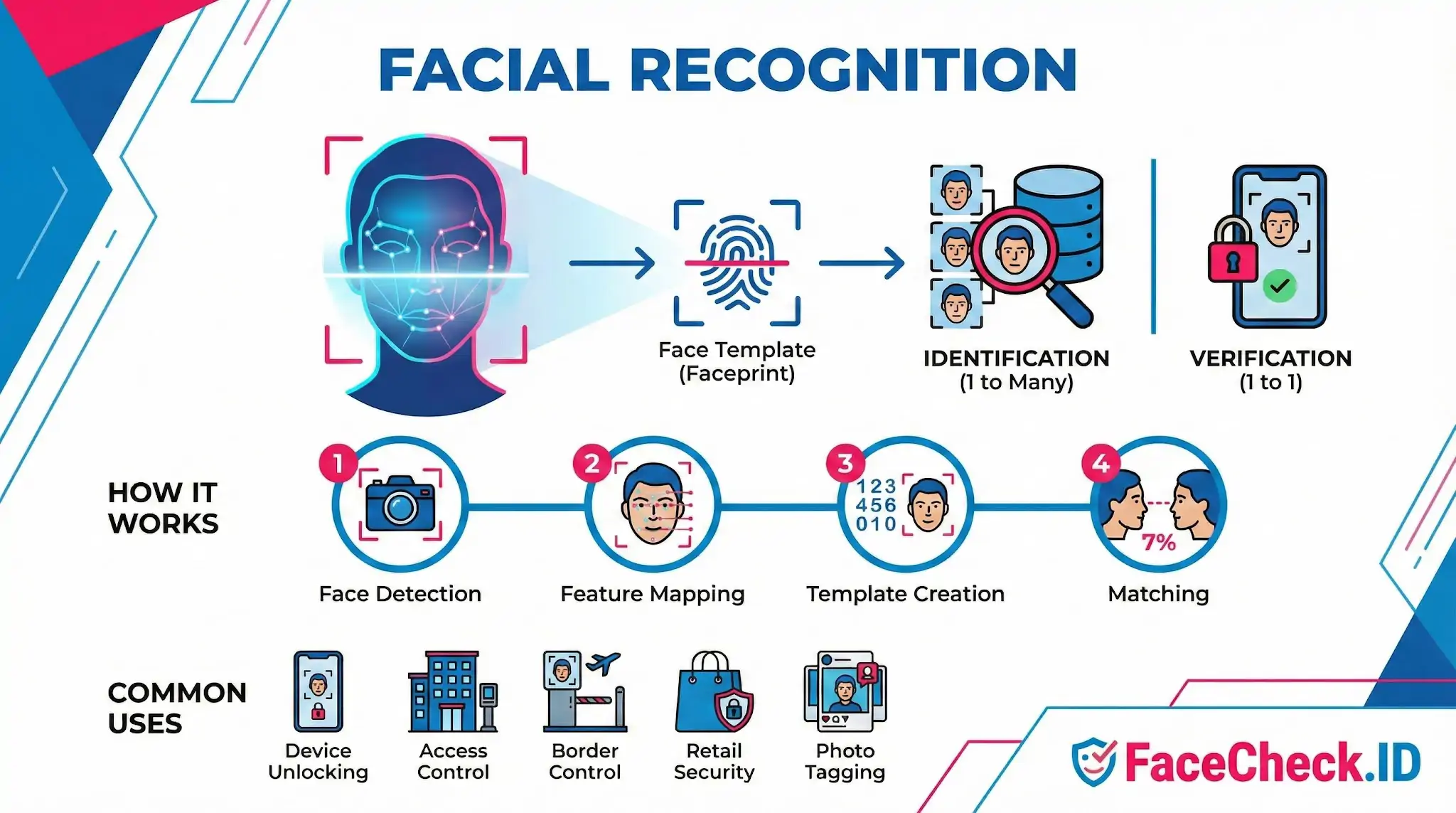
- Face detection. The system locates faces in your uploaded photo. Group shots, blurry phone screenshots, and heavily filtered selfies often fail here before any matching happens.
- Alignment and feature mapping. The detected face is rotated, cropped, and normalized so that landmarks — eye corners, nose tip, jaw width, cheekbone curvature — sit in consistent positions. This is why a slightly tilted head or an extreme profile shot produces weaker matches than a forward-facing portrait.
- Embedding generation. A neural network converts the aligned face into a vector of several hundred numbers, often called a faceprint or embedding. Two photos of the same person taken ten years apart should produce vectors that are close in this mathematical space.
- Similarity search. Your faceprint is compared against billions of indexed faces from public web pages — social profiles, news articles, dating sites, blog posts, mugshot databases, forum avatars — and ranked by similarity score.
The score you see on a result is not a probability of identity. It's a distance measurement between two embeddings, and the threshold for "this is probably the same person" depends heavily on the platform context.
Why image quality changes everything
A LinkedIn headshot tends to match cleanly because it's well-lit, front-facing, recent, and the subject is sober and unobscured. A nightclub photo posted to an Instagram story matches poorly even when it's the same person — flash washes out skin texture, the head is tilted, eyes are half-closed, and a friend's arm crosses the cheek. Facial recognition operates on the face it can see, not the face you know is there.
This is also why catfish accounts are often easier to unmask than people expect. Scammers reuse stolen photos across Tinder, Hinge, Instagram, and WhatsApp profile pictures. The original source — frequently a model's portfolio, an actor's IMDb page, or a stranger's old Flickr account — usually has higher-quality versions than the scammer's reposted copies, and a face search will surface those originals with high confidence.
Identification versus verification
These are two different problems and a face search engine only solves one of them.
- Verification (1-to-1): Confirming a known claim, like Face ID unlocking your phone or a bank verifying a selfie against a passport scan.
- Identification (1-to-many): Asking "who is this?" by comparing one face against a large index. This is what FaceCheck.ID does, and it's a fundamentally harder problem because the chance of a coincidental near-match grows with the size of the database.
What facial recognition does not prove
A high similarity score means two images contain faces that are mathematically close in embedding space. It does not, on its own, prove identity, intent, or context. Identical twins routinely return high-confidence matches against each other. Doppelgängers exist, especially within the same ethnic and age cohort. AI-generated faces from sites like ThisPersonDoesNotExist can produce false leads, and so can heavily edited or filtered photos that have drifted toward a generic "average" face.
A responsible face search workflow treats matches as leads, not conclusions. The match tells you where to look. Confirming identity still requires reading the page the result links to: Is the username consistent with other accounts? Does the photo set look like one continuous person across years, or a scraped portfolio? Is the surrounding text — captions, comments, article body — consistent with the person you're investigating? Facial recognition narrows the search space from billions of pages to a handful. Human judgment closes the gap.
FAQ
What does “Facial Recognition” mean in a face recognition search engine?
In face recognition search engines, “facial recognition” generally means analyzing a face in a photo and comparing its distinctive facial features to faces found across many other images to surface likely matches. It does not automatically “confirm” who someone is; it provides similarity-based candidates and links to where those images appear online.
What’s the difference between facial detection and facial recognition in face search tools?
Facial detection finds and crops a face within an image (e.g., locating eyes, nose, mouth and the face boundary). Facial recognition then compares that detected face against other faces to estimate similarity. A face search engine typically performs detection first, then recognition for matching.
What is a “faceprint” or “embedding” in facial recognition search?
A faceprint (often called an embedding) is a numeric representation of a face created by a model so the system can compare faces using distance/similarity measures. Face search engines use embeddings to quickly search large collections for faces that are mathematically close, then rank results by similarity.
Can facial recognition search be fooled by deepfakes, edited photos, or look-alike content?
Yes. Heavy photo edits, filters, AI-generated faces, deepfakes, and look-alikes can shift facial features enough to cause false positives or false negatives. In practice, you should verify matches by checking multiple independent photos, consistent context (same tattoos, scars, age range), and the original source pages—not just one high-similarity result.
Does facial recognition search work equally well for everyone, and what about bias?
Performance can vary by lighting, image quality, pose, age, and also by demographic representation in training data and the types of images indexed. This can lead to uneven error rates across groups. When using a face search engine (including tools like FaceCheck.ID), treat results as leads, not proof, and apply extra caution before making decisions that could affect someone’s reputation or safety.


Recommended Posts Related to facial-recognition
-
Google's Image Search vs. Yandex's Image Search: A Detailed Look
The Impact of Facial Recognition on Search Engines. Google and Yandex differ in one key aspect: facial recognition. Understanding Facial Recognition Technology.
-
All About Face Recognition Technology
Face recognition technology is everywhere. What are the pros and cons of face recognition technology? What Is Face Recognition Technology?
-
Facial Recognition: Understanding the Basics
Facial recognition is becoming more important in our daily lives. You'll learn about how facial recognition works on your smartphone, its impact on your privacy, and the new improvements made during the pandemic. This guide is designed to be simple and clear, giving you a straightforward look at how facial recognition is changing the way we live and interact with technology.
-
Unlocking the Power of Facial Recognition Technology: 10 Eye-Opening Facts
Facial recognition technology has become a hot topic in recent years, thanks to its many potential applications across a wide range of industries. In this blog post, we'll take a closer look at 10 fascinating facts about facial recognition technology, from how it works to its many applications. Facial recognition technology works by analyzing and comparing unique facial features, such as the distance between the eyes and the shape of the nose, with a database of known faces.
-
Can You Reverse Image Search a Face?
The Legality of Using Facial Recognition Tools. While facial recognition platforms like FaceCheck.ID and PimEyes operate within legal frameworks, it's crucial for users to understand that they bear the responsibility for how they use these tools. PimEyes is a facial recognition search engine that creates a "face print" from uploaded photos and searches the web for similar images.