How to Reverse Image Search on Yandex (and How It Differs from Google)
A reverse image search on Yandex takes about thirty seconds, is free and needs no account:
- Open yandex.com/images in any browser.
- Click the camera icon on the right of the search bar.
- Drag a photo in, click Select file, paste from your clipboard, or paste an image URL.
- Drag the crop frame tight around the face or object you care about.
Yandex then shows other sizes of the image, visually similar pictures and the sites that use it. The rest of this guide is about reading those results without fooling yourself.
In this article, we're going to discuss
- Reverse image search on Yandex from a computer
- What the Yandex results actually mean
- Yandex reverse image search on Android and iPhone
- Is Yandex reverse image search safe?
- Yandex vs Google reverse image search
- When the photo is of a person: a face-only search
- Where to go from here
- Frequently asked questions
Reverse image search on Yandex from a computer
The upload panel opens when you click the image search button to the right of the search bar. Yandex's own help page lists four ways in, and each one suits a different situation:
- Drag and drop works best for a file already on your desktop, such as a screenshot of a dating profile.
- Select file opens the normal file picker.
- Paste from clipboard is the fastest route for a screenshot you just took. Press Win+Shift+S (or Cmd+Ctrl+Shift+4 on a Mac), then paste into the panel.
- Paste a URL into the search bar when the image lives on a public page. Right-click the image, choose "Copy image address", and use that, not the address of the page it sits on.
One quirk catches almost everyone. If there is any text in the search bar, the camera icon can disappear (Yandex documents this on the mobile site). Clear the bar with the little cross and the icon comes back, which is a design choice you will now notice every single time.
Using Yandex Browser? On Windows you can right-click any picture on a website and pick "Search for this image on Yandex". On macOS, hover over the image and use the search icon that appears.
What the Yandex results actually mean
After the upload, Yandex builds a results page around your photo. According to its help page, it tries to identify the subject, find the same image in other sizes, show similar images and list sites that use the same image. Labels shift a little between versions, but you will see the same building blocks.
| Result block | What it contains | What it tells you |
|---|---|---|
| Object or subject panel | A guess at what is in the photo, sometimes with shopping or text matches | Useful for products, landmarks and plants; mostly noise for portraits |
| Other sizes | The same picture at different resolutions | That copies exist, and often which one is the original (the largest, least compressed) |
| Similar images | Pictures that look like yours | Lookalikes, and the place where photos of the same face can surface |
| Sites with this image | Pages that host an exact or near-exact copy | Where the photo has been used, with dates and context |
For a stolen-photo check, Sites with this image is the block that matters. If a "widowed engineer" profile photo also appears on a Lithuanian stock site and three Instagram fan pages, you have your answer. Open each page and look at the dates; the oldest copy is usually closest to the real owner.
Similar images is where people expect face matches. Sometimes they are there. More often you get a grid of strangers who share the same haircut, the same beige wall and the same pose, because general image search scores the whole picture, not the face.
Crop to the face before you trust anything
Yandex compares everything in the frame. A photo of a man in a navy suit in front of a bookshelf pulls in other navy suits and other bookshelves. Cropping changes the question you are asking.
On the results page your photo sits at the top with an adjustable frame. Drag its corners until it covers the face from the hairline to the chin with a little margin, and the results refresh. For a group photo, crop to one person. For a screenshot, cut away the app interface, the timestamps and any stickers.

Run the search twice, once on the full image and once on the crop. The full image is better for finding exact copies of the photo; the crop is better for finding other photos of the same face.
Yandex reverse image search on Android and iPhone
There is no separate Yandex reverse image search app to install. The mobile site does the job in any browser.
- Open Chrome, Safari or Firefox and go to yandex.com/images.
- Tap the camera icon in the search bar (clear any text first, or it hides).
- Pick Media library for a photo in your gallery, Take a photo to shoot something in front of you, or Select a file for a download.
- Adjust the crop frame on the results page.
Yandex's full app does have a camera search called Smart camera, which marks objects in the photo with dots and offers tabs such as Similar and Sites. It is built around products and objects, and you do not need it for a reverse image search. The browser route gives the same kind of results without another app asking for camera and file permissions.
On an iPhone, save a screenshot or downloaded image to Photos first, then pick it from Media library.
Is Yandex reverse image search safe?
Using it will not infect your phone or sign you up for anything. The real question is what happens to the photo, and that depends on whose photo it is.
The privacy policy that covers Yandex services names YANDEX LLC, a company incorporated under Russian law, as the operator. It lists the data collected when you use the services, including IP address, HTTP headers, cookies and device information, and says personal data of EEA users is transferred to Russia under standard contractual clauses. It says nothing specific about images uploaded to image search. The company's former Dutch parent, now Nebius Group, completed the sale of its Russia-based businesses in July 2024.
What that means in practice:
- A photo of a product, a landmark or a meme: no meaningful risk.
- A profile picture from a stranger's dating profile: low risk to you, since the photo is already public.
- A private photo of yourself or someone you know, especially anything intimate or identifying: do not upload it to any general search engine whose policy is silent on uploads.
For comparison, FaceCheck.ID does not log IP addresses, runs no third-party trackers, deletes search history within 24 hours, and does not add uploaded photos to its index. It keeps only low-resolution face thumbnails and links to public pages, not the photo you upload.
Yandex vs Google reverse image search
The table below sets the two side by side. The rows about faces and regional strength come from Bellingcat's guide to reverse image search for investigations, published in December 2019. In its tests, Yandex returned other photographs of the same person while Google had no luck on the same face. That is the best public comparison available, but it is several years old and both engines have changed since.
| Yandex Images | Google Lens / Google Images | |
|---|---|---|
| Where to start | yandex.com/images, camera icon | images.google.com or the Lens icon in the Google app and Chrome |
| Account needed | No | No |
| Strongest at | Photos taken in a European or former-Soviet context (Bellingcat, 2019) | Products, places, text and plants |
| Portraits | Found other photos of the same person in Bellingcat's 2019 tests | Came up empty on the same face in that test |
| Mobile | Browser, or the Yandex app's Smart camera | Built into Android, the Google app and Chrome |
| Privacy | Russian operator; policy silent on uploads | Google account history applies if you are signed in |
That regional strength cuts both ways. If the person in your photo lives in Ohio or Leeds, an empty or junk-filled Yandex result proves very little about whether the photo is original. Run Google and a face search before you conclude that nobody else is using it.
If you are checking where an image came from, run both engines. They crawl different parts of the web, so one often finds the copy the other missed. For a face, both are still general image matchers, and both will happily show you a hundred men with the same beard.
When the photo is of a person: a face-only search
Yandex scores the whole picture. FaceCheck.ID ignores the background, clothes and lighting, and compares only the face against faces on public web pages. Here is how the same check runs there.
Say a match on Hinge sends you a photo of "Marco", who works offshore and cannot video call because of the rig's Wi-Fi (the FTC lists "working on an oil rig" among the standard romance-scam excuses). Yandex finds no exact copies and a grid of tanned men on yachts.
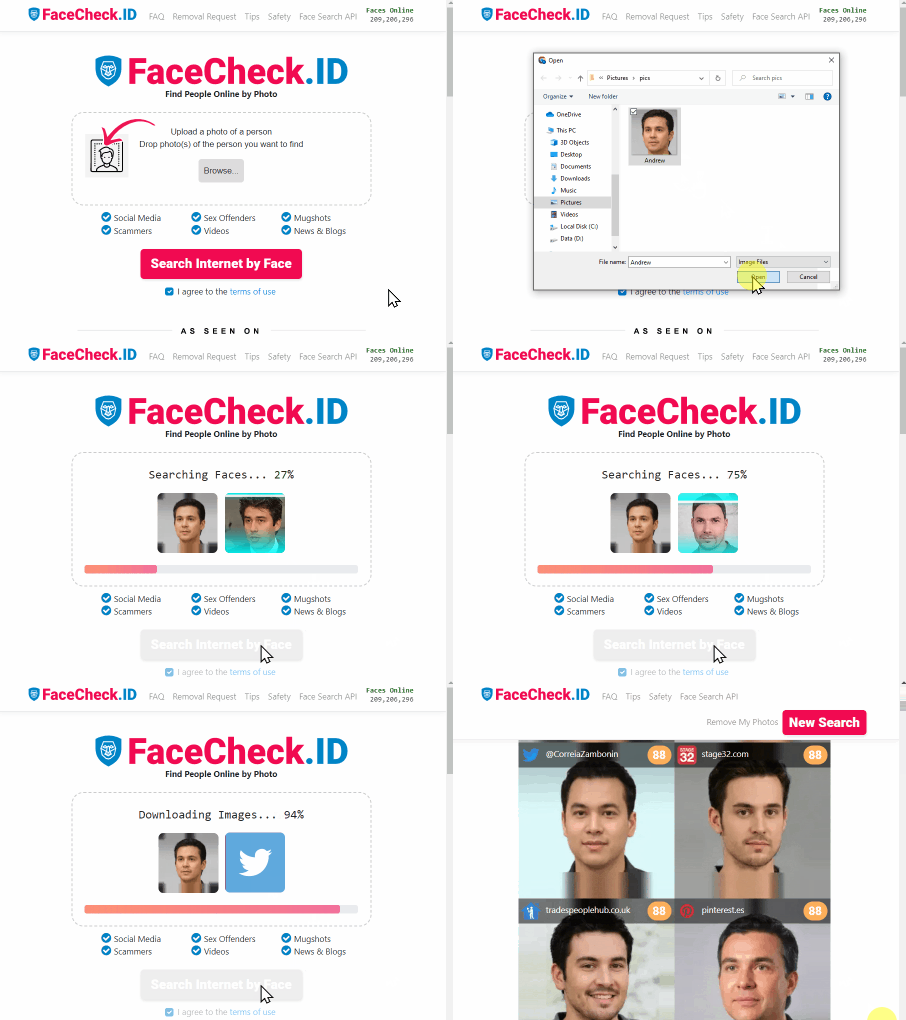
- Go to FaceCheck.ID, upload the same photo and agree to the terms.
- Let the search run. Results come back as face thumbnails, each with a score.
- Read the scores: 90-100 is a certain match, 83-89 confident, 70-82 uncertain and 50-69 weak.
- Look for red flags. FaceCheck.ID marks matches found on scam-report, adult, mugshot, sex-offender, most-wanted or AI-generated-face sources, and faces that appear on many profiles under different names.
- Open the source pages. The free search shows every matching thumbnail and its score; credits unlock the links to the pages where each face appears.
If a 94-score match sits on a fitness instructor's public Instagram in Porto under a different name, Marco is probably borrowing someone's face. A high score means a similar face, not a confirmed identity: lookalikes exist, and the person in a stolen photo is almost always an innocent party. Confirm with a second source before you act on anything.
FaceCheck.ID searches public web pages only. It cannot look inside Tinder, Snapchat, WhatsApp or private accounts, and it does not index sites that block crawlers. The model is trained on adult faces, and searching for anyone under 18 is prohibited and gets accounts banned. It is also off-limits for employment, tenant, insurance or credit decisions.
Where to go from here
If your photo is an object, a place or a meme, Yandex plus Google will usually settle it in two searches. If it is a person, run Yandex for exact copies, then a face search for the same face in other photos, and keep the two sets of results side by side.
For a deeper look at how Yandex handles faces specifically, and where its coverage has thinned since 2022, see our Yandex image search guide for finding faces. To see how it ranks against other engines, read the reverse image search engine rankings.
Frequently asked questions
Is Yandex reverse image search free?
Yes. Uploading a photo or pasting an image URL at yandex.com/images costs nothing and needs no account. Yandex also offers a Search API through Yandex Cloud for developers who want image results inside their own software, but the website itself is free. If you are comparing free options, our list of free reverse image search tools covers the rest.
Is Yandex reverse image search safe?
Yes for public photos, objects and memes: searching installs nothing and needs no account. Keep private or intimate photos off it, because the policy says nothing about uploads. Phishing mail sent from free Yandex Mail accounts is a separate problem that searching does not expose you to, and a "Yandex" email asking you to log in or pay deserves the same suspicion as any unsolicited message.
Is there a Yandex reverse image search app for Android or iPhone?
There is no dedicated reverse image search app. Open yandex.com/images in your phone's browser and tap the camera icon, then choose Media library, Take a photo or Select a file. The full Yandex app includes a Smart camera mode for objects and products, but the browser gives you a reverse image search without installing anything.
Can Yandex find a person from a photo, and is it better than Google Lens?
Sometimes. In Bellingcat's 2019 tests, Yandex surfaced other photos of the same person where Google found nothing, and it did best on photos from a European or former-Soviet context. It is still a general image matcher, so backgrounds and clothing pull in lookalikes, and an empty result for a Western subject proves little. For a person, a face-specific search such as FaceCheck.ID is the better tool, and any match from any engine is a similar face rather than proof of identity.
Why does Yandex show no results or the wrong results?
Usually because the image has never been indexed, or because the background is driving the match. Crop to the face or object, remove borders, text overlays and app interface from screenshots, and try a higher-resolution copy. If the camera icon is missing, clear the text in the search bar. If you still get nothing, the photo may simply not exist anywhere Yandex crawls.
What is a good alternative to Yandex for faces?
FaceCheck.ID compares only the face and searches public web pages, including social profiles, news sites, mugshot archives and scam-report databases. A free search shows every matching face thumbnail with its score; credits unlock the links to the source pages. It is for adults only and does not search inside closed apps or private accounts.

Read More on Reverse Image Search
How to Detect Fake Remote IT Workers with Facial Recognition (2026 Guide)
Fraudsters are landing remote tech jobs using AI-generated headshots, stolen identities, and deepfake interviews - and your background checks won't catch them. Learn the verification steps that expose fake developers before they access your codebase.
On the subject in other languages
 Como fazer uma pesquisa reversa de imagens no Yandex (e como ela difere do Google)
 如何在 Yandex 上进行反向图片搜索(以及它与 Google 有何不同)
 Jak zpětně vyhledávat obrázky na Yandexu (a jak se liší od Googlu)
 So funktioniert die umgekehrte Bildersuche mit Yandex (und so unterscheidet sie sich von Google)
 Cómo hacer una búsqueda inversa de imágenes en Yandex (y en qué se diferencia de Google)
 Comment effectuer une recherche d’image inversée sur Yandex (et en quoi elle diffère de Google)
 Come effettuare una ricerca inversa di immagini su Yandex (e in cosa differisce da Google)
 Yandexで画像を逆検索する方法(Googleとの違いも解説)
 Yandex에서 이미지 역검색하는 방법(그리고 Google과의 차이점)
 Jak wyszukiwać obrazem w Yandex (i czym różni się to od Google)
 Как выполнить обратный поиск по изображению в Яндексе (и чем он отличается от Google)
 كيفية إجراء بحث عكسي عن الصور على Yandex (وكيف يختلف عن Google)
 Yandex'te Tersine Görsel Arama Nasıl Yapılır (ve Google'dan Farkı Nedir)
Popular Topics
API Identity Image Search Confirm Identity Instagram Google Images Image Search Engine Image Search Tool Romance Scam Sex Offenders Mugshots Yandex Images Image Search App Reverse Image Search Free Screenshot iPhone Android Google Lens Face Search Face Match Similar Images PhishingReverse Image Search Showdown 2026: PimEyes vs FaceCheck - Who Wins?