Phishing Explained: Types, Signs & Protection Tips
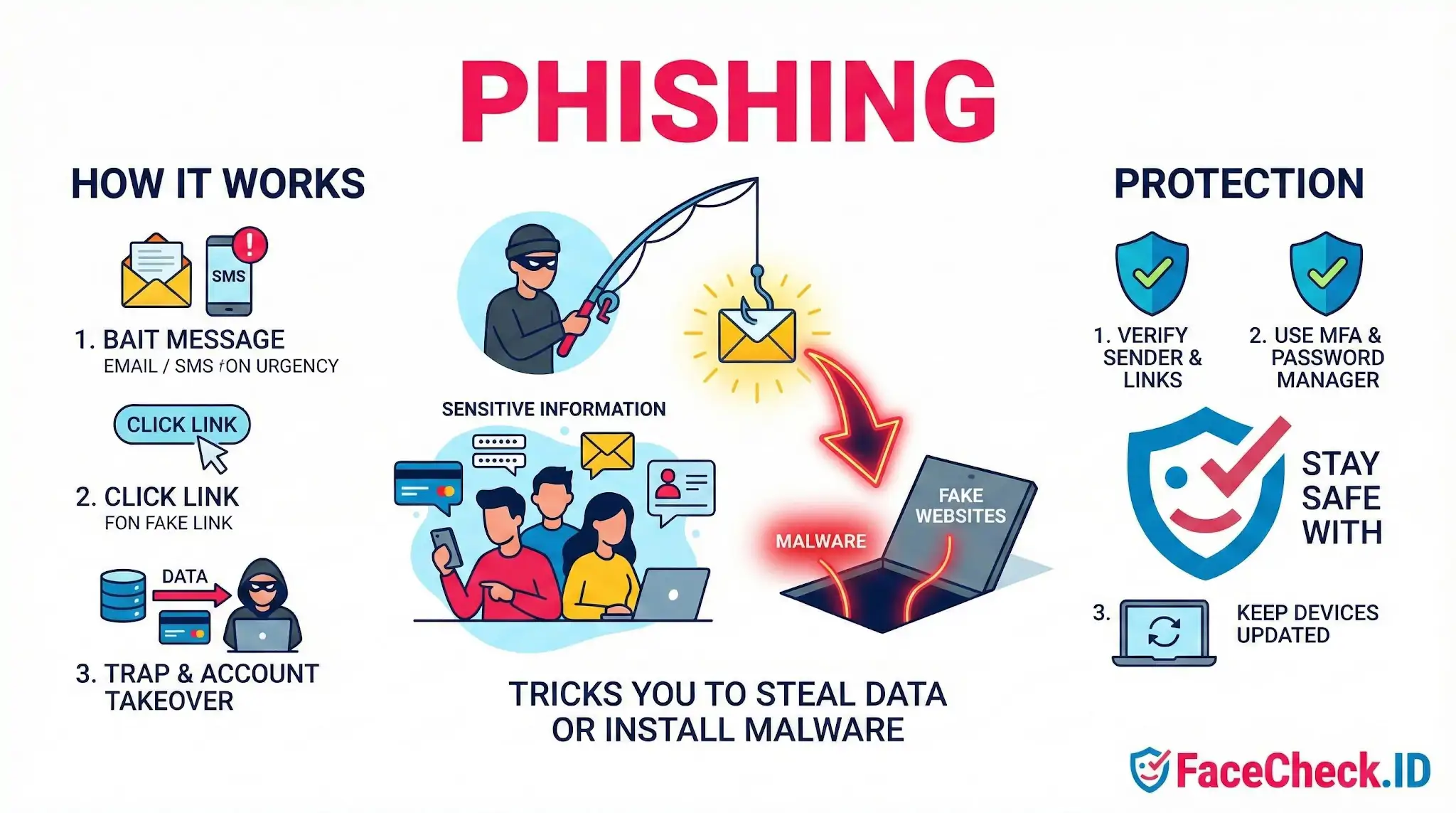
Phishing is a type of cyber attack where criminals trick you into sharing sensitive information or installing malware. The attacker usually pretends to be a trusted person or brand, such as your bank, a delivery company, Microsoft, or your employer. The goal is often to steal passwords, credit card details, bank access, personal data, or authentication codes.
Phishing commonly happens through email, text messages, phone calls, social media, and fake websites.
How phishing works
Phishing attacks follow a simple pattern:
- A bait message arrives, often claiming something urgent like a security alert, failed payment, prize, invoice, or account suspension
- A call to action pushes you to click a link, open an attachment, scan a QR code, or reply with information
- A trap collects your data on a fake login page, installs malware, or convinces you to send money or codes
- Account takeover or fraud happens when the attacker uses what they stole to access accounts, move money, or spread more scams
Common types of phishing
- Email phishing: Mass emails that imitate well known companies and drive victims to fake sites
- Spear phishing: Targeted phishing aimed at a specific person or team using personal details
- Whaling: Spear phishing that targets executives, finance leaders, or administrators
- Smishing: Phishing sent by SMS or messaging apps, often with short links
- Vishing: Phishing done through phone calls, sometimes using caller ID spoofing
- Clone phishing: A real email is copied and resent with a malicious link or attachment
- Business Email Compromise (BEC): Attackers impersonate a manager or vendor to request wire transfers or gift cards
- Pharming: Redirecting users to fake websites even when they type the correct address
- Social media phishing: Fake support accounts and direct messages that steal logins or payments
- QR phishing: Malicious QR codes that send you to a fake sign in page
Signs of a phishing attempt
- A message creates pressure with urgency, fear, or threats
- The sender address or domain looks slightly wrong
- Links go to a different domain than the company name suggests
- Unexpected attachments, especially asking you to enable macros or run a file
- Requests for passwords, one time passcodes, recovery codes, or payment
- Poor spelling or formatting, but some phishing is very polished
- The message does not match normal processes, like finance requests without approval steps
Why phishing is dangerous
Phishing can lead to:
- Stolen passwords and account takeover
- Identity theft and fraudulent purchases
- Ransomware and data breaches
- Loss of business funds through invoice fraud or wire transfer scams
- Long term access to systems through stolen credentials and session cookies
How to protect yourself from phishing
- Verify the sender using a known phone number or official website, not the contact details in the message
- Check the link destination by hovering on desktop or long pressing on mobile before opening
- Type the website yourself instead of clicking a login link in a message
- Use multi factor authentication (MFA) and prefer authenticator apps or passkeys when possible
- Use a password manager to avoid typing credentials into fake sites and to create unique passwords
- Keep devices updated to reduce the impact of malicious attachments and exploits
- Treat one time codes as secrets and never share them with anyone
- Report suspicious messages to your email provider, IT team, or the service being impersonated
What to do if you clicked a phishing link or shared information
- Change the affected password immediately and anywhere else you reused it
- Enable or reset MFA, and regenerate backup codes if available
- Sign out of other sessions in account security settings
- Check account activity for logins, rules, forwarding, and payments you did not authorize
- Contact your bank or card provider if money or card data may be exposed
- Run a security scan on the device if you opened an attachment or installed anything
- Report the phishing message to help protect others
FAQ
What is “phishing” in the context of face recognition search engines?
Phishing is a scam where someone pretends to be a legitimate face recognition search service (or a related “support,” “investigation,” or “report” workflow) to trick you into revealing passwords, payment details, API keys, or personal information. In face-search contexts, phishing often appears as fake result pages, fake “unlock full results” prompts, or fake takedown/opt-out forms that harvest your data.
What are common phishing tactics that target users of face recognition search tools?
Common tactics include: look-alike domains that mimic a real service; emails or DMs claiming “your face was found” and urging you to click; fake “remove my photo” or “copyright complaint” pages that ask for login/payment; malicious browser extensions promising better results; and fake “FaceCheck.ID verification” or “customer support” chats that request credentials, one-time codes, or payment outside the normal checkout flow.
How can I tell if a FaceCheck.ID-related message or page is a phishing attempt?
Treat it as suspicious if it pressures you to act urgently, asks for passwords/2FA codes, requests payment via unusual methods, or asks you to “confirm” account details through a link you didn’t initiate. Safer practice is to navigate to FaceCheck.ID by typing the address yourself (not from an email link), verify the exact domain and HTTPS lock, and avoid entering credentials or uploading images on pages reached through unsolicited messages.
What should I do if I think I entered my information on a phishing page after searching a face?
Immediately change the affected password(s) (and any reused passwords elsewhere), enable 2FA on your email and important accounts, revoke suspicious sessions/tokens where possible, and contact your bank/payment provider if you entered payment details. Also scan the device for malware, remove suspicious extensions, and keep evidence (screenshots, email headers, URLs) in case you need to report the incident to the service being impersonated or to your organization’s security team.
How can I reduce phishing risk when using face recognition search engines (including FaceCheck.ID) in the first place?
Use direct navigation/bookmarks for the service, not links from messages; avoid installing “helper” extensions; keep your browser and password manager up to date; use unique passwords and 2FA; and limit what you upload (crop to the face, remove extra personal details) so even a mistaken upload exposes less information. If you need removal/opt-out actions, use the official site’s documented process rather than third-party forms or “agent” offers.


Recommended Posts Related to phishing
-
The New Face of Digital Deception: FraudGPT, Romance Scams, and Protecting Yourself in 2026
While FraudGPT is widely used to generate flawless phishing emails, malicious code, and fake websites, its application in social engineering—particularly romance scams—is one of its most devastating uses. If a sophisticated phishing scam does manage to trick you into handing over your password, Multi-Factor Authentication (MFA) is your strongest technical defense, as it blocks the attacker from using your credentials without the second verification factor. Where possible, transition to passwordless authentication methods, such as passkeys, which rely on cryptography to make your credentials entirely unphishable — the closest thing the security industry has to a phishing antidote.
-
How to Stay Scam-Proof in 2026: Defending Yourself From GhostGPT and the New Wave of AI Cybercrime
Modern phishing increasingly steals session cookies — the digital ID your browser uses to prove you're already logged in — which lets attackers slip past two-factor authentication entirely. They can't be phished, can't be stolen by a fake login page, and can't be intercepted by a session-hijacking script. GhostGPT offers AI coding, phishing assistance for cybercriminals — SC Media.