Photo Lookup Explained: Reverse Image Search Basics
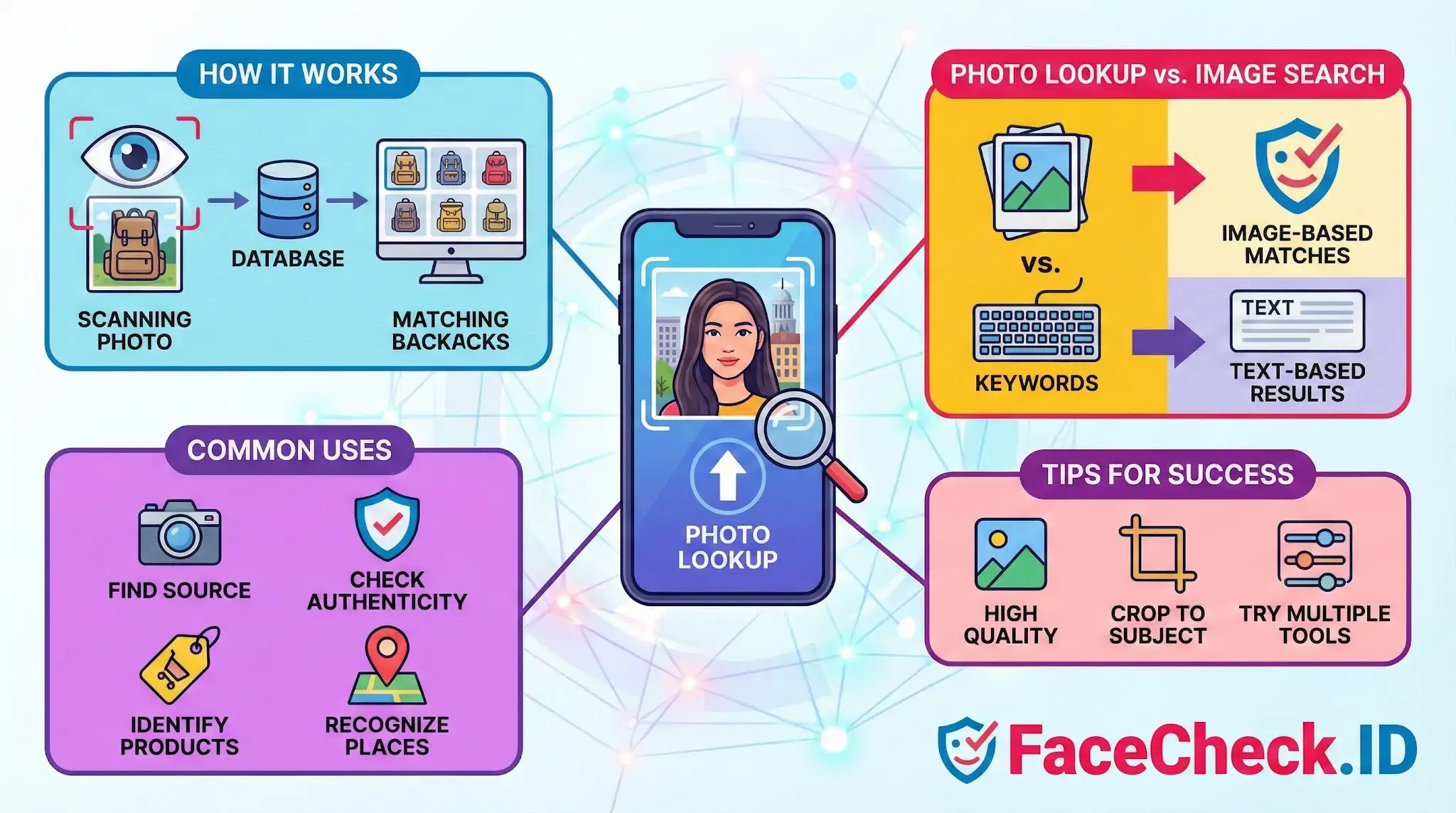
Photo lookup is the process of using a photo to find information about what is shown in the image. It can help you identify a person, object, place, product, logo, artwork, or the original source of a picture by comparing it with images across the web or within a specific database.
Photo lookup is commonly done through reverse image search tools and apps. Instead of typing keywords, you upload an image or paste an image URL, then the tool returns visually similar images and related pages.
What photo lookup is used for
Photo lookup can be useful in many everyday situations, such as:
- Finding the original source of a photo and where it was first published
- Checking if an image is real or has been edited, reused, or taken out of context
- Identifying products to buy by matching the item in the photo
- Recognizing places or landmarks from travel photos
- Detecting copyright issues by seeing where your images appear online
- Locating higher quality versions of the same image
- Spotting duplicates and reposts on websites and social platforms
How photo lookup works
Most photo lookup tools use computer vision to analyze visual features in the image, such as shapes, colors, patterns, and text. The system creates a digital signature of the image and compares it to a large index of other images.
Depending on the tool, results may include:
- Exact matches of the same image
- Near duplicates that are cropped, resized, filtered, or compressed
- Visually similar images that share the same subject
- Web pages where the image appears
- Detected text through optical character recognition in some cases
Photo lookup vs image search
- Photo lookup starts with an image and returns information or matches based on that image.
- Image search typically starts with typed keywords and returns images related to those keywords.
If you have the photo but not the right words to describe it, photo lookup is often faster and more accurate.
What affects photo lookup accuracy
Results can vary based on:
- Image quality and resolution
- Cropping and heavy edits that remove key details
- Lighting and angles that change the appearance of the subject
- Background clutter that confuses the main object
- Whether the image exists online or is private and not indexed
Tips for better photo lookup results
- Use the largest, clearest version of the image you have
- Crop to focus on the main subject if the background is distracting
- Try more than one tool, since databases and matching methods differ
- If searching a person, use a photo with a clear, front facing view when possible
FAQ
What does “Photo Lookup” mean in the context of face recognition search engines?
In face recognition search engines, “Photo Lookup” usually means uploading (or providing) a face photo so the system can search the open web for visually similar faces and possible matches across different sites. It’s not the same as looking up a person by name—results are based on facial similarity and the engine’s indexed sources.
What are the best photo qualities for a reliable Photo Lookup by face?
Use a clear, front-facing image with good lighting, minimal blur, and enough resolution to see key facial features. Avoid heavy filters, extreme angles, strong shadows, and large obstructions (sunglasses, masks, hands). If the original is a screenshot, try to use the highest-quality frame and crop to include the full face without cutting off the chin or forehead.
Can Photo Lookup reveal a person’s real identity or name with certainty?
No. A Photo Lookup can surface pages where a similar face appears, but it does not prove the person’s identity. Names on linked pages can be wrong, outdated, or refer to a different look-alike. Treat results as leads, and confirm using independent evidence (consistent usernames, multiple corroborating photos, matching context, and authoritative sources).
Why can Photo Lookup results show many similar faces, mismatches, or mixed identities?
Common causes include low-quality or heavily edited photos, partial occlusion (hats, masks), pose/angle changes, look-alikes (doppelgängers), and the engine returning “visually similar” candidates when an exact match isn’t indexed. Reposts, memes, and screenshots can also spread the same image across many pages, creating confusing clusters that need careful verification.
How can I do a Photo Lookup more safely and reduce privacy or harm risks (including when using FaceCheck.ID)?
Use the minimum necessary image (crop to the face and remove unrelated people), avoid uploading sensitive images (minors, private settings, medical/financial info), and don’t share or publicize results as “proof.” If using FaceCheck.ID (or any similar tool), read its terms and privacy controls, interpret match strength cautiously, and verify across multiple independent sources before taking any action that could affect someone’s reputation or safety.


Recommended Posts Related to photo lookup
-
Social Catfish Review: Is It Actually Worth Your Money in 2026?
Their photos look professional. If every photo looks like a headshot or modeling portfolio, those images are likely stolen.
-
How to Spot a Catfish in 2025: Red Flags in Fake Dating Profiles
Their photos look like stock images or too polished.
-
Fake Profile Scam? Why 99% of the Time the Person in the Photo Is Innocent
Pro tip: if the photo looks too perfect with professional lighting, modeling poses, and polished lifestyle shots, assume it's stolen until proven otherwise.
-
Social Media Lookup: Find Anyone's Profiles by Photo
It tells you that two photos look like the same person.
-
What is The Most Accurate Reverse Image Search?
How to Lookup a Person by Photo. Looking up a person by pic is easy:.
-
140+ Common Romance Scammer Lines, Excuses & Red Flags to Watch For in 2026
Photos look like a model / too polished / inconsistent ✅.