Fake Profile Scam? Why 99% of the Time the Person in the Photo Is Innocent
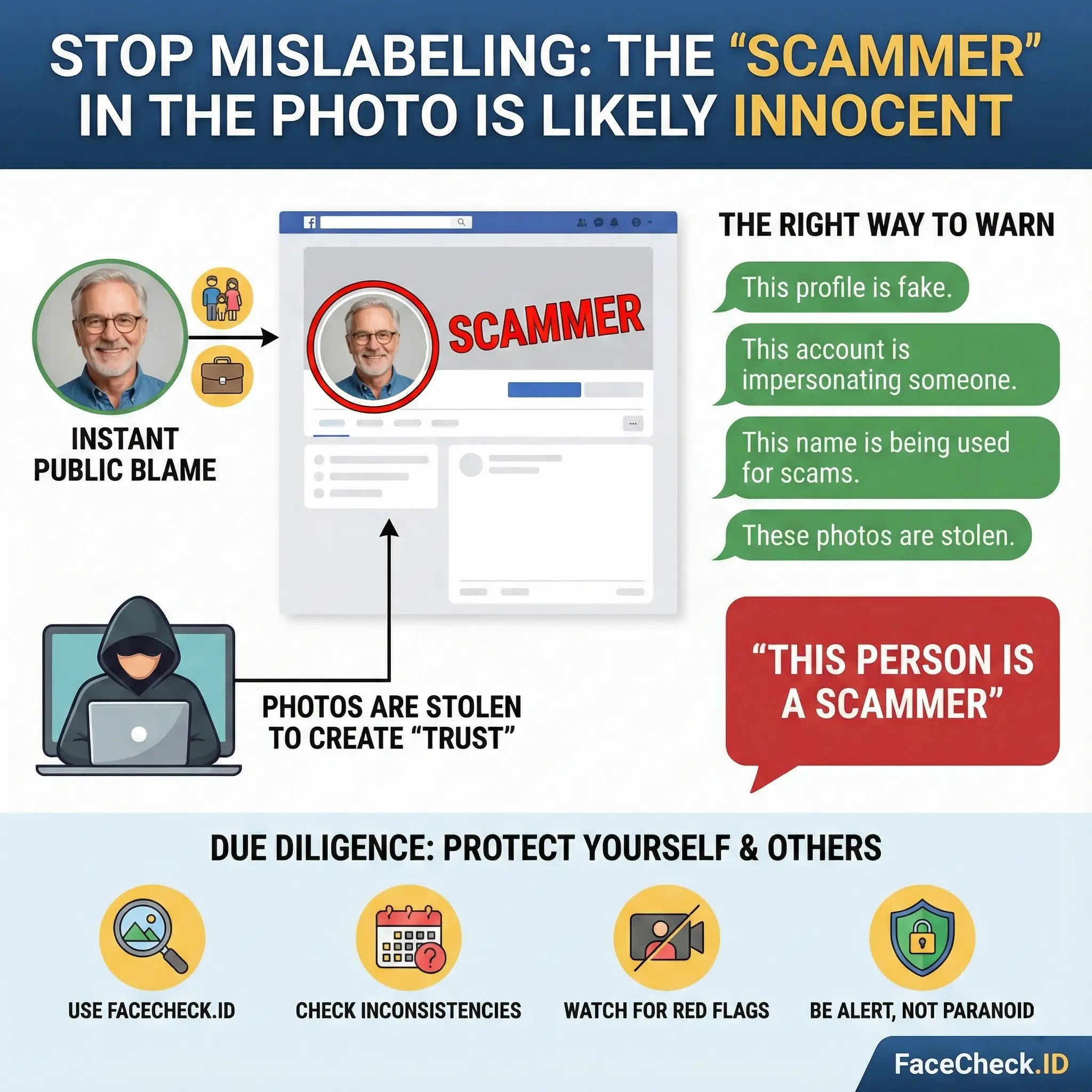
If you've been online for more than five minutes, you've probably seen it: someone posts a screenshot of a profile, circles the face, and labels it SCAMMER.
I get why people do it. Scams are stressful, humiliating, and infuriating. But here's the truth that needs to be said louder:
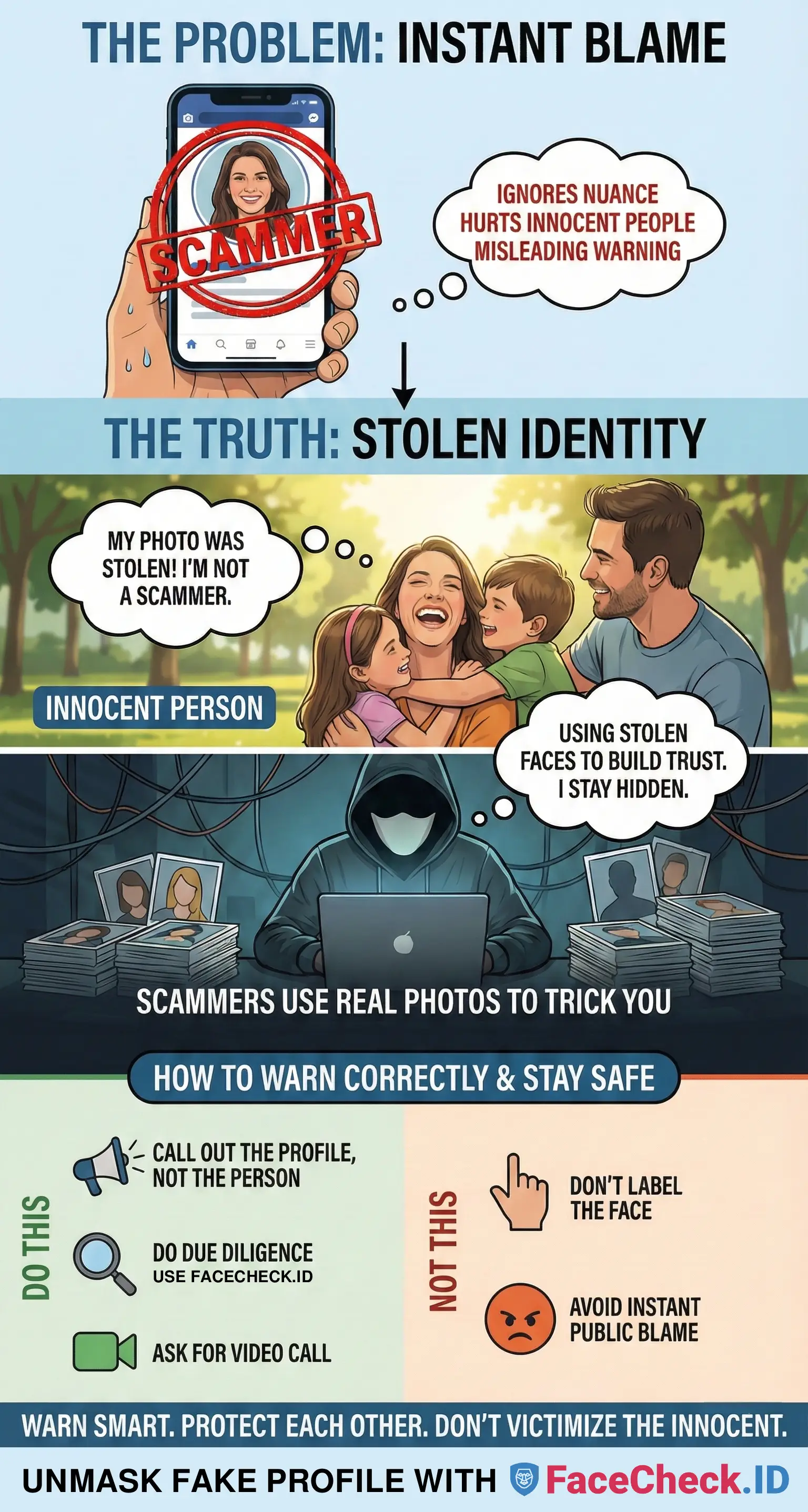
99% of the time, the person in the profile photo is NOT the scammer. They're usually an innocent person with a spouse, kids, a job, and a reputation. Their picture got stolen.
This post shows you how to spot a fake profile, how to do a reverse image search, and how to warn others without accusing the wrong person.
In this article, we're going to discuss
Why the person in the photo is usually innocent
Scammers don't want their real identity attached to the scam. So they do the easiest thing in the world:
- Steal a real person's photos
- Create a convincing fake profile
- Use a fake name or a slightly altered name
- Start messaging people until someone bites
That's why calling the face in the picture a scammer is usually misdirected. The scammer is the account. The photo is bait.
The most accurate way to describe what's happening:
This profile is impersonating someone and using stolen photos.
That statement protects people and avoids harming an innocent person whose image got copied.
Common fake profile scam types
Fake profiles show up everywhere, but the patterns repeat. These are the big ones:
Romance scams and dating scams
They push intense affection fast. They avoid video calls and eventually hit you with a crisis: medical bills, travel money, customs fees, emergency rent, or a crypto investment.
Catfish accounts
They want emotional control, intimate photos, or leverage. Sometimes it turns into blackmail. Sometimes it's just a long con for money.
Military and oil rig scripts
Same storyline: they're far away, can't meet, can't call much, and there's always a reason they need help.
Impersonation scams
They copy someone's photos, sometimes even their posts, and message friends or followers to ask for money or personal info.
How to do a reverse image search
Reverse image search used to be the default advice. It used to work better. But in 2025, mainstream tools are effectively useless for face-based searches in the way most people expect.
You'll often get a message saying results for people are limited. That means you're not getting a true face lookup across the web. It might still find the exact same image, but it often won't connect the same person across reposts, especially if the image has been cropped, compressed, filtered, flipped, or edited.
If you want to find out whether a face is being used under other names, use tools built for face search:
FaceCheck.ID
- Save the profile picture or screenshot it
- Upload it to FaceCheck.ID
- Look for the same face attached to different names, reposts across multiple sites, and older appearances of the image
PimEyes
- Upload the image to PimEyes
- Try multiple crops, both full face and tighter
- Look for the earliest or most original-looking source and the same face reused on other profiles
SocialCatfish
Use SocialCatfish when you want identity context, not just face matches. It's especially useful if you have a name plus location and socials, an email or phone they shared, or multiple photos from the same person.
Use more than one tool
Scammers deliberately edit photos to dodge detection. If one tool shows nothing, try another.
Pro tip: if the photo looks too perfect with professional lighting, modeling poses, and polished lifestyle shots, assume it's stolen until proven otherwise.
Quick tool comparison
| Tool | Best for | Works with low-quality images |
|---|---|---|
| FaceCheck.ID | Finding who a face belongs to across scam-report sites, Instagram, Facebook, X, TikTok, YouTube, sex offender databases, and mugshots | Often yes |
| PimEyes | Finding adult-oriented images | Often no |
| SocialCatfish | Searching by name, email, and phone to cross-check signals beyond the image | No |
Fake profile red flags
Use this quick checklist before you accept a new profile into your life.
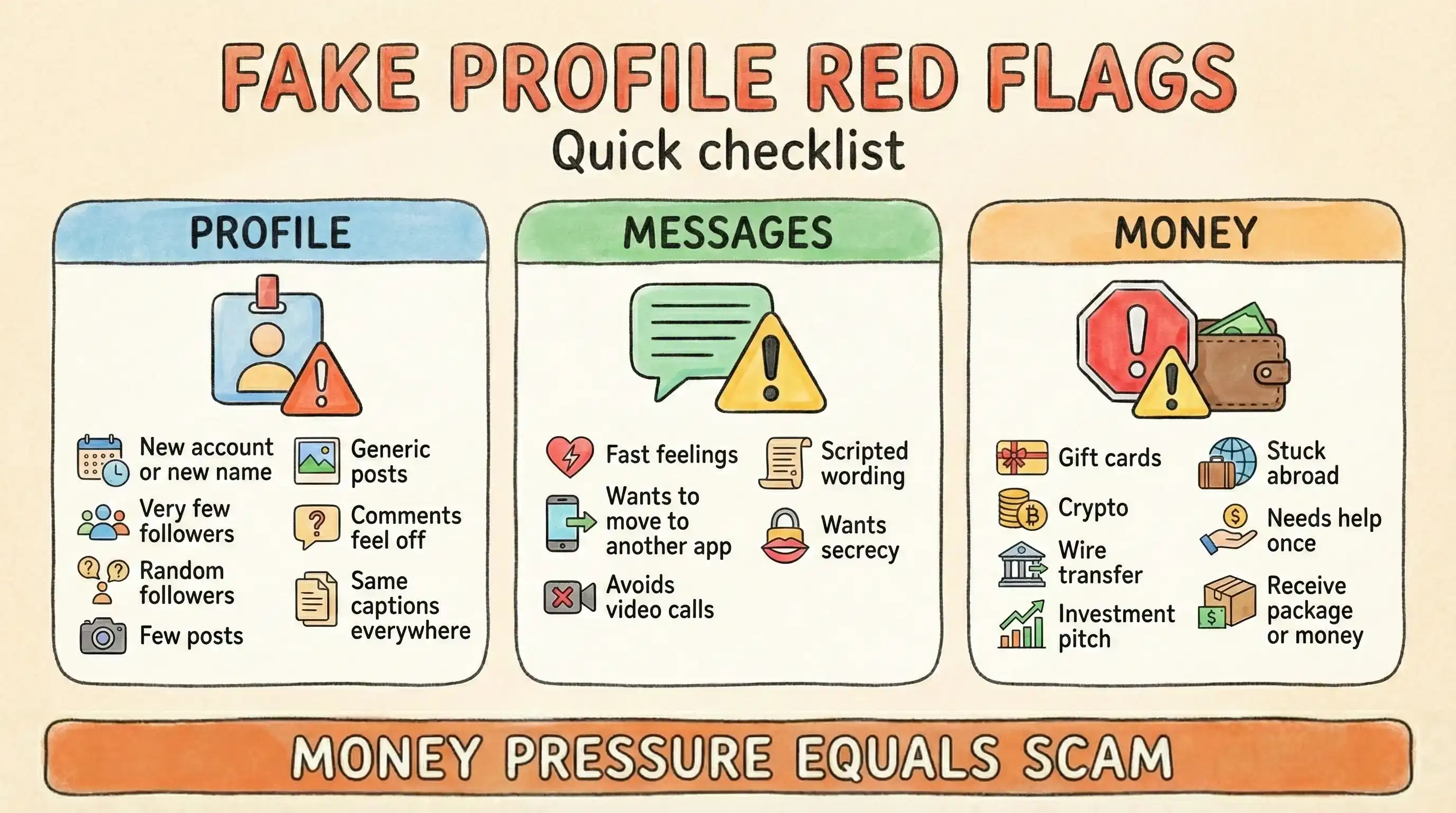
Profile-level red flags
- Very new account or recently changed name
- Few friends or followers, or suspiciously random connections
- Limited posts or posts that feel generic
- Comments that don't match the real-person vibe
- Same caption style across many photos with a copy-paste feel
Messaging red flags
- Moves too fast emotionally with talk of soulmates and destiny within days
- Pushes you off-platform quickly to WhatsApp, Telegram, or text
- Avoids video calls or makes endless excuses
- Uses overly formal or repetitive phrasing like scripted messages
- Tries to isolate you by saying not to tell anyone or that people will judge
Money red flags
- Gift cards, crypto, or wire transfers
- Investment opportunities
- Claims of being stuck abroad
- Requests for help just this once
- Asks whether you can receive a package or money for them
If you see money pressure, treat it as a scam until proven otherwise.
What to say instead of calling someone a scammer
Want to warn others? Yes, do it. Just do it accurately.
Better warning phrases
- This is a fake profile using stolen photos. Please block and report.
- This account is impersonating someone. The photos appear to be stolen.
- This profile is not who it claims to be. Do not engage.
- Someone is using this person's photo to scam people.
These warnings protect your community without falsely accusing the innocent person in the image.
How to report a fake account
Reporting helps reduce harm, even if platforms aren't perfect about enforcement.
What to gather first
- Screenshot of the profile
- Screenshot of suspicious messages
- Any money request proof if it happened
- Face-search results if available
What to report it as
Use categories like impersonation, fake account, scam or fraud, or harassment if they're threatening you.
Also block the account. If you were contacted on multiple platforms, report on all of them.
Final thought: protect people without creating new victims
We can call out scams without turning someone else's face into the blame target.
Remember:
- The profile can be fake
- The name can be fake
- The story can be fake
- And 99% of the time, the photo is stolen
So warn people, absolutely. Just aim your warning at the account and impersonation, not the innocent person whose image was used.
FAQ
Is the person in the scammer's profile photo usually the real scammer?
No. In most cases the scammer is using stolen photos from an innocent person to look trustworthy.
What's the fastest way to check if a profile picture is stolen?
Use a face search tool like FaceCheck.ID or PimEyes. If you also want identity context like name, email, or phone, try SocialCatfish.
Why does it say results for people are limited?
Because in 2025, many mainstream reverse image search tools don't provide open-ended face matching the way people expect. They might find the same photo, but often won't reliably connect the same face across reposts, especially if the image has been cropped, compressed, filtered, or edited.
What should I say when warning others about a fake profile?
Say that the profile is fake and using stolen photos, or that the account is impersonating someone. Avoid saying the person in the photo is the scammer.
What are the biggest red flags for a romance scam?
Fast intimacy, avoiding video calls, pushing you off-platform, and any request for money including gift cards, crypto, or emergency help.
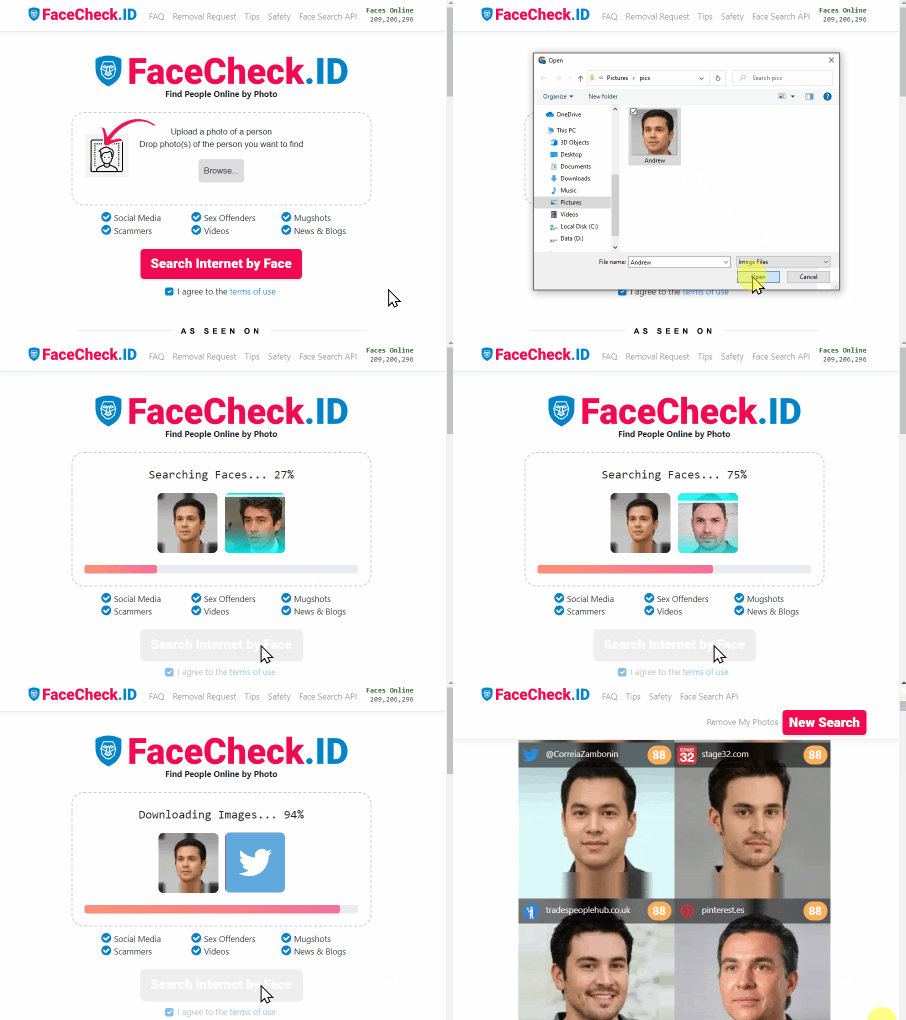
Quick check before you trust a new profile: reverse face search can reveal reused photos and scam patterns

Read More on Search by Picture
Fansly Search: How to Find Someone on Fansly by Username, Link or Photo
Fansly's search bar finds a handle you already know, and not much else. This guide covers the in-app options, Google and bio-link tricks, why location search does not exist, and how to go from a single photo to a Fansly handle with a face search.
On the subject in other languages
 Golpe de Perfil Falso? Por que 99% das Vezes a Pessoa na Foto é Inocente
 假冒账号骗局吗?为什么 99% 的情况下,照片里的人是无辜的
 Podvod s falešným profilem? Proč je v 99 % případů člověk na fotce nevinný
 Fake-Profil-Betrug? Warum in 99% der Fälle die Person auf dem Foto unschuldig ist
 ¿Estafa con un perfil falso? Por qué el 99% de las veces la persona de la foto es inocente
 Arnaque au faux profil ? Pourquoi 99 % du temps la personne sur la photo est innocente
 Truffa con profilo falso? Perché nel 99% dei casi la persona nella foto è innocente
 偽プロフィール詐欺?なぜ99%のケースで写真の人物は無実なのか
 가짜 프로필 사기? 99%의 경우 사진 속 사람은 무고합니다
 Oszustwo z fałszywym profilem? Dlaczego w 99% przypadków osoba na zdjęciu jest niewinna
 Мошенничество с фейковым профилем? Почему в 99% случаев человек на фото невиновен
 احتيال الحسابات الوهمية؟ لماذا في 99% من الوقت يكون الشخص في الصورة بريئًا
 Sahte Profil Dolandırıcılığı mı? Vakaların %99’unda Fotoğraftaki Kişi Masumdur
Popular Topics
Identity Image Search Reverse Face Search How To Facebook Instagram Image Search Tool Scammers Catfishing Fake Profiles Romance Scam PimEyes Sex Offenders YouTube Fake Accounts Face Lookup Screenshot Photo Lookup Face Search Face Match ImpersonationBest Reverse Image Search Engines: PimEyes vs FaceCheck Review