Facial Search
Facial search is what happens when you take a photo of a face and ask the internet, "Where else does this person appear?" On FaceCheck.ID, that question gets answered by scanning indexed public images across social profiles, news sites, blogs, mugshot records, and other pages where a face has been published.
How a facial search engine processes an image
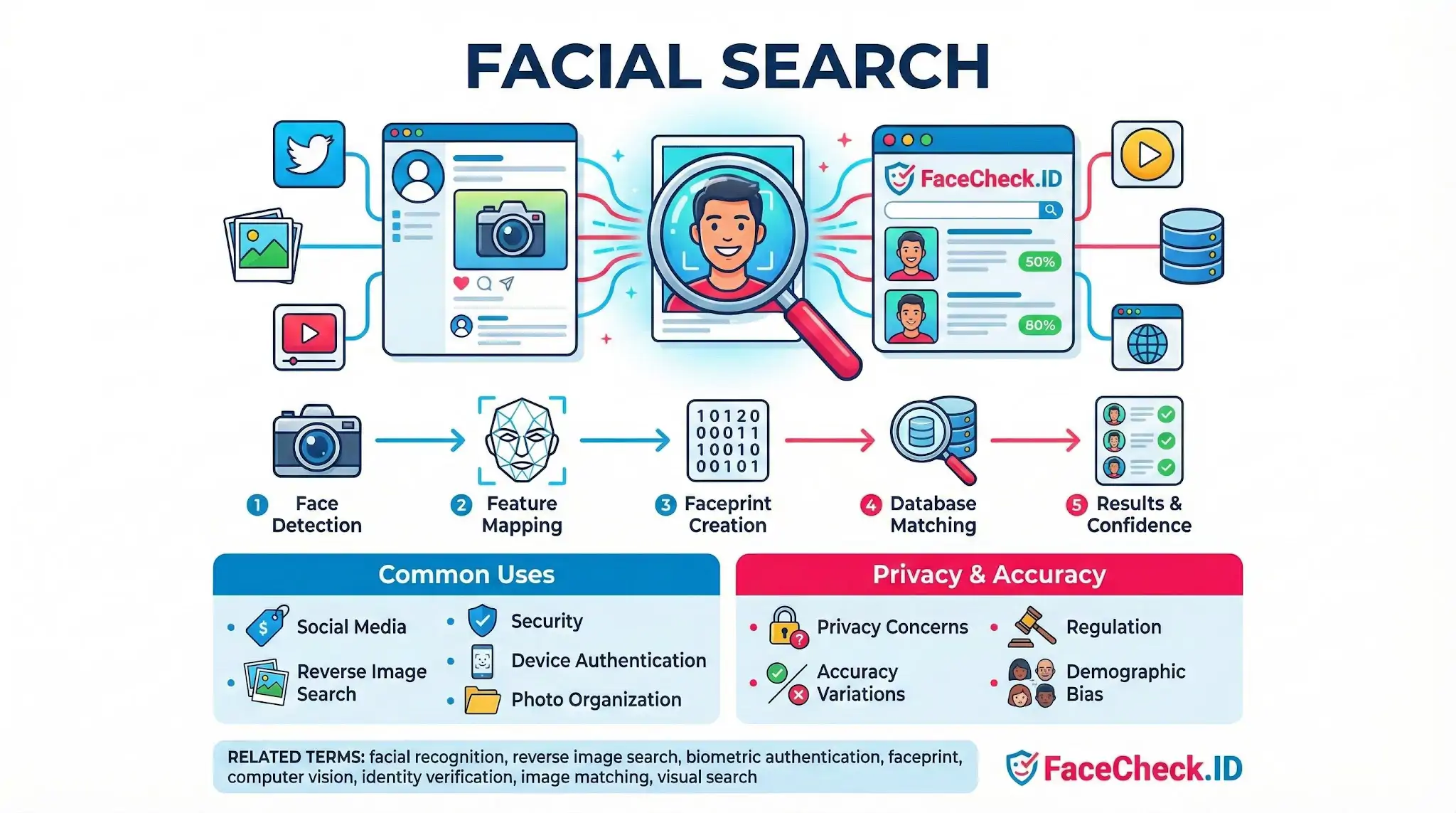
The pipeline behind a facial search query has a few distinct stages, and understanding them helps you read results more carefully.
- Face detection: The system locates a face in the uploaded image. If the photo contains multiple faces, you usually pick which one to search.
- Feature embedding: The face is converted into a high-dimensional vector, sometimes called a faceprint or embedding. This vector encodes geometry and texture in a way that survives changes in lighting, expression, and modest pose variation.
- Index comparison: The vector is compared against millions of vectors extracted from images already crawled and indexed from public web pages.
- Ranked results: Pages are returned sorted by similarity score. Higher scores suggest the same person; mid-range scores often surface lookalikes, relatives, or photos with poor angles.
The quality of the input photo drives most of what happens next. A front-facing, well-lit, unobstructed face will produce a tighter embedding and pull cleaner matches than a side profile shot at night with sunglasses.
What facial search is actually useful for
People use facial search for a narrow set of identity questions that traditional text search cannot answer.
- Verifying who someone is online: Someone you met on a dating app, a buyer on Marketplace, a recruiter on LinkedIn. Facial search can show whether their photo also appears under a different name elsewhere.
- Catfish and romance scam checks: Scammers reuse stolen photos. A search often finds the original face on an unrelated Instagram or modeling site, exposing the impersonation.
- Investigating unknown people in photos: A person tagged in your friend's old picture, a face from a crime watch post, a witness photo. Reverse face search can surface profiles, articles, or archived pages featuring the same person.
- Finding your own exposure: Many people search themselves to see where their photos have ended up, including stolen images used on fake profiles.
Facial search vs general reverse image search
A standard reverse image search like Google Images looks for visually similar pictures: the same image file, crops, or near-duplicates. It usually fails when the face appears in a different photo entirely, because the pixel composition is different.
Facial search ignores the rest of the image and focuses on the face vector. A person photographed in a kitchen and then in a stadium five years later can still match, because the underlying facial geometry is what gets compared, not the background, clothing, or framing.
Why match scores deserve skepticism
A high similarity score is evidence, not proof. Several things can mislead a reader of facial search results:
- Identical twins and close relatives can produce very high scores.
- Lookalikes sometimes cross the threshold that separates "same person" from "different person," especially when both photos are low resolution.
- Heavy filters, makeup, or aging between the query image and the target image lower scores even when it is genuinely the same person, leading to missed matches.
- Reused photos mean the same image can appear on dozens of unrelated pages. Ten matches do not mean ten confirmations of identity. They may all trace back to one stolen profile picture.
- Limited index coverage: A face only matches if photos of that person have been published on pages a crawler can reach. Private accounts, closed forums, and unindexed sites stay invisible.
What facial search cannot tell you
Facial search returns pages, not verified identities. The system does not know who someone really is. It shows where a face has been published and lets you draw conclusions from the surrounding context: usernames, captions, article text, profile metadata.
That distinction matters. A match places a face on a page. A name, a job, a criminal record, or a relationship status comes from what humans wrote next to that face, and any of it can be wrong, outdated, or fabricated. Treat strong matches as a starting point for verification through other channels rather than a final answer about who someone is.
FAQ
What does “Facial Search” mean in the context of face recognition search engines?
Facial Search is the process of using a face recognition model to search an index of images for faces that look like the face in your query photo. Instead of matching the whole picture (background, clothing, objects), it focuses on facial features and returns visually similar faces, often as links to pages where those images appear.
Is “Facial Search” the same as “Face Recognition Search” or “Face Search”?
In practice, “Facial Search,” “Face Search,” and “Face Recognition Search” are often used interchangeably to describe searching by a person’s face. Some vendors use “facial search” as a more user-friendly label, while “face recognition search” emphasizes the underlying biometric-style matching method.
How is Facial Search different from reverse image search for duplicates?
Reverse image search typically finds exact or near-duplicate copies of the same image (including crops or resized versions). Facial Search aims to find the same-looking face even when the photo is different (different camera, lighting, pose, or background), which means it can surface more leads but also increases the risk of look-alike matches.
Should I crop the image to the face before running a Facial Search?
Often yes: cropping to a single, clear face can reduce distractions (other faces, busy backgrounds) and help the engine focus on the correct subject. If the service supports it, upload a photo where one face is prominent, sharp, and not heavily occluded; otherwise, group photos may cause the search to lock onto the wrong person.
What does Facial Search use to find matches—does it rely on names, tags, or metadata?
Facial Search primarily relies on visual similarity of facial features encoded into a numerical representation (an embedding), not on names, EXIF data, or social-media tags. Any text or page metadata mainly helps present results (the surrounding webpage context), but the core match is made from the face itself. Tools such as FaceCheck.ID may then display source-page context and match strength indicators to help you evaluate what the visual match likely represents.


Recommended Posts Related to facial-search
-
Doppelgänger Effect in Facial Recognition Technology
How to Ensure Accurate Results and Minimize False Positive Matches in Facial Searches. Users of facial recognition systems should be aware of the Doppelgänger Effect when performing facial searches, as it can impact the accuracy of the results. Use multiple data sources: To increase the accuracy of the results, users should use multiple data sources when performing facial searches.
-
Searching Instagram by Photo: A Guide to Finding People and Accounts
While Instagram itself does not provide a built-in reverse image search feature, FaceCheck.ID is the only facial search engine built specifically for searching Instagram. With FaceCheck.ID, you can also leverage its powerful facial search capabilities to find them on Instagram, especially if they use the same profile picture across different platforms. By uploading a photo of the person, the facial search engine will scan Instagram profiles to find a match, making it one of the most effective tools for locating someone on the platform.
-
Leveraging Facial Recognition Technology to Combat Human Trafficking
Facial recognition software, such as FaceCheck.ID's facial search engine, plays a critical role in these investigations by analyzing facial features and comparing them with social media profiles, escort workers, and wanted criminals. By leveraging tools like FaceCheck.ID's facial search engine, investigators can navigate the complexities of the dark web and other challenging online environments, identifying and linking traffickers and their activities.
-
How to Spot a Catfish Online in Under 60 Seconds with FaceCheck.ID
Google, Bing, and general-purpose tools like TinEye restrict or limit facial searches due to privacy policies.
-
How to Use Reverse Image Search to Find LinkedIn Profiles by a Photo
Why FaceCheck.ID is the Best Facial Search Engine for LinkedIn. One genuine note before you go: facial search is powerful, and that cuts both ways. Can someone block their LinkedIn photo from being indexed by facial search engines?