Identity Verification
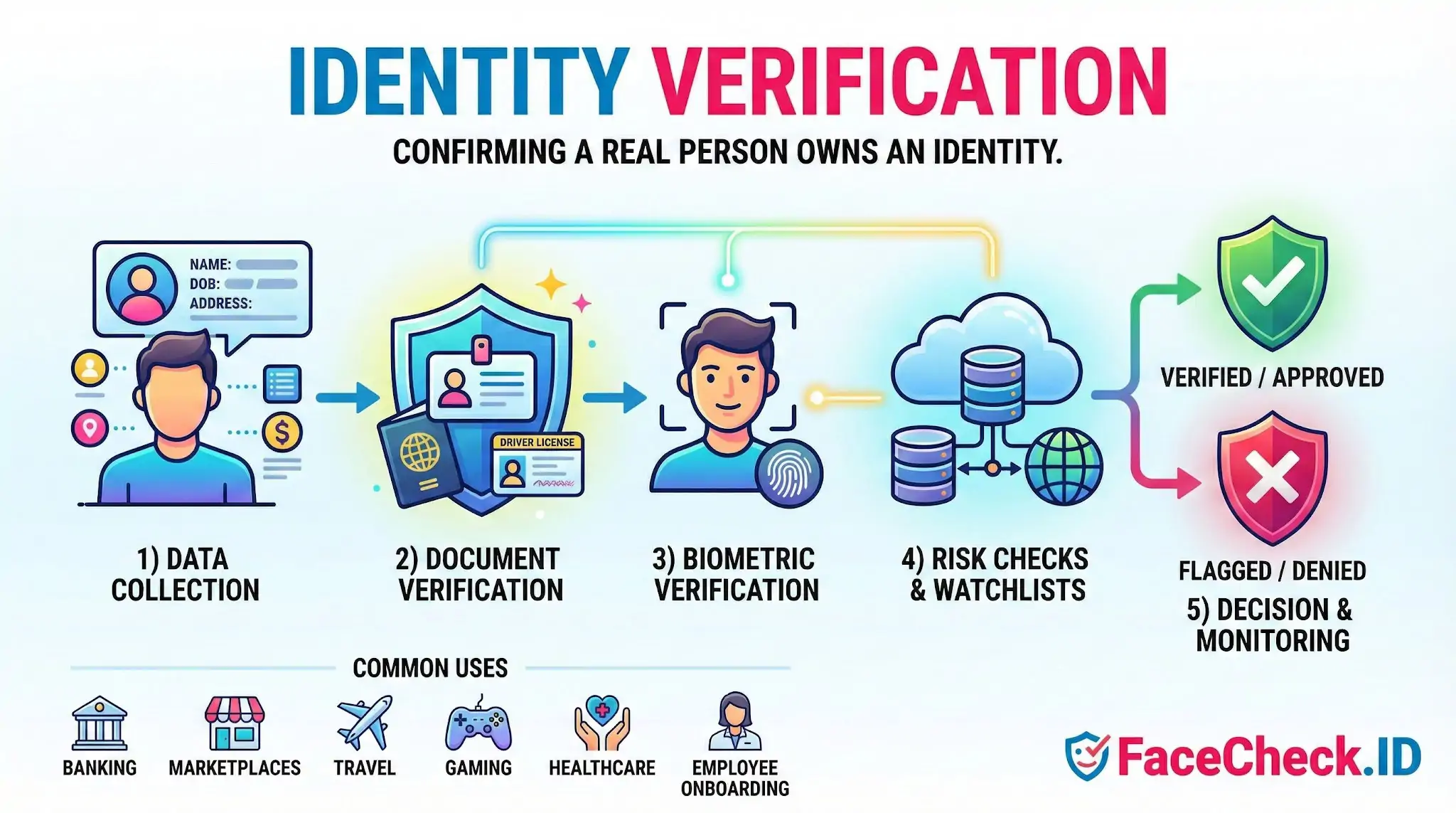
Identity verification is how platforms confirm that a person is real, present, and the rightful owner of the identity they claim. For anyone using FaceCheck.ID, the term cuts two ways: face search can support identity verification by surfacing where a face appears across the public web, and it can also expose when a verified identity does not match the face behind it.
How face search fits into identity verification
Traditional verification relies on a government ID plus a selfie. The system compares the document photo to a live capture and runs a liveness check. That confirms the ID matches the person holding the phone, but it does not confirm the person is who they say they are in any wider sense. Stolen IDs, doctored documents, and identities built from leaked data can still pass these checks if the selfie matches the photo on file.
Reverse face search adds a different signal. Instead of comparing a face to one document, it compares a face to images already indexed across the public web. If a profile photo on a dating app, a LinkedIn headshot, or a remote-hire selfie shows up under several different names, that is a strong indicator the identity claim is wrong. Investigators, journalists, recruiters, and ordinary users running due diligence often use face search to test whether a presented identity is consistent with the person's prior online footprint.
Where face search strengthens or contradicts a verified identity
Face-search results can support or undermine an identity claim in ways an ID scan cannot:
- A claimed name returns matches on profiles using a completely different name, in a different country, or with a flagged scam history.
- An applicant submits a stock-style headshot that appears on dozens of unrelated profiles, suggesting a recycled or AI-generated face.
- A dating match's photos appear on escort sites, mugshot databases, or romance scam reports.
- A "verified" remote worker's face surfaces on a different professional profile with a different employment history.
LinkedIn-style headshots tend to produce cleaner matches because they are well-lit, frontal, reused across professional sites, and indexed widely. Cropped, side-angle, or filtered images return weaker results, which is why scammers often prefer those formats.
Verification signals beyond the document and selfie
Face-search context can sit alongside the standard checks already used in regulated onboarding:
- Document verification and tamper detection on a government ID.
- Liveness detection to rule out a printed photo, replay video, or deepfake.
- Selfie-to-ID biometric match within a configured similarity threshold.
- Watchlist and sanctions screening, PEP checks, and address history.
- Device fingerprinting, IP geolocation, and velocity patterns.
- Reverse face search across the public web to test identity consistency.
Banks, crypto platforms, gig marketplaces, dating apps, and hiring teams all face the same core question: is this face attached to a real, consistent, non-fraudulent identity? Each layer answers part of it.
Identity verification vs authentication vs face search
These three are often confused. Identity verification confirms who a person is, usually at onboarding. Authentication confirms that the same user is returning, often through a passkey, OTP, or device biometric. Face search confirms where a face has appeared publicly online, which is neither verification nor authentication but a way to validate or challenge the identity story a user has presented.
Limits of using face search for verification
Face-search results suggest a great deal but prove very little on their own. A high-confidence match across multiple profiles strongly indicates the same person, but lookalikes, identical twins, and shared family resemblance produce real false positives. A missing match does not mean an identity is fake, since many people simply have a small public photo footprint. Old, edited, or low-quality images can also miss legitimate matches.
Face search should be treated as one input into an identity decision, not the decision itself. It works best when combined with document checks, liveness, and human review of the surrounding context: the names attached to matches, the platforms they appear on, the dates of the photos, and whether the pattern looks like a real person living a normal online life or a constructed identity stitched together from someone else's images.
FAQ
What does “Identity Verification” mean when using a face recognition search engine?
In face-recognition search, “Identity Verification” usually means checking whether a person’s claimed identity (name/account/profile) is consistent with evidence found online for the same face. It’s a confidence-building step (a lead), not a guaranteed proof of identity, because open-web results can be incomplete, outdated, or misattributed.
Why isn’t a face recognition search engine enough for true identity verification?
Face search typically lacks controls that formal identity verification requires—such as document authenticity checks, liveness detection, chain-of-custody, and verified enrollment. Even a strong match can be a look-alike, a reused photo, or an edited/AI-generated image, so face search should support verification workflows rather than replace them.
How can face recognition search results be used responsibly in an identity verification workflow?
Use results to corroborate or challenge a claim: compare multiple photos of the claimed person, look for consistent cross-site signals (same username, biography, locations, timestamps), and validate the original source page rather than relying on reposts. Treat mismatches or mixed results as a prompt for additional verification steps—not as evidence of wrongdoing.
What are common red flags in face-search results that suggest identity verification risk?
Frequent red flags include: the same face tied to multiple unrelated names or profiles; many low-quality repost pages with no clear original; heavy filtering/beauty edits across images; results that cluster around different ages/ethnicities/face shapes; and a “too perfect” portfolio-like trail that appears manufactured. Any of these can indicate photo reuse, impersonation, or synthetic/edited media.
How does FaceCheck.ID add value to identity verification checks without “confirming” identity?
Tools like FaceCheck.ID can help surface where a face appears on the public web, which can support identity verification by finding additional context (other photos, repost patterns, or conflicting identities). The safest approach is to use FaceCheck.ID results to gather leads and then verify through independent steps (direct communication, platform verification, official IDV processes), rather than treating a match list as confirmation.


Recommended Posts Related to identity-verification
-
Examining the State-of-the-Art in Facial Recognition Algorithms for Unconstrained Environments
The ability to accurately identify individuals from facial images has important applications in various domains, including access control, surveillance, identity verification, and forensic investigations. The algorithm achieves state-of-the-art performance on standard benchmarks such as LFW and is used for various applications such as access control and identity verification. The algorithm achieves state-of-the-art performance on standard benchmarks such as LFW and is used for various applications such as access control and identity verification.
-
Social Catfish Review: Is It Actually Worth Your Money in 2026?
Social Catfish is one of the most heavily marketed identity verification services on the internet, with YouTube ads and influencer sponsorships everywhere. Their tagline is basically "verify your online date before meeting them." They've built a lot of content around catfishing, romance scams, and identity verification. Best forMulti-input investigationFace-first identity verification.
-
How to Spot a Catfish Online in Under 60 Seconds with FaceCheck.ID
FaceCheck.ID is purpose-built for identity verification: advanced facial recognition that handles real-world image variations, combined with integrated AI-generated image detection to flag synthetic faces instantly. Pro Tips for More Accurate Identity Verification.
-
How to Detect Fake Remote IT Workers with Facial Recognition (2026 Guide)
Identity verification is now a cybersecurity requirement, not an HR formality. FaceCheck.ID gives hiring teams identity-verification capabilities once available only to government agencies and elite security teams. These takeaways support the need for stronger identity-verification processes, especially for companies hiring remote technical talent.
-
Top 5 Reverse Image Search APIs for Your Projects
Integrate it with security systems and identity verification platforms.