Search by Face: How Photo Queries Work
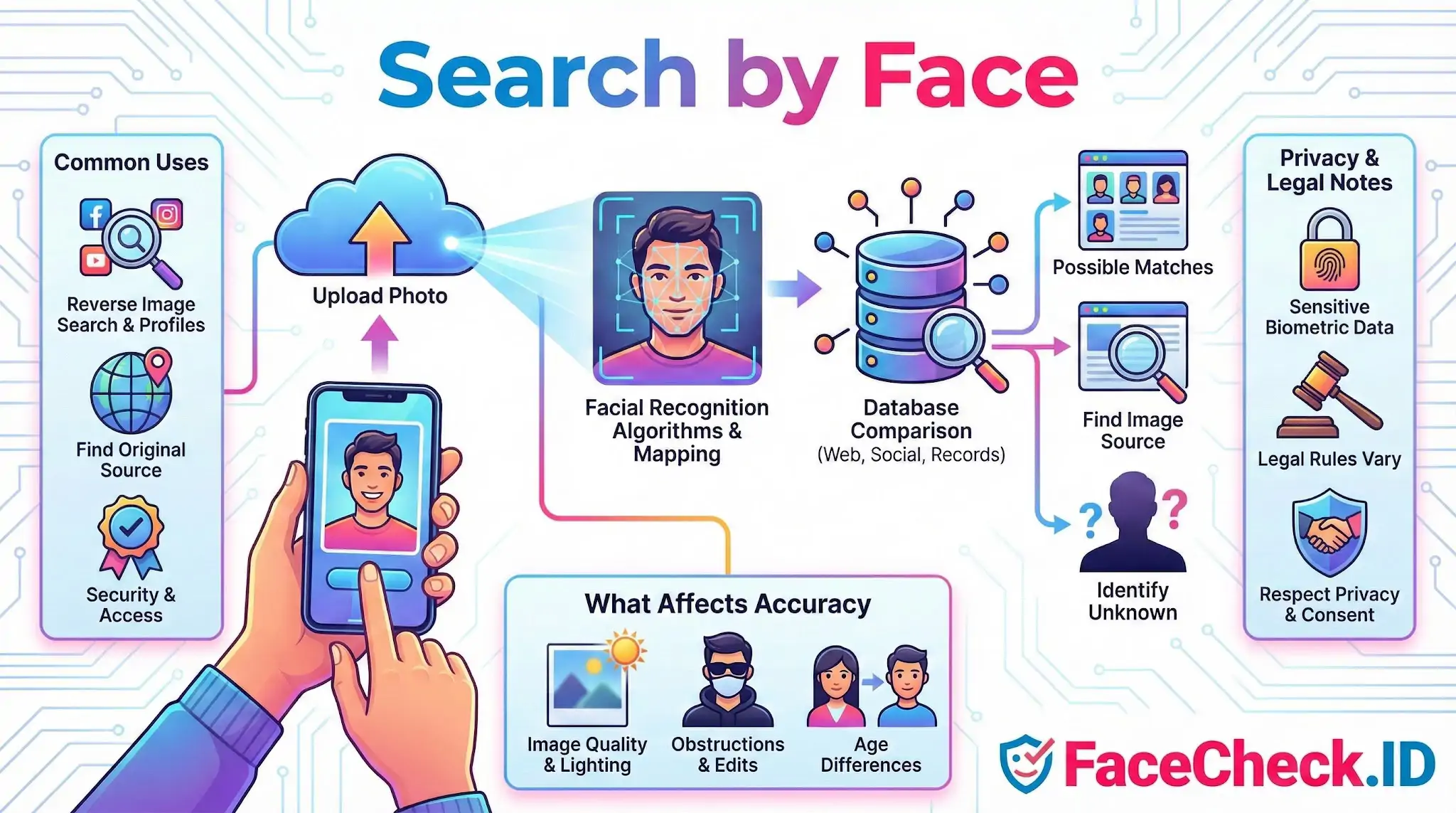
Search by Face is the core action behind FaceCheck.ID: instead of typing a name or handle, you upload a photo and ask the index where else that face appears on the public web. It turns a single image into a starting point for identity research, scam checks, and investigations where you have a face but no other reliable information.
How a face query actually runs
When you submit a photo, the system does not store or compare the picture itself. It detects the face, normalizes it for pose and lighting, and converts the visible features into a numerical embedding. That embedding is then compared against embeddings already extracted from indexed pages across social profiles, news sites, blogs, scam-report forums, mugshot aggregators, and other publicly crawlable sources.
What comes back is a ranked list of candidate matches with confidence scores and the URLs where each face was found. A high score does not mean "this is the same person" with certainty. It means the embeddings are close enough that a human should look at the surrounding context: the username, the page text, the date, and whether the same photo or a different one of the same face appears across multiple unrelated sites.
When Search by Face is the right tool
Face search is most useful when you have an image but no usable text. Typical scenarios include:
- Vetting someone met on a dating app, where the profile name and photos may not match the real person
- Checking whether a LinkedIn or Instagram headshot is being reused under different identities
- Finding the original source of a photo that has been reposted, cropped, or watermarked
- Looking up someone whose face appears in a screenshot, group photo, or surveillance still
- Identifying repeat scammers who recycle the same stolen photos across romance fraud, investment scams, and fake recruiter schemes
Text search struggles with all of these because the name attached to the photo is often invented, while the face itself is the constant.
What changes the quality of your results
Image conditions matter more than most people expect. A front-facing photo with even lighting, a neutral expression, and at least a few hundred pixels across the face produces cleaner embeddings and tighter matches. Heavy filters, extreme angles, sunglasses, masks, low resolution, and aggressive compression all reduce the signal the model has to work with.
Index coverage matters just as much. A face that has been posted to public profiles, news articles, or forum avatars is likely to surface. A face that lives only in private accounts, encrypted messengers, or pages blocked from crawlers will not appear in any face-search engine, no matter how good the algorithm is. Age gaps between the query photo and the indexed photos also reduce match scores, especially for photos taken more than ten years apart or across puberty.
Lookalikes are a real failure mode. Identical twins, close siblings, and unrelated people with similar bone structure can produce high confidence scores. This is why a single match is rarely conclusive, and why investigators look for clusters of matches across independent sources before drawing conclusions.
What a face match does not prove
A match shows that two images contain faces the model considers similar. It does not prove identity, intent, or any claim attached to either page. The person in the photo may not control the account where the photo appears. Stolen photos are common in scam profiles, so finding a face on a fraudulent page does not mean the real person committed the fraud, only that their image was used.
Treat results as leads, not verdicts. Cross-check with the surrounding profile details, the timeline of when photos appeared, and whether the same person shows up in genuinely independent contexts. Face search narrows the search space dramatically, but the final judgment about who someone is, and whether to trust them, still belongs to the person reading the results.
FAQ
What does “Search by Face” mean in face recognition search engines?
“Search by Face” is a feature that lets you upload a photo containing a face and search for other images on the web that appear to show the same person (or very similar-looking faces). Instead of matching the entire picture (background, clothing, objects), the engine focuses primarily on facial features to find visually related faces across different photos.
What kinds of images can I use for “Search by Face” (selfie, screenshot, video frame)?
Most face search tools accept selfies, profile photos, screenshots, and still frames captured from video, as long as the face is reasonably clear. Images may perform poorly if the face is very small, heavily compressed, motion-blurred, covered (mask/hand), strongly filtered, or distorted by extreme angles or wide-angle lenses.
Does “Search by Face” give a person’s name or confirm identity?
Typically, “Search by Face” returns links and images where a similar face appears; it does not reliably provide a verified real name or confirm identity. Treat results as investigative leads that require external verification (e.g., consistent usernames, multiple independent sources, matching context), because similar-looking people and reused photos can produce misleading associations.
Why can “Search by Face” results differ between tools like FaceCheck.ID and other face search engines?
Results can vary because different services crawl and index different parts of the web, update their indexes on different schedules, and use different face-matching models and ranking methods. For example, FaceCheck.ID may surface sources or prioritize matches differently than another engine, so running the same face across multiple tools can produce different (sometimes complementary) result sets.
How can I use “Search by Face” to check whether my photos are being reused or impersonated online?
Use a clear photo of yourself (preferably a common headshot) and review results for unfamiliar accounts, repeated use of the same image, or the same face paired with different names/handles. Open the source pages to confirm context (date, account history, other photos), and document URLs/screenshots before reporting impersonation to the platform. If the service (such as FaceCheck.ID) provides reporting or removal guidance, follow those steps and also use the relevant site’s impersonation/reporting workflows.


Recommended Posts Related to search-by-face
-
Search by Face to Find Social Media Profiles
How to search by face and find social profiles. The website that specialize in searching by face to find social media profiles is FaceCheck.ID. 4 Simple Steps to Search by Face.
-
Who is She? Reverse Image Search Your Favorite Adult Film Star!
Search by Face and Find Adult Film Stars.
-
A Step-by-Step Guide on How to Search Sex Offender Registry by Photo
Ensure Your Personal Safety with Search-by-Face Technology. This article highlights the importance of searching sex offender registry photos using the search-by-face website FaceCheck.ID, offers dating safety tips and suggests everyday personal safety measures.
-
LinkedIn Reverse Image Search to Find LinkedIn Profiles by Photo Using Facial Recognition
Introduction to Search by Face.
-
Find Criminals by Face Pic
Here's the exciting part: FaceCheck.ID lets you search-by-face the largest public databases of mugshots, fugitives, inmates, gang members, and registered sex offenders.