How to Find Someone on Fansly by Photo in 4 Easy Steps
Fansly doesn’t offer built-in image search, but there are other ways to look for a profile using a photo.

Trying to find a specific Fansly profile without a username can be frustrating. Fansly does not currently have a built-in reverse image search feature, so a photo alone usually is not enough to search directly on the platform.
One workaround is to use a facial recognition or reverse image search tool. With a clear screenshot or photo, you may be able to match the image to public profiles or social pages connected to the creator.
In this article, we're going to discuss
Search Fansly Profiles with FaceCheck.ID
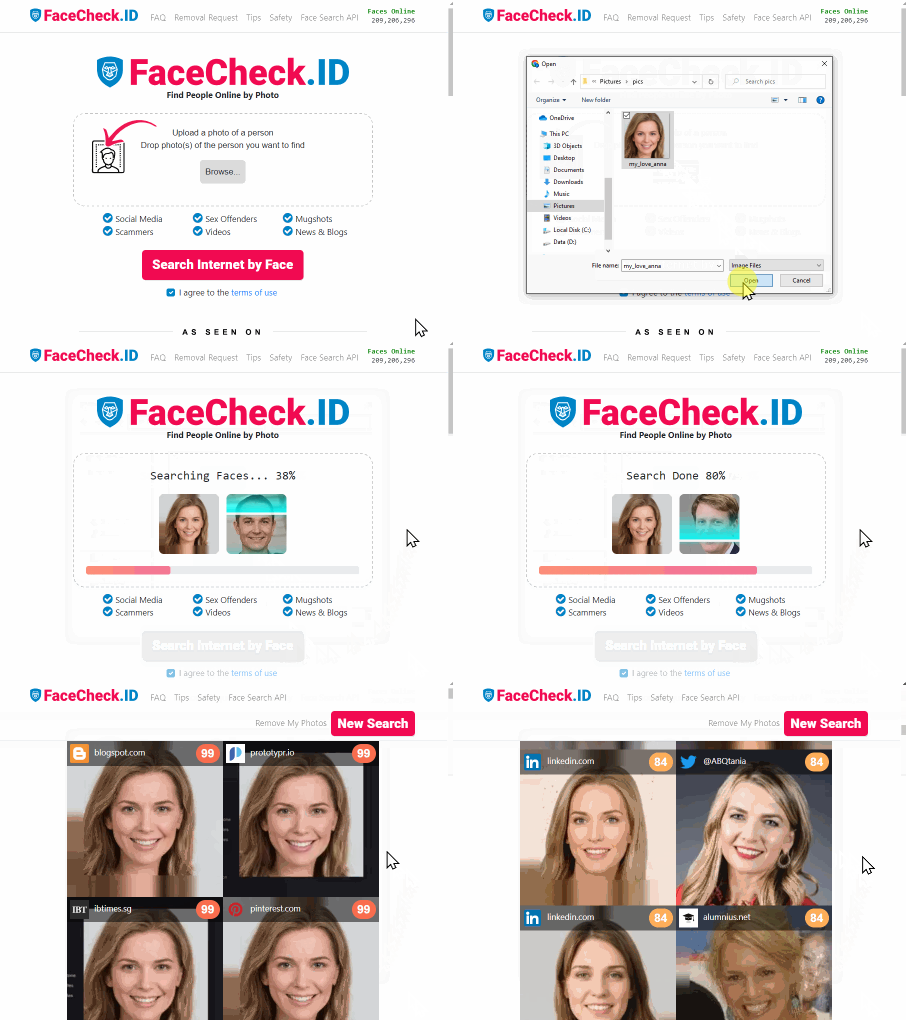
FaceCheck.ID is a facial recognition search tool that can help you look for public profiles using an image. Here’s the basic process:
Upload your image to FaceCheck.ID
Use a clear photo where the person’s face is visible. A close-up, selfie, or screenshot usually works best.
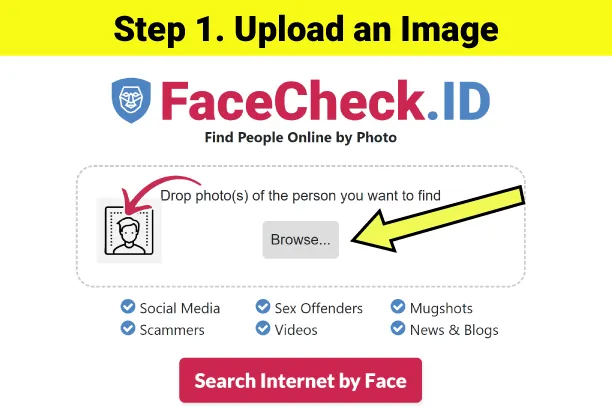
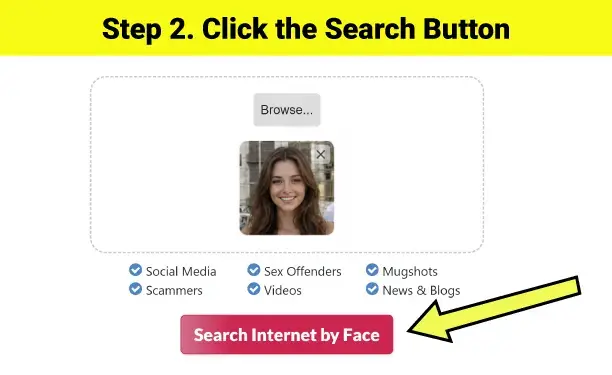
Start the search
Click the search button. If you have more than one image, you can upload up to three angles to help improve the results.
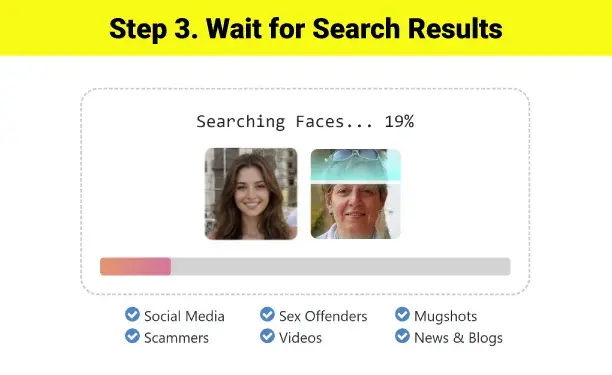
Wait for the scan
The tool will compare your image against indexed public profiles and pages.
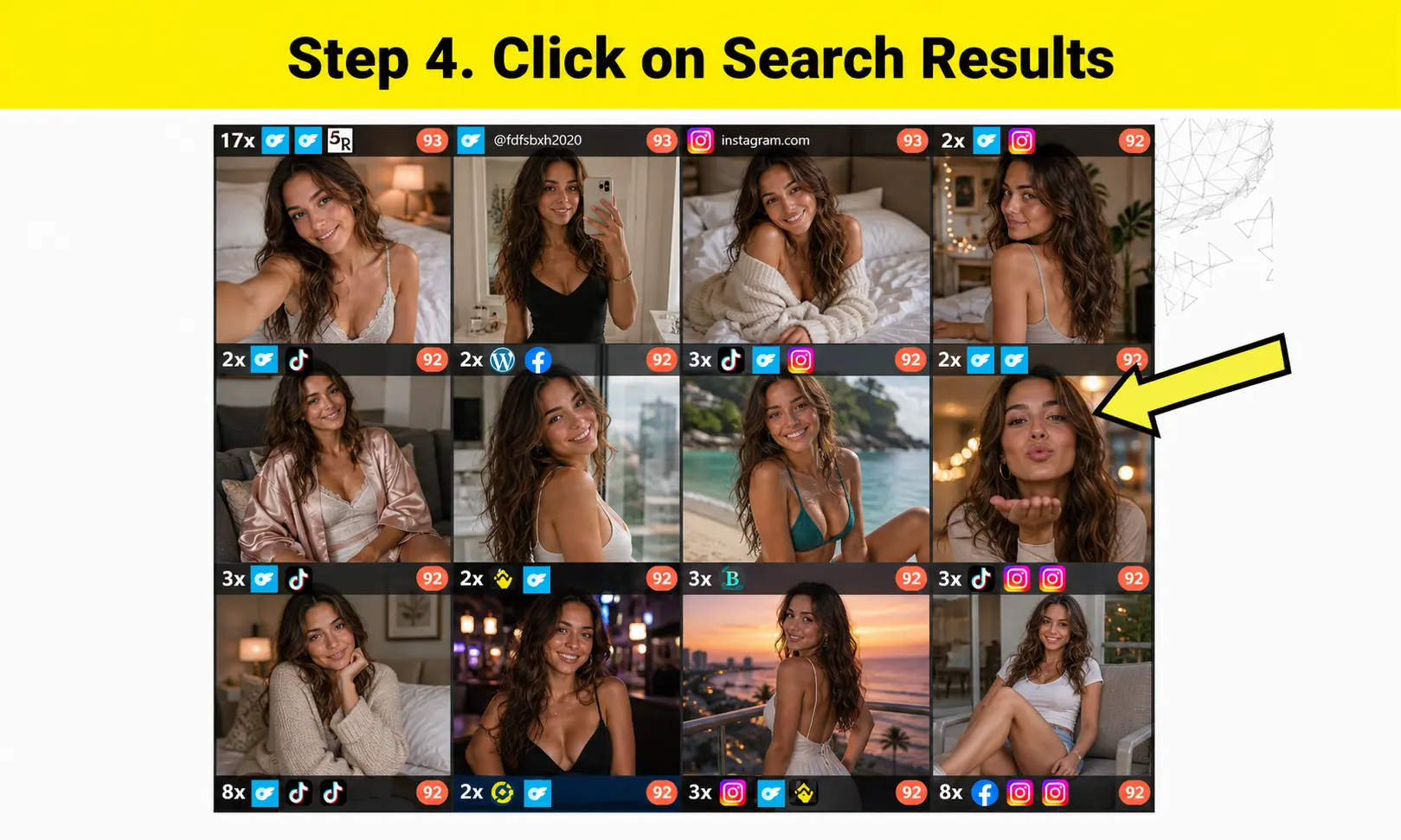
Review the results
If there is a match, check the result carefully before clicking through. Make sure it is actually the same person and that the profile is public.
Why Use Reverse Image Search for Fansly?
Fansly has grown quickly, and many creators use different usernames across platforms. That can make it difficult to find someone’s official profile if all you have is a screenshot or photo.
Reverse image search can help by checking whether the same image, or a similar one, appears on public websites, social profiles, or creator pages. It can save time compared with manually searching usernames, bios, Linktree pages, or social media posts.
That said, image search is not perfect. Results depend on the quality of the photo, whether the profile is public, and whether the creator’s images are indexed.
Privacy and Security Considerations
Use reverse image search responsibly. Only search with images you are allowed to use, and respect creators’ privacy, boundaries, and platform rules.
Also, avoid assuming every result is correct. Facial recognition tools can return false matches, especially with edited images, low-quality screenshots, filters, or similar-looking faces. Always verify results before taking any action.
Frequently Asked Questions
Can I find a Fansly creator if they use a fake name or stage name?
Possibly. Image-based search does not rely on usernames, so it may still find public pages connected to the same face or photo. However, results are not guaranteed, especially if the creator keeps their profiles private or uses different images across platforms.
What if the photo has a heavy filter or a lot of makeup?
Filters, masks, heavy editing, poor lighting, and unusual angles can make results less accurate. For best results, use a clear, well-lit image where the person is facing the camera.
Are there free alternatives to search Fansly by image?
You can try tools like Google Lens, Bing Visual Search, or Yandex image search. These may help find public matches, although they may not work well for creator platforms or face-based searches.
Will the creator know that I searched for their photo?
Reverse image search tools generally do not notify the person in the image. However, each search tool has its own privacy practices, so it is worth reviewing the tool’s policy before uploading anything.
Why didn’t my search return any Fansly profiles?
There may be no indexed public match. The profile could be new, private, paywalled, using different photos, or not connected to public pages. You can try a clearer image or check public social links where the creator may share their Fansly profile.
Is it legal to reverse image search someone’s photo?
Laws vary by location and situation. In general, searching public information may be allowed, but using someone’s image to harass, impersonate, expose, or contact them against their wishes can create serious legal and privacy issues. Use these tools responsibly.
Can I use this search tool from my smartphone?
Yes. Most reverse image search tools work on mobile. You can upload a screenshot or photo directly from your phone’s gallery.
How accurate are face recognition search results?
Accuracy depends on the image quality, lighting, angle, facial visibility, and whether matching public content exists online. Treat results as leads, not proof.
How can I remove my own photos from a facial recognition database?
If you are a creator and want your images removed, check the search tool’s website for an opt-out or removal request form. Many facial recognition search platforms provide a way to request removal from their index.
Video Guide: Navigating Creator Platforms
Switching platforms or trying to follow creators to new places? This video covers creator platform changes and alternatives:
I'M BREAKING UP WITH ONLYFANS 💔 (kind of) I am joining 2 new platforms: Slushy & Fansly
SEO Metadata

Read More on Search by Image
Find & Remove Deepfake Porn of Yourself: Updated 2025 Guide
Deepfake porn can be made from just one photo, and 99% of victims are women who never gave their consent. If someone has used your face this way, you need to act fast. Here's exactly how to find hidden fakes, document the evidence correctly, and get platforms to take them down.
On the subject in other languages
 Encontre Alguém no Fansly por Foto em 4 Passos Fáceis
 通过照片在Fansly上找人只需四个简单步骤
 Najděte někoho na Fansly podle fotografie ve 4 jednoduchých krocích
 Jemanden auf Fansly mit einem Foto finden in 4 einfachen Schritten
 Buscar a alguien en Fansly por foto en 4 pasos fáciles
 Trouver quelqu'un sur Fansly par photo en 4 étapes faciles
 Trova qualcuno su Fansly tramite Foto in 4 Semplici Passaggi
 写真でFanslyの誰かを見つける 簡単な4ステップ
 사진으로 Fansly에서 누군가를 찾기 간편하게 4단계로 진행하세요
 Znajdź kogoś na Fansly za pomocą zdjęcia w 4 prostych krokach
 Найти кого-то на Fansly по фото в 4 простых шага
 البحث عن شخص على Fansly بواسطة الصورة في 4 خطوات سهلة
 Fotoğrafla Fansly'de Birini Bulma 4 Kolay Adımda
Popular Topics
Face Recognition Search Social Media Image Search Facial Recognition Image Search Tool Find Someone OnlyFans Fansly Yandex Images Screenshot Visual Search Google Lens Bing Visual Search ImpersonationReverse Image Search Engines Tested: PimEyes and FaceCheck