Face Search: How It Works
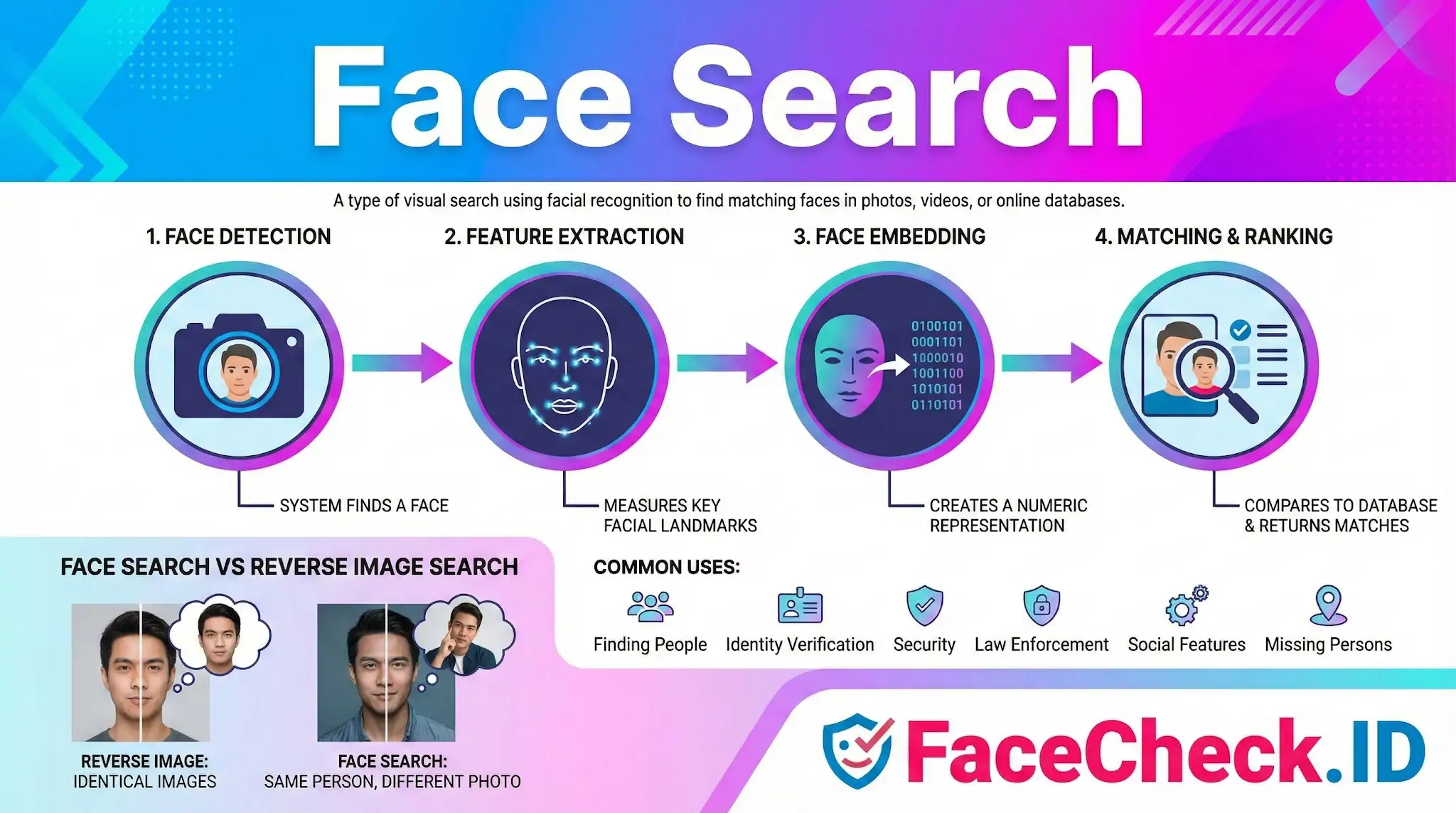
Face search is the core capability behind FaceCheck.ID: you upload a photo of a face, and the engine returns public web pages where that same face appears. It treats the face itself as the query, not the filename, the surrounding text, or pixel-level duplicates of the original image.
How face search differs from reverse image search
A traditional reverse image search looks for copies or near-copies of the exact image you uploaded. If someone cropped the photo, ran it through a filter, or saved a screenshot, results often drop off. Face search ignores most of that. It detects the face, converts the visual features into a numeric embedding, and compares that embedding to faces extracted from billions of indexed images.
That difference matters in real investigations. A scammer might steal a model's photo, crop it tightly, recolor it, and post it on a dating profile. Reverse image search may miss the connection. Face search can still link the cropped profile picture back to the original source, because the underlying face geometry survives the edits.
It also works in the other direction. The same person may appear in photos taken years apart, in different lighting, at different angles, wearing glasses in some and not in others. Face search can surface those varied appearances as separate results tied to the same identity, which is useful when piecing together someone's online footprint.
What face search is good for
The typical FaceCheck.ID use cases cluster around identity verification and risk assessment:
- Checking whether a dating-app match is a real person or a recycled photo from someone else's social profile
- Vetting a remote hire, online seller, or new business contact whose only proof of identity is a profile picture
- Investigating suspected catfishing, romance scams, or sextortion attempts
- Finding public traces of a person whose name you do not know but whose photo you have
- Looking for misuse of your own face on profiles or sites you never authorized
The common thread is that the searcher has a face but not a confirmed identity, or has a claimed identity and wants to test whether the face supports it.
What affects match quality
Face search results depend heavily on the input image and on what the public web has actually indexed. A few patterns show up consistently:
- Front-facing, well-lit photos with both eyes visible produce the strongest matches. LinkedIn-style headshots and passport-style images tend to perform best.
- Heavy filters, beauty smoothing, and aggressive compression strip out the features the embedding relies on.
- Sunglasses, masks, low-angle selfies, and motion blur reduce confidence scores and increase false positives.
- People with a large public web footprint (influencers, executives, public figures) return more results than private individuals, simply because more of their face is indexed.
- Identical twins and strong lookalikes are a known failure mode. Embeddings cluster similar faces together, so a high score is not by itself proof of identity.
Match confidence is a similarity signal, not a verdict. A 90-plus score combined with consistent context across multiple sites is meaningful. A high score on a single result with mismatched names, ages, or locations deserves more scrutiny.
What face search cannot prove
A face match shows that two images probably depict the same person. It does not prove who that person actually is, whether they wrote anything on the page where their photo appears, or whether the page is current. Stolen photos appear on impostor profiles all the time, and a real person's image can be attached to an account they never created.
This is why face search results work best as leads, not conclusions. A match points to a page worth reading. The reader still has to weigh the source, check whether the surrounding profile is consistent with other evidence, and consider that the photo's owner and the account's operator may not be the same person. Face search narrows the search space dramatically. Verifying identity still requires human judgment.
FAQ
What is “Face Search” in the context of face recognition search engines?
“Face Search” is the process of submitting a face photo (or face crop) to a face-recognition system that compares the face’s visual features against an indexed collection of images to find likely matches. Unlike keyword search, it relies on facial similarity rather than names, captions, or tags.
What is the difference between “same-person matches” and “similar-face matches” in Face Search?
Same-person matches aim to find other photos of the exact same individual, even if the images differ (angle, lighting, aging). Similar-face matches return people who look alike but may be different individuals. Many tools mix both types in results, so users should treat matches as leads and verify using non-face context (source, timeline, corroborating identifiers).
What are common legitimate use cases for Face Search, and what uses should be avoided?
Legitimate uses can include checking whether your own images are being reused without consent, investigating impersonation or stolen profile photos, and basic due-diligence for fraud prevention. Uses to avoid include stalking, harassment, doxxing, or trying to “identify” someone in a way that could cause harm without strong independent verification.
Why can Face Search results change over time even for the same uploaded photo?
Results can change because the search engine’s index changes (new pages added, old pages removed, links updated), ranking and filtering rules are adjusted, or the underlying recognition model is updated. As a result, repeated searches may surface new matches or reorder prior matches.
If I find my face in results on a face search tool (e.g., FaceCheck.ID), what should I do?
First, open the result source page to confirm it really contains your image and isn’t a look-alike or mislinked page. Then document the URL(s) and context (screenshots, timestamps). Next, use the site’s removal/opt-out and the original hosting site’s takedown/reporting process where applicable; many tools (including FaceCheck.ID) typically provide guidance or mechanisms for reporting or requesting removal. If the use is abusive (impersonation, extortion), consider reporting to the relevant platform and, if necessary, local authorities.


Recommended Posts Related to face-search
-
The 4 Simple Steps To Find Someone Using Face Search Engine
With the release of FaceCheck.ID new face search engine, people are wondering how this technology works and what implications it may have. A face search engine is a powerful tool that can be used to find almost anyone online. What is a face search engine?
-
Uncover the Truth Before Your First Date
How a Face Search Engine Can Save You from Scammers and Sex Offenders in Online Dating. One such precaution is using a face search engine to vet your date and avoid potentially dangerous situations with scammers or sex offenders. Advantages of Using a Face Search Engine.
-
AI Face Search: How It Works and Best Tools (2026)
That's where AI face search comes in, and the difference between these approaches is the difference between finding nothing and finding everything. What Is AI Face Search and How Does It Actually Work? AI face search uses deep neural networks trained on millions of faces to convert any photo of a person into a mathematical representation called a "face embedding." Think of it as a numerical fingerprint for someone's face.
-
How to Reverse Face Search: Find Anyone by Photo (2026)
What you need is a reverse face search: a tool built specifically to match human faces across the internet. What Is a Reverse Face Search (And How Is It Different)? A reverse face search flips the approach entirely.
-
Instagram Image Search to Find Instagram Profile by Photo using Face Search Engine
We'll show you how to use a face search engine to do an Instagram image search and find an Instagram profile by photo. Even so, if the profile is not private you may be able to find the profile using a 3rd party face search engine FaceCheck.ID. This is also known as a face search engine.