Find Photos by Face Across the Public Web
Finding photos of a specific person across the public web is the core use case behind FaceCheck.ID. Instead of scrolling through endless feeds or guessing at usernames, face-based photo search lets you start with a face and surface the pages, profiles, and articles where that face has appeared online.
How face-driven photo search differs from keyword search
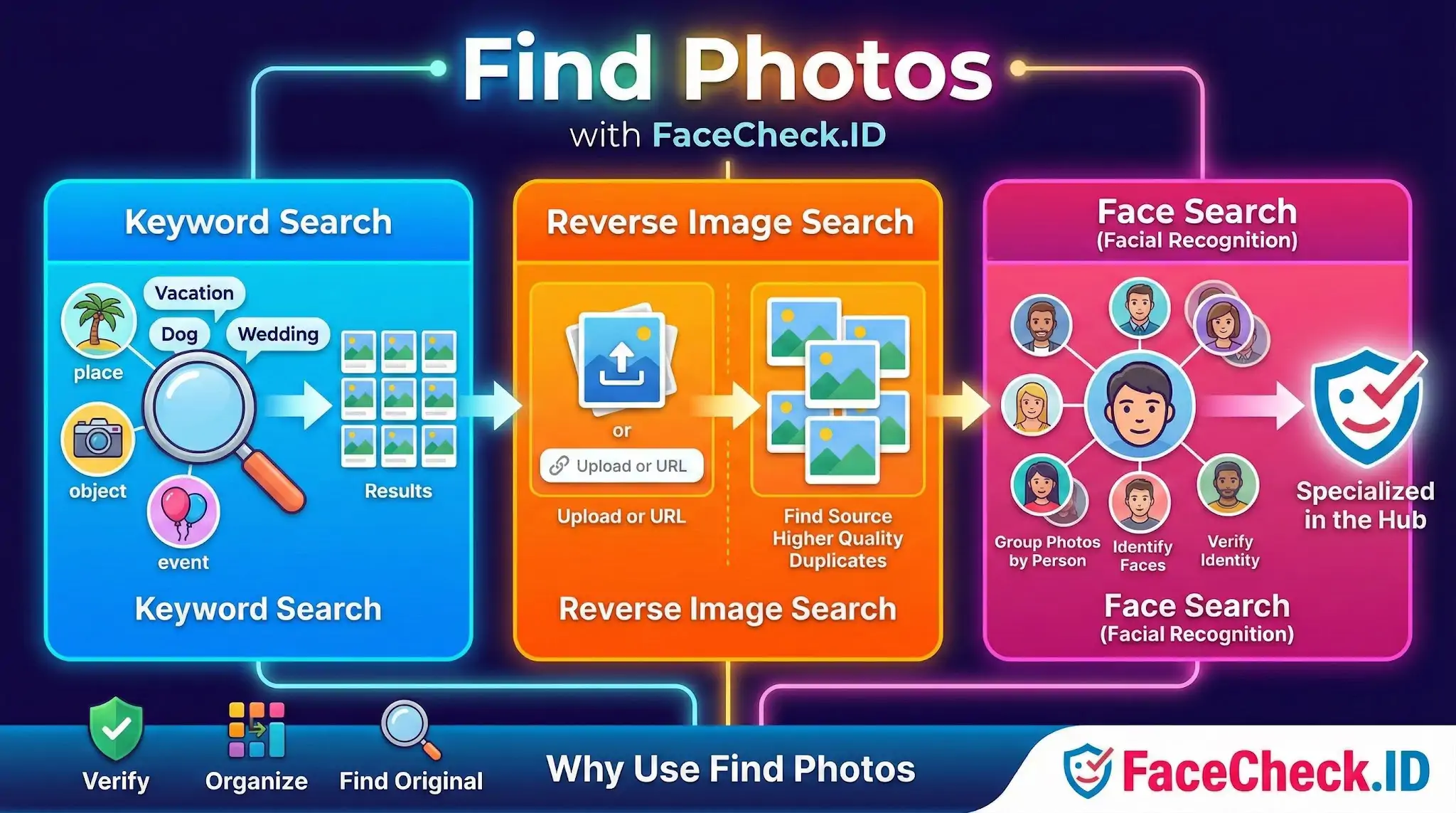
Most "find photos" features inside apps like Google Photos or Apple Photos work on a closed library you already own. FaceCheck.ID works on the opposite problem: locating images of a person you may not even be able to name, scattered across indexed public sites you have never visited.
The mechanics are different from keyword or tag search:
- A face detector locates faces in your uploaded image and extracts a numerical embedding that represents that face.
- The embedding is compared against embeddings built from publicly indexed images.
- Results come back ranked by similarity score, not by recency or popularity.
This matters because two photos of the same person taken years apart, in different lighting, with different hair, can still match. And two strangers who look alike can score high enough to confuse a casual viewer.
What people actually use face photo search for
The reasons users run a face search tend to cluster around identity verification rather than casual curiosity:
- Checking whether a dating-app match has profiles under different names elsewhere
- Investigating the person behind an anonymous social account or a suspicious DM
- Verifying that a remote job candidate, business contact, or romantic interest is real
- Looking for a missing relative or an old acquaintance whose name has changed
- Researching whether a stolen headshot is being used in romance scams or fake profiles
- Journalists and OSINT researchers tracing a face seen in a news photo or video frame
In each case, keyword search fails because the searcher does not know what name, handle, or city to type.
Getting usable results from a face photo search
The quality of your input image controls the quality of your matches more than anything else. A few practical points:
- Front-facing photos with both eyes visible produce the strongest embeddings. Side profiles and three-quarter angles often miss matches entirely.
- Resolution matters up to a point. A sharp 400-pixel face crop usually beats a blurry 4K group shot.
- Sunglasses, heavy filters, masks, and extreme expressions reduce match confidence.
- Group photos work, but cropping to a single face first gives the engine a clearer target.
- Older photos can still match newer ones, but the further apart in age, the more false negatives you will see.
When results come back, treat the top match as a lead, not a conclusion. Two visual cues that genuinely confirm identity: matching context across multiple results (same name appearing on independent sites) and matching distinguishing features (tattoos, scars, ear shape, dental details) rather than just overall facial similarity.
What face photo search cannot do
A high similarity score is not proof of identity. Several common situations produce misleading results:
- Identical twins and close siblings frequently score near the top of each other's results.
- Lookalikes from unrelated parts of the world can match strongly enough to fool a quick scan.
- Photos that are reused across many sites (stock images, profile pictures lifted by scammers, viral memes) will show the same face in places that have nothing to do with the actual person.
- Private images, photos behind logins, deleted content, and most images on closed platforms are not indexed and will never appear, regardless of how many photos of someone exist.
A face-based photo search tells you where a face appears in the public, indexed web. It does not tell you who someone is, where they live, or whether they are trustworthy. That last step still belongs to a human reviewing the surrounding context, the source pages, and any independent confirmation available outside the search results themselves.
FAQ
What does “Find Photos” mean in a face recognition search engine?
“Find Photos” typically means using a face-recognition-based search to locate other images on the web that appear to contain the same face (or very similar faces), even when the photos are cropped, resized, or taken in different settings.
What should I upload to “Find Photos” to get the best results?
Use a clear, well-lit image where the face is front-facing, not heavily filtered, and large enough to show key features (eyes, nose, mouth). If the tool allows it, crop tightly to the face, avoid group photos, and try multiple images from different angles to improve match coverage.
Why might “Find Photos” return multiple different people for one face?
Results can include look-alikes, people with similar facial features, or mismatches caused by low image quality, extreme angles, heavy makeup/filters, occlusions (hats/masks), or AI-generated/edited faces. Treat results as leads and verify using source context (same username, timeline consistency, location clues, and multiple distinct photos).
Can “Find Photos” locate images behind paywalls or in private accounts?
Generally, no. Face-recognition search engines typically index content that is publicly accessible to them (or available through their data providers). Photos in private social media accounts, locked profiles, closed groups, or behind strict paywalls are usually not searchable unless they have been reposted publicly elsewhere.
How should I use “Find Photos” results safely and responsibly (including on FaceCheck.ID)?
Use results as investigative pointers, not proof of identity. Confirm with multiple independent matches, check the original source pages for context, and avoid doxxing, harassment, or making accusations from a single hit. If you use FaceCheck.ID or similar tools, follow their terms, prefer verification through corroborating details, and consider opting out/removal processes when available if your own images appear unexpectedly.


Recommended Posts Related to find-photos
-
How to Find Pictures of Your Girlfriend Online
This guide covers the tools people actually use to find photos of someone online — facial recognition engines, reverse image search, the usual social platforms, the metadata buried inside JPEGs. Rarely useful for finding photos of her, but occasionally useful for finding photos she's saved, which is a slightly different and arguably more interesting thing.
-
Facial Recognition Resources
https://www.forbes.com/sites/kathleenchaykowski/2017/12/19/facebooks-new-facial-recognition-switch-can-find-photos-of-you-across-the-social-network/?sh=7b9ba9b93fd7. Facebook's Facial Recognition Can Find Photos Of You Across The Social Network.
-
Social Media Lookup: Find Anyone's Profiles by Photo
Face search tools can only find photos that are publicly accessible.
-
Leveraging Facial Recognition Technology to Combat Human Trafficking
PimEyes: An advanced facial recognition search engine that helps find photos of individuals across the internet.
-
How to Find Pictures of Yourself on the Internet
FaceCheck.ID uses facial recognition rather than keywords or visual similarity, which means it can find photos of you where you look completely different — different hair, different decade, different glasses.