How to Find Pictures of Your Girlfriend Online
Face search, reverse image lookup, social platforms, and EXIF metadata — what actually works.

Look — we both know why you're here. Maybe you want to surprise her with a printed photo book of her old hiking pics. Maybe a stranger tagged her in a wedding album last week and you got curious. Maybe the reason is less wholesome and you're not telling anyone, including yourself. Whatever brought you to this article, here's the honest version of it.
This guide covers the tools people actually use to find photos of someone online — facial recognition engines, reverse image search, the usual social platforms, the metadata buried inside JPEGs. It also covers, briefly and without preaching, the part where you stop and ask whether you should.
In this article, we're going to discuss
Facial Recognition Search
Facial recognition tools work by mapping the geometry of a face and then looking for matches across whatever slice of the internet they've indexed. Five years ago this felt like CIA technology. Now it lives in a browser tab and costs less than a sandwich.
How to Run a Face Search on FaceCheck.ID
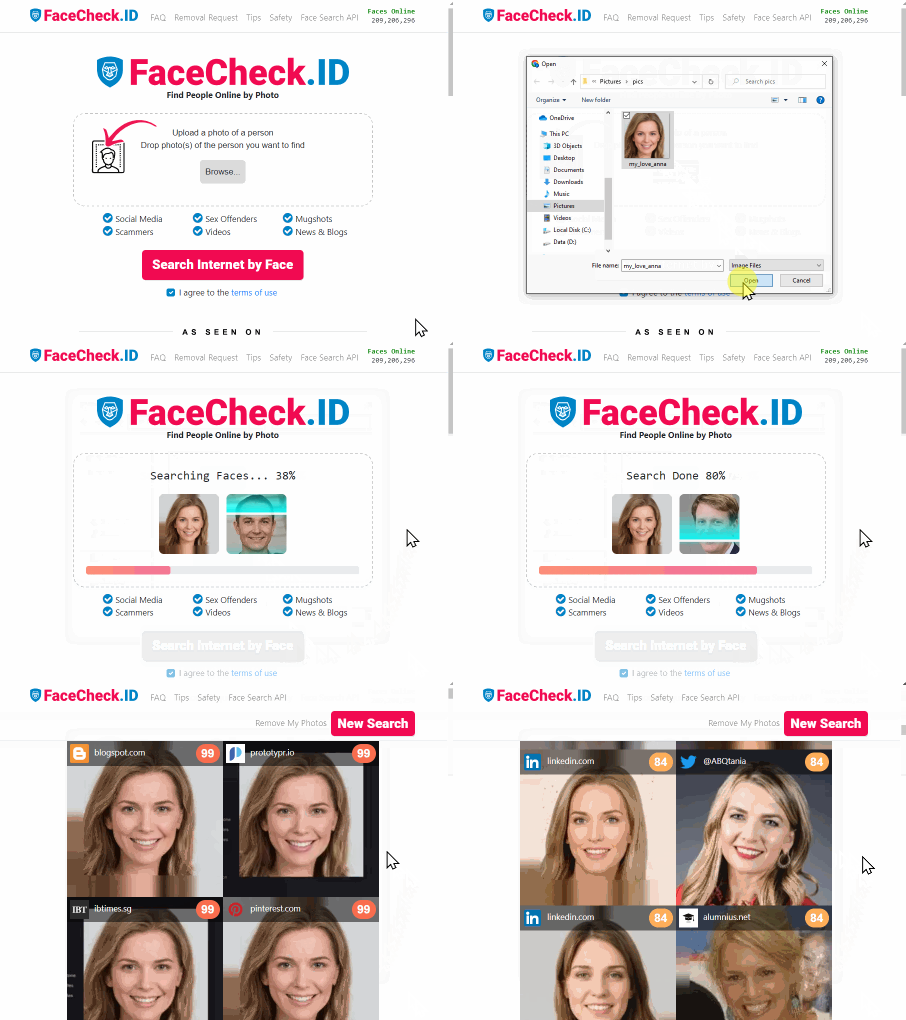
Find your Girlfriend's Pics on Social Media
FaceCheck.ID is the most approachable of these tools for a casual user. Upload a clear photo of her face, hit search, and it returns a grid of image matches pulled from across the open web — news photos, blogs, public social posts, the occasional forum thread.
What You'll Get, and What You Won't
Face search is genuinely good at the thing it does: matching a face to other public images of that face. It's bad at things it isn't designed for. If her photos live behind locked Instagram accounts or sit in iCloud, no tool is pulling them out. You'll also get false positives — strangers who happen to share a jawline and a haircut. Each match comes with a confidence score; it's there for a reason.
Other Tools That Do Roughly the Same Thing
PimEyes and TinEye are the usual alternatives. PimEyes runs on similar principles to FaceCheck.ID with a different index, which is the main reason to try both — they crawl different corners of the internet. TinEye is technically a reverse image search rather than a face search, which makes it better suited to finding exact copies of an image (where else has this photo been posted?) than finding other photos of the same person. Worth knowing the distinction before you sink twenty minutes into the wrong tool.
Google Images
The world's largest image database, and arguably the worst tool for this specific job. Type her name into Google Images with a few qualifiers — her city, her job, her university, the band she liked enough to tweet about in 2019 — and you'll get something. Not much, usually. Try "Maya Patel" half marathon Boston 2023 and you might land on a race photographer's gallery. Try Maya Patel alone and you'll meet every Maya Patel.
How to Use Google Images to Find Pictures of Someone
Why Google Images Is Actually Pretty Bad at This
Google Images doesn't do facial recognition. It indexes captions, filenames, alt text, and surrounding page content — text, basically — which is why it's excellent at finding a chair you saw in a magazine and mediocre at finding a person. The algorithm also rewards popularity, so unless your girlfriend is mildly internet-famous, her photos lose to wedding photographer SEO and Pinterest mood boards. It's a fine starting point. It is not the answer.
Social Platforms
The unglamorous part of the work, and probably where most of the photos you actually want are sitting.
Still hosts a remarkable archive of photos people forgot they uploaded in 2014. Browse her tagged photos, the "Photos of" tab, the albums of mutual friends. You can only see what her privacy settings allow you to see, which is the entire design.
The obvious one — her grid, her tagged photos, anything she's been mentioned in by friends with public accounts. The search-by-hashtag trick works if you know roughly what to look for: a city, a venue, a recurring caption.
Twitter/X
Mostly text, but people post photos, and the media tab on a profile collects them all in one place.
Rarely useful for finding photos of her, but occasionally useful for finding photos she's saved, which is a slightly different and arguably more interesting thing.
Search Tips That Save Time
Quotation marks force an exact match: searching "Maya Patel" filters out partial matches and irrelevant Mayas. Boolean operators like AND and NOT still work: "Maya Patel" AND "marathon" NOT "obituary" will save you a grim afternoon.
Combine specifics. A name alone is too broad; a name plus a single distinctive detail — a former employer, a sport, an unusual hobby — narrows the field enormously.
The Awkward Ethics Part
This is the section where I'd normally say "communication is key" and you'd close the tab. Instead, the short version: there is a real difference between I want to find that one cute photo from her sister's wedding and I want to build a dossier on a person who hasn't agreed to that. The tools don't know which one you're doing. You do.
A useful gut check: if you'd be uncomfortable telling her later what you searched, that's the signal. Either don't do it, or ask her first. People generally don't mind if you say "I tried a face search tool on my own name, want to see what's indexed about you?" — that's a real conversation, and you might find she'd like to know too.
Locations, Events, and the Stuff Inside the File
If you know she was at a specific event — a half marathon, a conference, a music festival — the event itself is often a better search term than her name. Race photographers, festival recap blogs, and local news outlets post galleries tagged by event rather than by person. Pair the event with her name in quotes and you'll cut through a lot of noise.
EXIF Metadata
Every photo file carries metadata: camera model, timestamp, sometimes GPS coordinates if the original phone had location services on. Tools like ExifTool or any browser-based EXIF viewer will read this. From a photo's timestamp and location, you can sometimes find other photos taken in the same place around the same time — a process people call reverse geotagging.
One practical note: most photos uploaded to Instagram, Facebook, or X have had their EXIF data stripped on upload. The metadata trick mostly works on photos you have direct access to — files texted to you, AirDropped, emailed. If you're scraping metadata from photos she sent you privately, that crosses from research into something else, and you already know what it is.
When You Find Something You Didn't Want to Find
Image searches occasionally surface things from someone's past that the present version of them hasn't mentioned — an ex, a former job, a previous look, a previous life. It happens more than you'd think. The honest move is to ask, not to silently build a case. People grow. Some don't. You can usually tell which is which from a conversation, not from a search result.
A Last, Plain Note
The tools in this article are genuinely useful. They're also, in the wrong hands, the toolkit for behavior that has a name and isn't a good one. If at any point in this process the word that describes what you're doing has drifted from curious toward surveilling, stop. Close the tab. The person you're looking up gets to have a life you don't have full visibility into — that's not a problem to solve. That's just what being two people is.
Reverse Image Searching and Pulling Metadata from Pictures

Read More on Search by Image
How to Find Pictures of Yourself on the Internet
Your photos could be scattered across websites you've never even visited, or worse, stolen by scammers pretending to be you right now. Tracking down every image of yourself online feels impossible without the right approach. Here are proven strategies to uncover your hidden digital footprint and take back control.
On the subject in other languages
 Como encontrar fotos da sua namorada online
 如何在网上找到你女朋友的照片
 Jak najít fotky vaší přítelkyně na internetu
 Wie man Bilder Ihrer Freundin online findet – aber richtig und respektvoll
 Cómo encontrar fotos de tu novia en línea
 Comment trouver des photos de votre petite amie en ligne
 Come trovare le foto della tua ragazza online
 オンラインで彼女の写真を見つける方法
 여자친구의 온라인 사진 찾는 방법
 Jak znaleźć zdjęcia swojej dziewczyny w internecie
 Как найти фотографии вашей девушки в интернете
 كيفية العثور على صور صديقتك على الإنترنت
 Kız Arkadaşınızın Fotoğraflarını İnternet'te Nasıl Bulursunuz
Popular Topics
Face Recognition Search Social Media Image Search Facial Recognition Reverse Image Search How To Facebook Instagram Google Images Twitter TinEye Find Someone PimEyes YouTube Find Pictures Find Photos Reverse Image Lookup Image Lookup Face Search Exact MatchExpert Analysis: PimEyes vs FaceCheck for Facial Recognition 2026