API: Programmatic Face Search
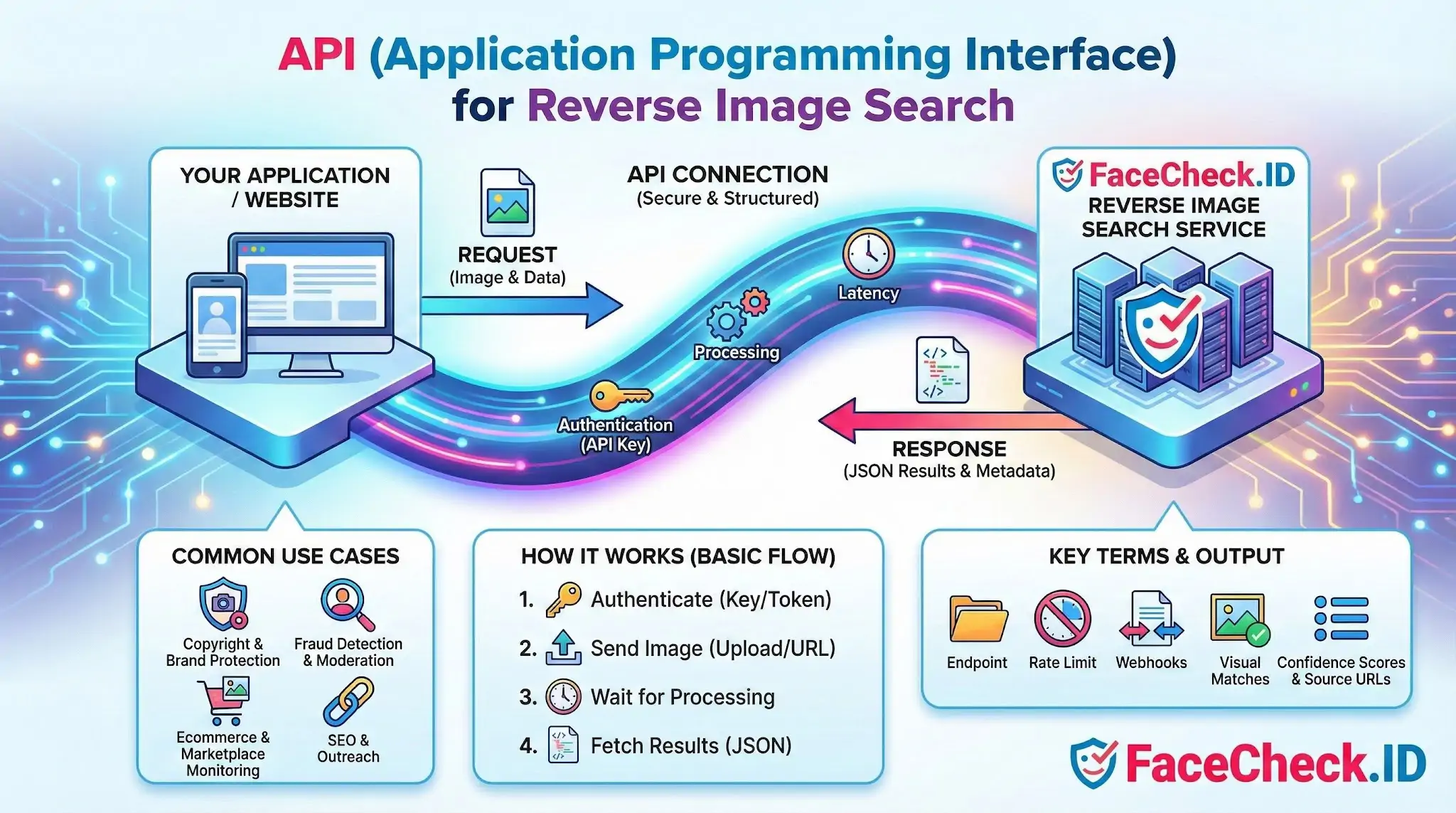
When FaceCheck.ID runs in a browser, it returns face matches through a web interface. An API exposes the same matching pipeline programmatically, so a developer, fraud team, or trust-and-safety system can submit a face image and receive structured match data without anyone clicking through a form. That distinction matters because most serious face-search work, whether vetting hundreds of dating profiles or screening user signups, cannot be done by hand.
How a face-search API differs from a generic image API
A standard reverse image search API looks for visual duplicates: the same JPEG, the same crop, the same product photo posted on another site. A face-search API is doing something narrower and harder. It detects a face in the submitted image, builds a numerical embedding of that face, and compares it against embeddings indexed from public web pages. The result is not "this image appears here" but "a face that looks like this person appears here," which is a probabilistic claim, not a file-level match.
That difference shows up in the response payload. A face-search API typically returns:
- A list of pages where a similar face was detected
- A similarity or confidence score per match
- A thumbnail or cropped face region from the source page
- The source URL and sometimes domain category, such as social, news, or adult
- Image metadata when available, like dimensions or detection box coordinates
The score is the field that matters most. A high score on a front-facing, well-lit photo is meaningful. A high score on a tiny, blurry, side-angle crop deserves skepticism even when the number looks good.
Practical uses for a face-search API
Programmatic access is what makes face search useful at scale. Common workflows include:
- Dating and marketplace platforms screening new profile photos against known scammer faces or against profiles already flagged on other sites
- Journalists and OSINT teams running batches of suspect photos from leaked datasets, Telegram channels, or scam reports through a single pipeline
- Background and due-diligence checks comparing a submitted ID photo to public web appearances to catch stolen identities or fabricated personas
- Brand and executive protection monitoring whether an executive's face is being used in deepfake ads, fake endorsements, or impostor accounts
- Catfish investigation tools that wrap the API in a consumer interface so a user can paste a Tinder screenshot and see whether the same face appears under a different name on Instagram or VK
In each case the API is doing the same core thing: turning a face into an embedding, querying an index, and returning ranked candidates. The application layer decides what to do with weak matches, what to escalate, and what to ignore.
Authentication, rate limits, and result handling
Face-search APIs are rate-limited for both cost and abuse reasons. A request usually carries an API key, an image payload or URL, and optional parameters like result count or minimum score threshold. Responses are commonly asynchronous: you submit the image, receive a search ID, and poll or wait for a webhook because indexing and matching against a large face database is not instantaneous. Storing the search ID, the input image hash, and the returned matches lets you build audit trails, which matter when a match leads to a real-world decision like banning an account.
Image quality submitted through the API drives result quality more than any tuning parameter. Front-facing images with clear eyes and mouth, minimal occlusion, and resolution above roughly 200 pixels per face produce far better candidates than cropped group photos or low-light selfies.
What an API match does not prove
A high-confidence response from a face-search API is a lead, not a verdict. Identical twins, close relatives, and unrelated lookalikes can score high. A reused stock photo can produce dozens of "matches" that are all the same person but have nothing to do with the individual using the photo. A low score does not mean the person is absent from the web; it can mean their public photos are at angles or resolutions the matcher cannot align well.
Any system built on top of a face-search API should treat results as ranked candidates for human review, log enough data to defend a decision later, and avoid using a single match to take irreversible action against a real person.
FAQ
What does “API” mean for a face recognition search engine?
An API (Application Programming Interface) is a set of rules and endpoints that lets software (your app, website, or script) send a face-search request to a face recognition search engine and receive results in a structured format (often JSON), instead of using the website manually.
What data is typically sent to a face recognition search API request?
Common inputs include an image file upload (or an image URL), optional parameters like face-crop coordinates, a confidence/similarity threshold, result limits, and flags for filtering or sorting. The response often returns matched URLs/pages, preview images, similarity scores, and metadata about each match.
How do authentication and rate limits usually work for face search APIs?
Most face search APIs require an API key or token to identify the caller, enforce rate limits (requests per minute/day), and apply quotas or billing. If you exceed limits, you may receive errors (e.g., HTTP 429) and need to slow requests, batch jobs, or request higher limits.
How should I handle privacy and security when integrating a face recognition API?
Use HTTPS, restrict and rotate API keys, log minimally, and avoid uploading unnecessary sensitive data (e.g., full screenshots with names, chats, locations). If possible, crop to the face region locally before upload, and ensure you have a lawful basis/consent where required. Also document retention and deletion practices for any images or embeddings you store.
Does FaceCheck.ID have an API I can integrate with my application?
Some face recognition search services offer APIs, but availability, access requirements, and permitted use cases vary by provider and may change over time. For FaceCheck.ID specifically, check its official documentation or support channels to confirm whether an API is available, how authentication and pricing work, and what usage policies (e.g., anti-doxxing/anti-harassment rules) apply.


Recommended Posts Related to api
-
Top 5 Reverse Image Search APIs for Your Projects
Whether you're developing an e-commerce platform, a content management system, a dating app, tools for copyright infringement detection, or a social media application, this guide will help you find the perfect reverse image search API tailored to your needs. API'>FaceCheck.ID Reverse Image Face Search API. User-friendly API with ready to use sample code.
-
Face Recognition Systems: How They Work, Best Open Source Models, and Production APIs
This article breaks down the full face recognition pipeline, compares the best open source models available in 2026, shows you the actual performance numbers, and explains when it makes sense to build your own system versus using a production API. Understanding these four stages will help you evaluate any model or API. Milvus: Purpose-built vector database with FAISS under the hood plus persistence, scaling, and API layers.
-
Free Reverse Image Search Tools That Actually Work (2026)
"Free" but useless: Sites that run your image through Google's API and slap ads around the results. Free for basic searches, with limits on API usage.
-
Yandex Image Search: Complete Guide to Finding Faces (2026)
No API access. Yandex shut down its free image search API, making it harder to integrate into workflows.
-
TinEye Review: What It Does Well and Where It Falls Short
Businesses that need more use TinEye's paid API. Businesses and apps that need more searches or automated access use TinEye's paid API.