Face Recognition Systems: How They Work, Best Open Source Models, and Production APIs
If you're building anything that needs to match faces, verify identities by photo, or search for a face across a dataset, you need to understand how modern face recognition actually works under the hood. Not the marketing version. The real pipeline, from raw pixels to a 512-dimensional embedding vector that encodes a person's unique facial geometry.
This article breaks down the full face recognition pipeline, compares the best open source models available in 2026, shows you the actual performance numbers, and explains when it makes sense to build your own system versus using a production API.
In this article, we're going to discuss
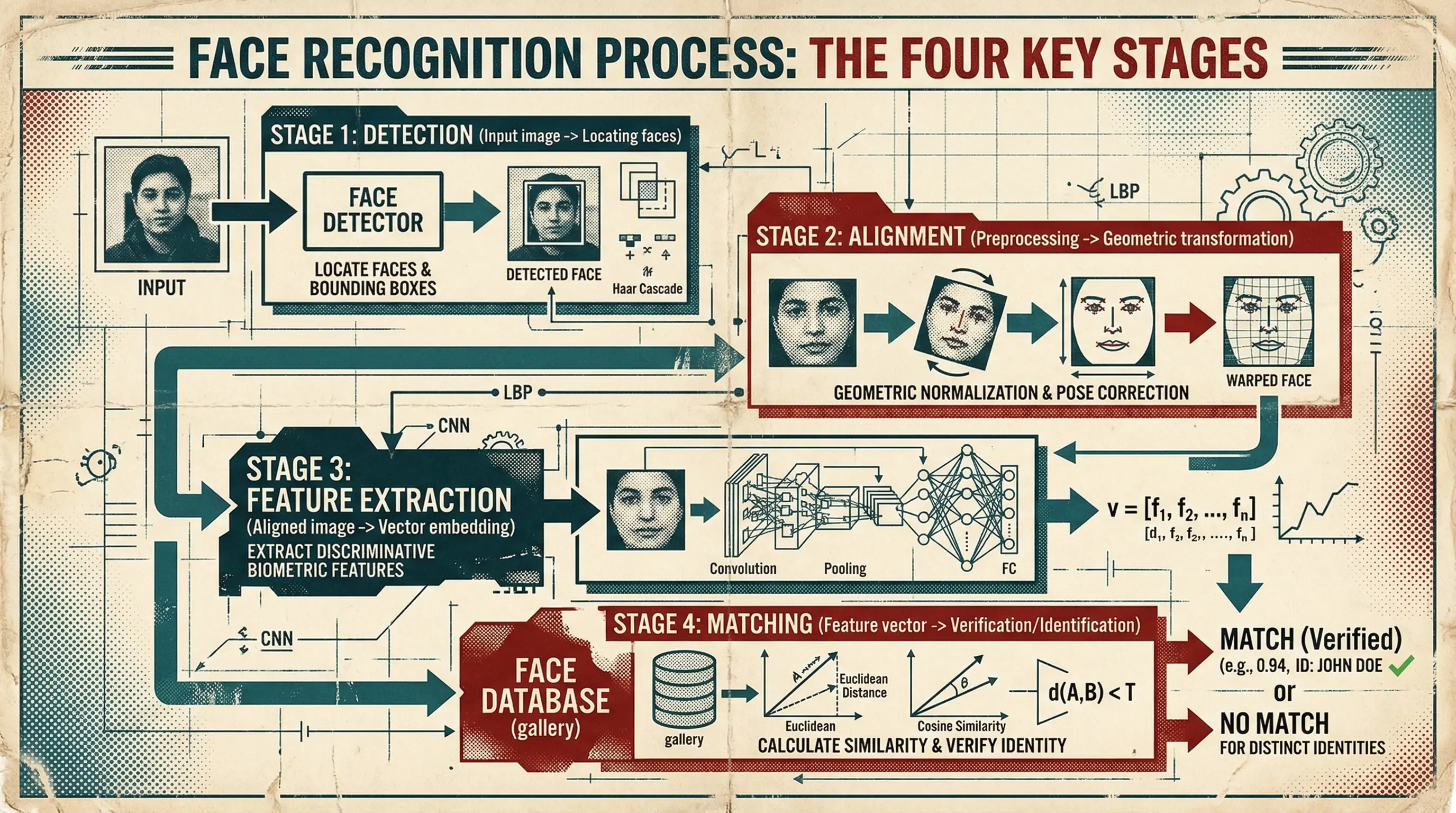
The Face Recognition Pipeline: Four Stages
Every modern face recognition system follows the same basic pipeline, regardless of whether it's running on a $35 Raspberry Pi or a GPU cluster at a government agency. Understanding these four stages will help you evaluate any model or API.
Stage 1: Face Detection
Before you can recognize a face, you need to find it. Face detection takes an image and outputs bounding boxes around every face present. This sounds simple, but it's where many systems fail in production.
The standard models:
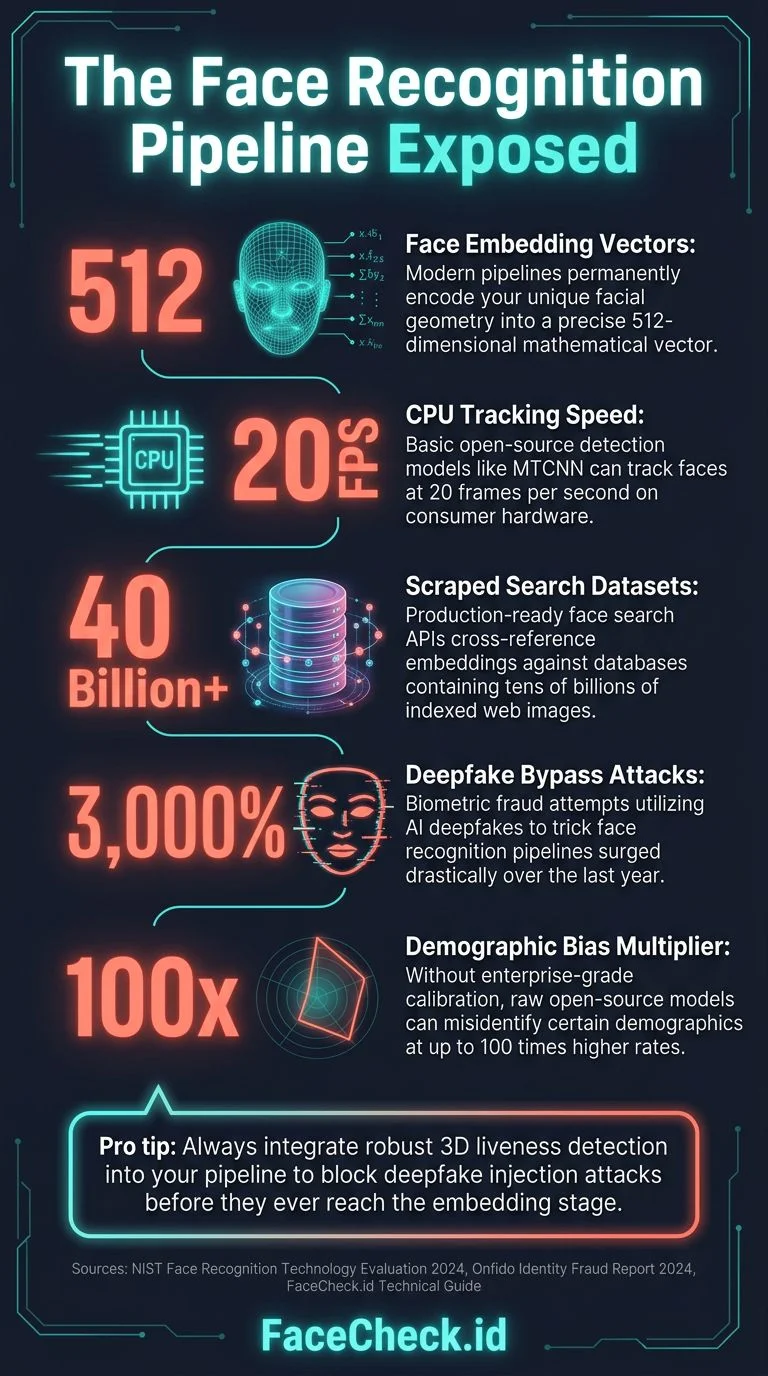
- MTCNN (Multi-task Cascaded Convolutional Networks): The workhorse of face detection since 2016. Three-stage cascade: Proposal Network (P-Net) finds candidate regions, Refine Network (R-Net) filters false positives, Output Network (O-Net) refines bounding boxes and outputs facial landmarks. Still widely used. Accurate on frontal faces, struggles with extreme angles and occlusion. Runs at ~20 FPS on a modern CPU.
- RetinaFace: State of the art for detection accuracy. Single-stage detector built on a [Feature Pyramid Network](https://arxiv.org/abs/1612.03144) backbone. Returns bounding boxes plus five facial landmarks (eyes, nose, mouth corners). Handles multiple scales well. The go-to choice if accuracy matters more than speed. ~15 FPS on GPU, slower on CPU.
- SCRFD (Sample and Computation Redistribution for Efficient Face Detection): The speed champion. Designed for mobile and edge deployment. Achieves RetinaFace-level accuracy at 3-10x the speed. Multiple model sizes from 0.5M to 34M parameters. If you're deploying on mobile or need real-time processing, this is what you want.
- BlazeFace: Google's contribution, designed for [MediaPipe](https://ai.google.dev/edge/mediapipe/solutions/guide). Extremely fast (runs at 200+ FPS on mobile GPUs) but trades off some accuracy on difficult angles. Good for real-time video applications where you need every frame processed.
What actually matters in detection: The hard cases aren't selfies with good lighting. They're surveillance footage, group photos where faces are 50 pixels wide, extreme side profiles, faces partially hidden by sunglasses or masks. Your detection model determines the ceiling of your entire system. If detection misses a face, nothing downstream can fix that.
The multi-face problem: When an image contains multiple faces, you need to decide which face to embed. Strategies include largest face, most centered face, highest quality score, or embed all and let downstream logic sort it out. Each choice has different failure modes. Embedding all faces in group photos creates index bloat and ambiguous search results; choosing only the largest face misses the person standing in the back row. Most production systems embed all detected faces above a minimum size threshold (typically 40-60 pixels between the eyes) and associate them as separate entries linked to the same source image.
Face quality scoring as a gatekeeper: Running a lightweight quality estimator like SER-FIQ or the quality branch from MagFace before computing expensive embeddings prevents garbage from ever entering your index. Blurry crops, extreme occlusions, and overexposed faces all produce low-confidence embeddings that pollute search results. Rejecting faces below a quality threshold at the detection stage dramatically improves downstream precision and saves GPU cycles. This is one of the highest-ROI optimizations in the entire pipeline.
Face anti-spoofing for verification: In verification scenarios, presentation attack detection (PAD) is critical. Paper printouts, screen replays, and 3D masks can all fool embedding-based systems. Models like CDCN or PatchNet detect these attacks but add 5-15ms of latency per face and require additional model maintenance. If you're building anything where the user controls the input image - access control, KYC, authentication - you must include anti-spoofing or you will be exploited.
Stage 2: Face Alignment
Once you've detected a face, you need to normalize it. Different head poses, camera angles, and distances all change how a face appears in the raw image. Alignment transforms every detected face into a standardized position: eyes level, face centered, consistent scale.
The standard approach uses the five landmarks from detection (left eye, right eye, nose tip, left mouth corner, right mouth corner) to compute a similarity transform. This maps the detected face to a canonical 160x160 pixel crop with eyes at fixed pixel coordinates.
This step is often overlooked in tutorials but it's critical. A 2-degree rotation error in alignment can drop recognition accuracy by 1-3%. Most open source pipelines handle this automatically, but if you're building custom, use the FaceNet alignment specification (160x160, specific eye coordinates) as your standard. It's what most modern models were trained on.
Alignment sensitivity to landmark accuracy: RetinaFace landmarks have approximately 2-pixel error on average. That error propagates through the alignment transform and can cause 1-5% accuracy degradation, especially on smaller face crops where 2 pixels represents a larger proportion of the total face width. Some production systems run a secondary 68-point or 98-point landmark refinement (like face-alignment by Adrian Bulat) after initial detection for tighter alignment. The extra 3-5ms per face is worth it when your use case demands maximum accuracy - particularly for 1:1 verification where a single wrong decision has consequences.
Stage 3: Feature Extraction (Embedding)
This is the core of face recognition. A deep neural network takes the aligned face image and outputs a fixed-length vector (typically 512 dimensions) called an embedding or feature vector. This vector is a compact numerical representation of that face's unique characteristics.
Two faces of the same person, regardless of lighting, expression, age (within reason), or camera, should produce embeddings that are close together in vector space. Two different people should produce embeddings that are far apart.
How it works technically:
The network architecture is typically a modified Inception-ResNet or ResNet trained on millions of face images. The key innovation is in the loss function used during training, not the architecture itself.
- Softmax loss (the baseline): Treats face recognition as classification. Works but produces embeddings that aren't well-separated in angular space. Largely obsolete for recognition.
- Triplet loss: The approach popularized by FaceNet. The network learns by comparing anchor/positive/negative face triplets, pushing same-identity embeddings closer and different-identity embeddings apart. Requires careful mining of hard triplets during training. Produces highly discriminative embeddings.
- ArcFace loss: Arguably the most widely used loss function in production face recognition systems as of 2026. Adds an additive angular margin penalty in the angular space between the feature vector and its corresponding class weight, producing tighter intra-class clustering and wider inter-class gaps than cosine-margin approaches. The [InsightFace](https://github.com/deepinsight/insightface) project provides the reference implementation, and most state-of-the-art models are trained with ArcFace or one of its variants (AdaFace's adaptive margin, for example, is built on top of the ArcFace formulation). If you're training or fine-tuning your own face recognition model, ArcFace is the default starting point.
- CosFace loss: Adds a cosine margin to the softmax loss, forcing the network to produce embeddings that are more tightly clustered within each identity and more separated between identities.
- SphereFace / A-Softmax: The original angular margin approach from 2017. Historically important but largely superseded by ArcFace and more modern loss functions.
The output: A 512-float vector, L2-normalized to the unit hypersphere. The entire information about a face, compressed into 2KB of data. This is what gets stored, indexed, and compared.
The normalization trap: Many developers forget that embeddings must be L2-normalized before comparison. Unnormalized embeddings produce wildly inconsistent similarity scores. This is a common bug that's hard to diagnose because it "mostly works" - the relative ordering of matches may look correct in testing, but the absolute similarity scores drift across images, making threshold-based decisions unreliable. FaceNet512 produces normalized embeddings by default, but if you're using a custom model or exporting via ONNX, always verify that your output embeddings lie on the unit hypersphere (i.e., their L2 norm equals 1.0).
Production deployment: ONNX Runtime and quantization: The speed numbers in benchmarks assume FP32 inference on a clean GPU. In production, most systems deploy via ONNX Runtime with INT8 quantization, which cuts inference time by 2-3x with minimal accuracy loss (typically <0.1% on LFW). The workflow: export your PyTorch or TensorFlow model to ONNX, run the ONNX Runtime quantization tool with a calibration dataset of ~1000 face images, and deploy the quantized model. This is how you get from "10ms per face" to "3-4ms per face" on the same hardware, which matters enormously when you're processing billions of images.
Mixed-precision inference: Using FP16 on GPU for the backbone but FP32 for the final embedding layer avoids the floating-point precision issues described later in this article while still getting 1.5-2x speedup. This is a practical middle ground between full FP32 (accurate but slow) and full FP16 (fast but can produce subtly different embeddings on different hardware).
Embedding distillation for edge deployment: You can train a smaller student network (MobileFaceNet, ~1M parameters) to mimic FaceNet512's embeddings via knowledge distillation. The student model gets 95%+ of the accuracy at 10x the speed, making it viable for mobile and edge deployment where you can't afford a GPU. The key insight is that you don't need to train the student from scratch on face identity labels - you train it to reproduce the teacher's embeddings on unlabeled face data, which requires far less compute and no identity-labeled dataset.
Stage 4: Matching
Given two face embeddings, how do you decide if they're the same person? Two approaches:
Cosine similarity: Compute the cosine of the angle between two embedding vectors. Range: -1 to 1, where 1 means identical. A typical threshold for "same person" is 0.4-0.6 depending on your model and use case. Simple, fast, works well because FaceNet512 embeddings are L2-normalized.
Euclidean distance: Compute the L2 distance between vectors. For normalized embeddings, this is mathematically equivalent to cosine similarity (d = sqrt(2 - 2*cos_sim)). Some systems prefer this formulation.
For search (1:N matching): When you need to find a face in a database of millions, brute-force comparison is too slow. Use approximate nearest neighbor (ANN) search:
- FAISS (Facebook AI Similarity Search): The standard library. Supports GPU acceleration, multiple index types (IVF, HNSW, PQ). Can search 1 billion vectors in milliseconds. Free, open source.
- Milvus: Purpose-built vector database with FAISS under the hood plus persistence, scaling, and API layers.
- Qdrant / [Weaviate](https://weaviate.io/) / [Pinecone](https://www.pinecone.io/): Managed vector database options if you don't want to run infrastructure.
For a database of 10 million faces, a well-tuned FAISS HNSW index on a single GPU can return the top-10 matches in under 5 milliseconds.
FAISS index type selection matters enormously. IVF-PQ gives great compression (8-16 bytes per vector instead of 2KB) but loses accuracy on borderline matches where quantization error pushes a true match below the threshold. HNSW preserves accuracy but uses 4-8x more memory because it stores the full float vectors plus the graph structure. IVF-HNSW hybrid indices give the best tradeoff for 10M-1B scale. Most teams pick the wrong index type initially based on tutorial recommendations and have to rebuild their entire index infrastructure 6 months later when they hit the limitations. Test your specific workload with realistic data volumes and query patterns before committing to an index type.
The cold-start problem for ANN indices: HNSW and IVF indices need a minimum number of vectors to work well. With fewer than ~10K vectors, brute-force search is actually faster than indexed search because the index overhead (graph traversal, centroid comparison) dominates the computation. Start with brute-force (FAISS IndexFlatIP) during your early growth phase and migrate to an ANN index once your database crosses 50-100K vectors.
Pre-filtering with binary codes: Computing a binary hash of each embedding (via binarization or SimHash) lets you do a cheap Hamming distance pre-filter before expensive float comparisons. This can reduce the candidate set by 90%+ with minimal recall loss. The idea: store a 256-bit or 512-bit binary code alongside each full embedding. For a query, first compute the Hamming distance to all binary codes (extremely fast with CPU POPCNT instructions), take the top 1-5% candidates, then compute exact cosine similarity only on those. This two-stage approach is particularly effective when your dataset exceeds available GPU memory.
Re-ranking with face attributes: Initial embedding search returns candidates; a second pass using estimated attributes (age range, gender, skin tone, facial hair) can filter obvious false matches. If the query face is estimated as a 25-year-old woman and a candidate match is estimated as a 60-year-old man, that's almost certainly a false positive regardless of the embedding similarity score. This simple heuristic can cut false positives by 30-50% at minimal computational cost and is one of the most underused techniques in production face search.
Temporal consistency in video: If you're matching faces from video rather than stills, averaging embeddings across multiple frames of the same tracked face dramatically improves accuracy (often 5-10% on hard benchmarks). Track-level embedding aggregation is strictly better than frame-level matching. The approach: use a face tracker (like SORT or DeepSORT) to link detections across frames, compute embeddings for each detection, and aggregate them into a single "track embedding" using quality-weighted averaging, where the quality weight is the face quality score from the detection stage.
Best Open Source Face Recognition Models (2026)
FaceNet512
The gold standard. FaceNet512 is the 512-dimensional embedding variant of Google's FaceNet architecture, offering a larger and more discriminative embedding space than the original 128-d version.
from deepface import DeepFace

# Get face embeddings using FaceNet512
result = DeepFace.represent(img_path="face.jpg", model_name="Facenet512")
embedding = result[0]["embedding"] # 512-d list- Architecture: Inception-ResNet-v2 backbone producing 512-d embeddings
- License: MIT (permissive, commercial use OK)
- LFW accuracy: 99.65%
- Embedding size: 512-d
- Includes: Works with standard detection pipelines (MTCNN, [RetinaFace](https://github.com/deepinsight/insightface/tree/master/detection/retinaface)) for end-to-end recognition
- Python API: Available via the
deepfacelibrary or standalone implementations
Verdict: If you're building a face recognition system in 2026, FaceNet512 is a strong starting point. Excellent accuracy, 512-d embeddings for high discriminative power, permissive MIT license, and wide ecosystem support.
FaceNet (Google, Original 128-d)
The model that popularized the embedding approach in 2015. Introduced triplet loss training, where the network learns by comparing anchor/positive/negative face triplets.
- Original paper: "FaceNet: A Unified Embedding for Face Recognition and Clustering" (Schroff et al., 2015)
- Repository: Multiple implementations (davidsandberg/facenet is the classic TensorFlow version)
- License: MIT
- LFW accuracy: 99.63% (original), up to 99.75% with modern training
- Embedding size: 128-d
- Architecture: Inception-ResNet-v1 or Inception-ResNet-v2
Verdict: Historically important and still works well. The 128-d embedding is more compact but slightly less discriminative than the 512-d FaceNet512 variant. Use if you need a smaller embedding footprint or are working in TensorFlow with memory constraints.
DeepFace (Facebook/Meta)
Not to be confused with the Python library deepface (lowercase). Meta's DeepFace (2014) was one of the first deep learning approaches to face recognition, achieving near-human accuracy on LFW.
The more relevant project today is the deepface Python library by Serengil:
from deepface import DeepFace

# Verify two faces
result = DeepFace.verify(img1_path="face1.jpg", img2_path="face2.jpg", model_name="Facenet512")
print(result["verified"])  # True/False
print(result["distance"])  # 0.23

# Find a face in a database
results = DeepFace.find(img_path="query.jpg", db_path="./face_database/", model_name="Facenet512")- Repository: github.com/serengil/deepface
- License: MIT
- What it does: Wrapper library that provides a unified API across multiple backend models FaceNet512, FaceNet, VGG-Face, OpenFace, DeepID, Dlib, SFace
- Includes: Verification, search, facial attribute analysis (age, gender, race, emotion)
- Ease of use: Extremely simple API
Verdict: Best choice for prototyping and experimentation. The unified API lets you swap between models with one parameter change. In production, you'll want to use FaceNet512 directly for better performance and control.
dlib
The C++ library with Python bindings, maintained by Davis King. Includes a face recognition model trained on a 3 million image dataset.
import dlib
import numpy as np

detector = dlib.get_frontal_face_detector()
sp = dlib.shape_predictor("shape_predictor_68_face_landmarks.dat")
facerec = dlib.face_recognition_model_v1("dlib_face_recognition_resnet_model_v1.dat")

# Get embedding
dets = detector(image, 1)
shape = sp(image, dets[0])
embedding = np.array(facerec.compute_face_descriptor(image, shape))- Repository: github.com/davisking/dlib
- License: Boost Software License (permissive)
- LFW accuracy: 99.38%
- Embedding size: 128-d
- Detection: HOG-based (fast, CPU-friendly) and CNN-based (more accurate)
Verdict: Rock solid, battle-tested C++ with good Python bindings. Lower accuracy than FaceNet512 but extremely reliable. Good choice if you're working in C++ or need a lightweight solution without PyTorch/ONNX dependencies.
AdaFace
A newer model (2022) that specifically addresses image quality variation. Standard models are trained on high-quality images and degrade on low-resolution or blurry inputs. AdaFace adapts its margin penalty based on image quality during training.
- Repository: github.com/mk-minchul/AdaFace
- License: MIT
- Key advantage: Superior performance on low-quality images (surveillance, long-range cameras)
- LFW accuracy: 99.82%
- IJB-C TAR@FAR=1e-4: 97.39% (outperforms most open source models on hard benchmarks)
Verdict: Use when your input images are low quality. For surveillance, CCTV analysis, or any scenario where you can't control image quality, AdaFace gives measurably better results than standard models.
Performance Comparison Table
| Model | LFW (%) | Embedding | Speed (ms/face) | License |
|---|---|---|---|---|
| FaceNet512 (IR-v2) | 99.65 | 512-d | ~10ms (GPU) | MIT |
| FaceNet (IR-v1) | 99.63 | 128-d | ~12ms (GPU) | MIT |
| AdaFace (R100) | 99.82 | 512-d | ~9ms (GPU) | MIT |
| dlib ResNet | 99.38 | 128-d | ~25ms (CPU) | Boost |
| VGG-Face2 | 99.43 | 2048-d | ~15ms (GPU) | CC BY-SA |
LFW (Labeled Faces in the Wild) is the standard benchmark, but it's essentially solved. Every modern model scores above 99%. The real differentiation shows on harder benchmarks like IJB-C (varied conditions) and TinyFace (low resolution).
A note on benchmark vs. reality: These speed numbers are FP32 inference on a single face with a warm GPU. In production with ONNX Runtime INT8 quantization, expect 2-3x faster. But also remember that the full pipeline - detection + alignment + quality scoring + embedding - takes 3-5x longer than embedding extraction alone. A realistic end-to-end throughput for the full pipeline on a single A100 GPU is 200-400 faces per second, not the thousands that embedding-only benchmarks might suggest.
The Gap Between Open Source Models and Production Systems
Here's what tutorials don't tell you: getting a face recognition model running in a Jupyter notebook is the easy part. Building a production system that actually works at scale requires solving a long list of engineering problems that no model solves for you. Most teams dramatically underestimate both the cost and the timeline. What looks like a "just hook up the model" project turns into a 12-24 month engineering effort that can easily consume $500K-$2M+ before it's production-ready, and that's before ongoing operational costs.
The Infrastructure Bill
GPU compute for embedding extraction. Running face detection and embedding extraction on billions of images isn't something you do on a laptop. A single NVIDIA A100 GPU can process roughly 200-400 faces per second through a full detection + alignment + embedding pipeline. To process 1 billion images in a reasonable timeframe (say, under a week), you need a cluster of 40-80 GPUs running continuously. At cloud rates, that's $50,000-$150,000 per processing pass, and you'll need to reprocess as your model improves or your pipeline changes. Buying the hardware outright means $300K-$800K in GPU servers, plus rack space, power, cooling, and someone to maintain it all.
Storage at scale. 1 billion face embeddings at 512 floats (2KB each) is roughly 2TB of vector data alone. Add the original images, thumbnails, metadata, and index structures, and you're looking at hundreds of terabytes to low petabytes of storage. High-performance NVMe storage for your vector indices runs $0.10-$0.25/GB/month in the cloud. At 50TB of hot storage, that's $5,000-$12,500/month just to keep the lights on.
Vector search infrastructure. FAISS on a single machine tops out around 100-500 million vectors depending on your index type and available RAM. Beyond that, you need distributed search across multiple shards with load balancing, replication for fault tolerance, and enough RAM to hold the indices. A production-grade distributed FAISS or Milvus deployment for 1 billion+ vectors typically requires 8-16 high-memory machines (256GB+ RAM each), costing $15,000-$40,000/month in cloud compute.
Network and bandwidth. Crawling billions of images means downloading petabytes of data. At $0.05-$0.09 per GB of egress across major cloud providers, data transfer alone can cost tens of thousands of dollars. You also need high-throughput internal networking between your crawlers, GPU processing nodes, and storage backends.
Total infrastructure cost estimate for a web-scale face search engine: $30,000-$80,000/month in ongoing cloud costs, or $500K-$1.5M in upfront hardware plus $10,000-$20,000/month in power, bandwidth, and maintenance. And that's just the infrastructure, before a single engineer writes a line of application code.
The Engineering Timeline
Building a production face search system is not a hackathon project. Here's a realistic timeline for a team of 3-5 experienced engineers:
Months 1-3: Core pipeline. Get detection, alignment, and embedding extraction working reliably. Build the basic vector index. Handle image ingestion from local files. This is the "fun" part where everything seems to be going well and the demo looks impressive.
Months 3-6: Web crawling infrastructure. Build scrapers for major platforms. Handle rate limiting, CAPTCHAs, login walls, dynamic rendering (JavaScript-heavy sites), image deduplication, and content filtering. Discover that every social media platform has different anti-scraping measures that break your crawlers weekly. Build monitoring to detect when crawlers fail silently. This phase alone can take longer than expected because the web is messy and adversarial.
Months 6-9: Scale and reliability. Your prototype worked on 1 million faces. Now make it work on 100 million. Discover that your FAISS index doesn't fit in RAM anymore. Implement sharding. Fix the race conditions in your ingestion pipeline. Build retry logic for the 15% of images that fail to download. Handle corrupt images, images that claim to be JPEGs but aren't, images with EXIF rotation flags, truncated downloads. Add monitoring, alerting, and logging so you know when things break at 3 AM.
Months 9-12: Quality and accuracy. Realize that your false positive rate at scale is unacceptable. Implement face quality scoring to filter garbage embeddings. Tune thresholds per use case. Build a feedback mechanism so bad matches can be flagged and investigated. Discover that your model produces different results on different GPU architectures due to floating-point precision differences and spend two weeks tracking that down.
Months 12-18: Production hardening. Build an API layer with authentication, rate limiting, and usage tracking. Add GDPR/CCPA compliance features: opt-out mechanisms, data deletion requests, audit logging. Implement result caching. Build admin tooling. Write documentation. Handle the security audit. Load test everything. Fix the memory leaks you didn't know about.
Months 18-24: Ongoing operations. Crawlers break as websites change their layouts. Models drift as new types of images appear. Disk fills up. Indices need rebuilding. Users report edge cases you never anticipated. Someone discovers that your system returns confident matches on cartoon faces and you need to add a "real face" filter. This never ends.
The Full List of Problems You'll Encounter
Beyond infrastructure and timeline, here's every major issue teams encounter when building face recognition systems from scratch. This list comes from real production systems, not theoretical concerns.
Data quality nightmares:
- Garbage in, garbage out. The internet is full of memes, AI-generated faces, drawings, photos of photos, magazine covers, and statues. Your detector will find "faces" in all of them and produce embeddings that pollute your index. You need classifiers to filter synthetic faces, illustrated faces, extremely low-resolution crops, and non-photographic content. Building and maintaining these filters is a project in itself.
- Duplicate and near-duplicate images. The same photo appears on dozens of sites with different crops, watermarks, compression levels, and color adjustments. Without deduplication, one viral photo generates hundreds of "matches" that are all the same image, burying the real results. Perceptual hashing (pHash, dHash) helps but isn't perfect. You need deduplication at multiple levels: URL-level dedup (trivial), perceptual hash dedup (catches resized and recompressed copies), and embedding-level dedup (catches the same face photographed from slightly different angles). Each level catches things the others miss, and you'll spend more time on dedup than you expect.
- Age and appearance changes. A face embedding from someone's college photo may not match their photo from 15 years later. Weight changes, aging, cosmetic surgery, facial hair, and different hairstyles all affect recognition accuracy. No model handles this perfectly. Users will blame your system when it doesn't match someone across a 20-year gap.
- Demographic bias. Open source models trained on predominantly Western/Caucasian datasets perform worse on other demographics. Cross-ethnicity accuracy gaps are larger than LFW suggests - LFW is approximately 77% Caucasian. When you deploy globally, accuracy gaps between demographic groups can be 5-15% on hard benchmarks. Models like FaceNet512 trained on MS-Celeb-1M inherit its demographic skew. Fine-tuning on balanced datasets (like BUPT-Balancedface) or using demographic-aware training strategies is important for equitable performance. If you don't evaluate accuracy across racial groups, you may ship a system that works well for some users and poorly for others. This isn't just an ethical issue, it's a product quality and legal liability issue.
- EXIF orientation handling. Roughly 15-20% of images on the web have EXIF orientation tags that, if ignored, result in sideways or upside-down faces. Most face detectors can't find rotated faces. This is a silent accuracy killer that's easy to miss in testing (where you're using properly oriented images) but devastating in production. Always apply EXIF orientation correction as the very first step of your image processing pipeline.
- Progressive JPEG and WebP decoding failures. Some image libraries silently produce corrupted pixel data from partially downloaded progressive JPEGs or truncated WebP files. The face detector may still find a "face" in the corruption artifacts and produce a garbage embedding. You need image integrity validation - checking that the file decodes without errors and the resulting pixel buffer has reasonable dimensions - before processing. Without this, corrupt images silently pollute your index.
Engineering problems that aren't obvious at first:
- Embedding versioning. When you upgrade your model (and you will, because accuracy improvements matter), every embedding in your database becomes incompatible with the new model's output. You either re-embed your entire database (expensive, time-consuming, requires keeping all original images), run parallel indices during migration (double the infrastructure cost), or maintain backward compatibility (complex, limits your ability to improve). There is no good solution, only less painful ones.
- Floating-point determinism. The same image processed on different GPU models, different CUDA versions, or even different batch sizes can produce slightly different embeddings due to floating-point arithmetic. These differences are small (1e-6 to 1e-4) but they compound: a match that scores 0.401 on one machine might score 0.399 on another, flipping a binary threshold decision. This drives you insane during debugging. GPU driver updates are a particular landmine - NVIDIA driver updates can change floating-point behavior at the CUDA level. An embedding computed on driver 535.x may differ from the same image on 545.x. In production, this means you need to pin driver versions across your entire fleet and validate embedding consistency after any update.
- Concurrency and race conditions. Multiple crawlers ingesting faces simultaneously, users querying while the index is being updated, deletion requests arriving while search results are being assembled. Vector databases don't have the same mature transaction support as SQL databases. You will encounter scenarios where a face is partially indexed, queries return stale results, or deletion doesn't propagate to all shards.
- Memory management. FAISS indices are memory-mapped but query performance depends heavily on how much of the index fits in RAM. As your index grows, query latency spikes unpredictably when the OS evicts index pages from memory. OOM kills happen at the worst possible time. You'll become intimately familiar with Linux memory management, swap settings, and [NUMA](https://en.wikipedia.org/wiki/Non-uniform_memory_access) topology. Warm-up after cold starts is another headache: FAISS HNSW indices are memory-mapped, so after a server restart, the first few hundred queries are 10-100x slower because the index pages haven't been loaded into RAM yet. You need a warm-up phase that pre-loads the index before accepting production traffic, or your first users after a deployment will experience terrible latency.
- Silent failures. A crawler stops working because a website changed its HTML. Your GPU processing node starts producing NaN embeddings because of a driver update. A disk fills up and new faces silently stop being indexed. These failures don't throw errors, they just quietly degrade your system. Without comprehensive monitoring and anomaly detection, you won't know until users complain.
- The FAISS refresh problem. When you add new embeddings to an IVF index, the Voronoi cells become unbalanced. Search quality degrades gradually until you retrain the quantizer. At web scale, retraining means hours of GPU time on the full dataset. Teams typically batch additions and retrain weekly or monthly, meaning newly ingested faces aren't immediately searchable at full accuracy. You're always trading off freshness against search quality, and there's no free lunch.
- Score calibration across index shards. When your index is sharded across multiple machines, raw similarity scores from different shards aren't directly comparable because each shard has a different embedding distribution. You need per-shard score normalization (cohort normalization, Z-norm, T-norm) to merge results meaningfully. Without calibration, a score of 0.45 from Shard A might represent a strong match while 0.45 from Shard B represents a mediocre one. Merged results become unreliable.
- The fan-out problem in distributed search. Searching N shards means N network round-trips per query. If any shard is slow (GC pause, disk I/O spike, network hiccup), the whole query is slow. P99 latency is determined by the slowest shard's P99, which gets worse as you add more shards. Techniques like hedged requests (send duplicate requests and take whichever returns first) and adaptive timeouts are essential for maintaining acceptable tail latency.
Accuracy and matching problems:
- Threshold tuning is never "done." The optimal similarity threshold shifts as your database grows. At 1 million faces, a threshold of 0.45 gives you a good balance of precision and recall. At 100 million faces, that same threshold produces ten times more false positives simply because there are more near-miss lookalikes. You need adaptive thresholds or post-processing re-ranking. The underlying mathematics are unforgiving: as your database grows from 1M to 100M to 1B faces, the distribution of top-k similarity scores shifts upward because there are more near-miss lookalikes. A fixed threshold that gives 0.1% false positive rate at 1M faces might give 10% at 1B. You need to model this distribution and adjust thresholds dynamically, or accept that your precision degrades with scale.
- Open-set vs. closed-set recognition. Most benchmarks evaluate closed-set performance, where the query person is guaranteed to exist in the database. Real-world face search is open-set: the query face might not exist in the index at all. Open-set evaluation requires entirely different metrics (TPIR at fixed FPIR rather than rank-1 accuracy) and the failure mode is false matches rather than wrong rankings. A system that scores 99% on closed-set benchmarks may have a 10% false match rate in open-set deployment because it confidently returns the "closest" face even when the real match doesn't exist. Handling "no match found" correctly is as important as finding correct matches.
- Lookalikes and doppelgangers. In a database of 100 million+ faces, there are many pairs of unrelated people whose embeddings are surprisingly close. The larger your database, the more false matches you'll see. Users will report "wrong person" results regularly. You need a strategy for handling this: multiple-photo verification, contextual signals (name, location), human review queues.
- Pose-invariant recognition remains hard. Even FaceNet512 degrades significantly beyond plus or minus 60 degrees yaw. Profile-to-frontal matching accuracy can drop 10-20% compared to frontal-to-frontal. In surveillance scenarios, most faces are off-angle, which means your real-world accuracy is substantially lower than what benchmarks suggest. Models trained with 3D-aware augmentation or architectures like UV-GAN help but add complexity. If your input data is heavily off-angle, consider this a first-order accuracy concern, not an edge case.
- Adversarial inputs. Users will submit AI-generated faces, deepfakes, morphed images, and photos with deliberate perturbations. Some are testing your system; others are trying to manipulate results. Your system needs some robustness against these inputs or you'll return confident matches for fake faces.
- Photo manipulation. Filters, beauty apps, heavy makeup, face-tuning software. Instagram reality versus actual reality. These modifications change facial geometry enough to affect embedding similarity. A heavily filtered selfie may not match the same person's unfiltered photo.
- One face, many embeddings. A single person might have hundreds of photos online across different platforms, angles, and years. Do you return all of them as separate matches, or cluster them into a single identity? Clustering at scale (hundreds of millions of faces) is computationally expensive and introduces its own error modes: over-merging (combining two different people) and under-merging (failing to connect photos of the same person).
Operational headaches:
- Anti-scraping arms race. Every major social media platform actively blocks scrapers. They change page structures, add CAPTCHAs, detect headless browsers, rate limit by IP, fingerprint request patterns, and sometimes serve decoy content. Your crawling infrastructure is in a constant arms race. A scraper that works today may be completely blocked next week. Maintaining crawlers is an ongoing engineering cost, not a one-time build.
- Rate of change modeling. Different sources update at different rates. Celebrity news sites get new photos hourly; personal social media profiles might not change for years. Intelligent re-crawl scheduling based on historical change rates can reduce bandwidth costs by 60-80% while keeping the index fresher where it matters. Without this, you're either over-crawling static sources (wasting bandwidth and money) or under-crawling dynamic sources (serving stale results).
- CDN and geographic content variation. The same URL can serve different images based on the requester's location, device user-agent, or cookies. Your crawler might index a different image than what a user sees, leading to confusing "the match doesn't look like the result" reports. Some CDNs serve low-resolution placeholders until a real browser scrolls the image into the viewport. You need to handle these edge cases or accept a percentage of phantom results.
- Storage cost growth. Image storage grows linearly and never stops. You can't delete originals if you might need to re-embed them. Thumbnails, metadata, embedding vectors, index files, backup copies. The storage bill accelerates as your system matures. Teams that budgeted for Year 1 storage are shocked by Year 3 costs.
- Compliance requests at scale. GDPR gives individuals the right to request deletion of their data. When someone submits an opt-out, you need to: find all embeddings generated from their face across your entire database, delete them, ensure they don't get re-added when your crawlers find the original images again, and document the deletion for audit purposes. At scale, this requires dedicated tooling and engineering effort. The [EU AI Act](https://artificialintelligenceact.eu/) adds additional requirements for high-risk AI systems, including face recognition: mandatory conformity assessments, bias testing, transparency obligations, and human oversight mechanisms.
- Opt-out implementation is harder than it sounds. You can't just delete an embedding; you need to prevent re-indexing when the crawler encounters the same face again. This requires maintaining a "blocklist" index of opted-out face embeddings and checking every new embedding against it before indexing. This blocklist itself needs to be fast (it's queried on every insertion) and raises its own data retention questions: you must store the opted-out person's face embedding permanently so you can match against it - which means you're retaining biometric data to comply with a deletion request. The legal tension here is real and unresolved in many jurisdictions.
- The consent problem with publicly crawled data. GDPR's lawful basis for processing biometric data from public social media profiles is legally contested. Several EU data protection authorities have ruled against face recognition companies (notably the Clearview AI decisions across multiple EU member states). Your legal risk depends on jurisdiction, data source, and use case. This isn't a hypothetical future concern - it's an active enforcement area.
- Audit trail storage costs. If you log every search query and every match returned (which compliance may require), the audit logs can grow faster than the actual face data. A system handling 1 million searches per day with 10 results each generates approximately 10 million audit records daily. Retention requirements (often 1-7 years depending on jurisdiction) mean this data compounds relentlessly. Plan for audit storage as a primary cost center, not an afterthought.
- Incident response. What happens when your system incorrectly matches a face and someone takes action based on that false match? You need audit trails showing how each result was generated, the ability to explain matching decisions, and a process for handling disputes. When someone challenges a match, saying "the cosine similarity was 0.47 which exceeded our threshold of 0.42" isn't a satisfying explanation. Techniques like GradCAM can show which facial regions drove the match, which helps in dispute resolution and builds trust. This isn't just good engineering, it may be legally required depending on your jurisdiction.
- Model and dependency rot. CUDA versions, Python versions, [ONNX Runtime](https://onnxruntime.ai/) versions, operating system updates, all of these change over time and can break your inference pipeline in subtle ways. Pinning versions helps until you need a security patch. You'll spend a surprising amount of time on dependency management and environment reproducibility.
- Team knowledge concentration. The engineer who built the FAISS indexing layer understands the sharding logic. The engineer who tuned the crawlers knows which sites need special handling. When these people leave (and in an 18-24 month project, turnover happens), critical knowledge walks out the door. Documentation helps but never fully captures the "why" behind non-obvious decisions.
The Real Cost Summary
For a web-scale face search system searching against the public internet:
- Engineering team: 3-5 senior engineers for 12-24 months = $600K-$2.5M in salary and overhead
- Infrastructure (Year 1): $400K-$1M in cloud costs or hardware
- Infrastructure (ongoing): $30K-$80K/month ($360K-$960K/year)
- Legal and compliance: $50K-$200K for initial assessment, ongoing counsel
- Total Year 1: $1.4M-$3.7M
- Total Year 2+: $500K-$1.2M/year in infrastructure + engineering maintenance
And that's for a system that works. Many teams spend 6-12 months and $500K+ before realizing the problem is harder than they estimated and pivoting to an API solution.
When to Build vs. When to Use an API
Build your own when:
- You have a closed dataset (employee badges, customer photos) under 100K faces
- You need the system to run on-premises or air-gapped
- You have ML engineers who can handle model optimization, threshold tuning, and edge cases
- Your use case is verification (1: 1) rather than search (1:N against the web)
- You have the budget and timeline to commit to a multi-year engineering project
Use an API when:
- You need to search faces against the public internet (social media, news, web)
- You don't want to build and maintain a web scraping + indexing pipeline
- You need results now, not after 12-24 months of engineering
- You need the system to stay current with new content being posted online
- You want someone else to handle GDPR compliance, opt-out requests, and the EU AI Act
- You want to avoid $1M+ in upfront infrastructure and engineering costs
- Your core product is not face search itself, and engineering time is better spent on your actual product
FaceCheck.id Face Search API
For developers who need face search against the public web without building the infrastructure from scratch, FaceCheck.id offers a REST API that handles the entire pipeline: detection, embedding, and search against a continuously updated index of publicly available face images across social media, news sites, and the broader web.
FaceCheck.id uses a proprietary face recognition model optimized for web-scale search. Unlike open source models that you'd need to deploy and tune yourself, their proprietary model is specifically trained and fine-tuned for the challenges of internet face search: handling wildly varying image quality, diverse lighting conditions, demographic diversity, and the massive scale of their continuously crawled index. This proprietary approach allows them to iterate on model performance independently and optimize for their specific search pipeline in ways that general-purpose open source models cannot. Years of engineering, testing, and refinement have gone into making the system work at a level that would be extremely difficult and expensive to replicate from scratch.
What the API does:
You send a face image, the API returns matching faces found across the internet with confidence scores and source URLs. The matching, indexing, and web-scale infrastructure is handled on their side. All the GPU clusters, crawling pipelines, vector search infrastructure, compliance tooling, and ongoing maintenance described above - that's their problem, not yours.
API basics:
- RESTful JSON API
- Authentication via API key
- Send a base64-encoded image or image URL
- Returns: array of matches with similarity scores, source URLs, and thumbnail previews
- Rate limits and pricing scale with usage
Typical integration:
import requests
import time

def search_by_face(image_file):
    site = "https://facecheck.id"
    headers = {
        "accept": "application/json",
        "Authorization": APITOKEN
    }

    # Step 1: upload image
    with open(image_file, "rb") as f:
        files = {"images": f}
        upload = requests.post(f"{site}/api/upload_pic", headers=headers, files=files).json()

    if upload["error"]:
        return upload["error"], None

    search_id = upload["id_search"]

    # Step 2: keep checking until results are ready
    while True:
        result = requests.post(
            f"{site}/api/search",
            headers=headers,
            json={"id_search": search_id}
        ).json()

        if result["error"]:
            return result["error"], None

        if result.get("output"):
            return None, result["output"]["items"]

        time.sleep(1)
Use cases for the API:
- Dating app verification: Let users verify that a match's photos appear on real social media profiles
- Brand protection: Check if someone is using your team's photos for fake business profiles
- Due diligence platforms: Add face search to background check or KYC workflows
- Anti-fraud systems: Flag accounts using photos that appear elsewhere on the internet under different names
- OSINT tools: Build investigation tools that include web-scale face matching
Why use this instead of rolling your own:
Building a face search engine that searches the public web requires: (1) a web-scale crawling pipeline that discovers and downloads billions of images, (2) GPU infrastructure costing hundreds of thousands of dollars to run face detection and embedding extraction, (3) a distributed vector search system with terabytes of RAM to query against the full index in real-time, (4) continuous re-crawling to keep the index fresh, (5) compliance infrastructure for opt-outs, data deletion requests, and regulatory requirements, (6) a team of 3-5 engineers maintaining it full-time, and (7) 12-24 months before the first usable version ships. That's a multi-million dollar engineering project with significant ongoing costs. The API, powered by FaceCheck.id's proprietary model and battle-tested infrastructure, gives you all of that with a single HTTP call.
The open source models covered above are excellent for building closed-system face recognition (employee access control, photo library organization, custom verification flows). But if your use case is "search the internet for where this face appears," the engineering delta between a working model and a working product is enormous. The FaceCheck.id API bridges that gap, letting you ship a working product in days rather than years.
Get started: Visit facecheck.id/en/Face-Search/API for documentation, pricing, and API key registration.
FAQ
Which open source face recognition model is the most accurate?
FaceNet512 with an Inception-ResNet-v2 backbone currently achieves excellent results on most benchmarks, with 99.65% on LFW. For low-quality image scenarios (surveillance, CCTV), AdaFace shows better performance on hard benchmarks like IJB-C with a TAR@FAR=1e-4 of 97.39%.
Can I use open source face recognition models commercially?
Yes. FaceNet512, FaceNet, DeepFace, dlib, and AdaFace are all released under permissive licenses (MIT or Boost). You can use them in commercial products. However, be aware of legal restrictions on biometric data processing in your jurisdiction (GDPR, BIPA, EU AI Act) which apply regardless of the software license.
How much data do I need to train my own face recognition model?
You don't need to train from scratch. The pre-trained models listed above were trained on datasets of 5-12 million images across 100K-500K identities. Use these pre-trained models and fine-tune only if you have a specific domain need. Fine-tuning typically requires 10K-100K images. Training from scratch requires millions of images and significant GPU resources.
What's the difference between face verification and face search?
Face verification (1:1) answers "are these two photos the same person?" by comparing two embeddings directly. Face search (1:N) answers "where does this person appear?" by comparing one embedding against a database of millions. Verification is computationally simple. Search requires efficient nearest-neighbor indexing (FAISS, Milvus) and, for web-scale search, massive crawling and indexing infrastructure that can cost millions to build and operate.
How accurate is face recognition on low-quality images?
Accuracy drops significantly with image quality. On clear, front-facing photos, modern models achieve 99%+ accuracy. On blurry surveillance footage or photos where the face is under 50 pixels wide, accuracy can drop to 80-90% or lower. AdaFace is specifically designed to handle quality variation better than standard models. For any system, higher resolution input images produce dramatically better results. Pose matters too: accuracy on profile (side-view) faces can drop 10-20% compared to frontal faces, even on high-resolution images.
How much does it cost to build a face search engine?
For a web-scale system that searches against the public internet: expect $1.4M-$3.7M in Year 1 costs (engineering team + infrastructure + legal), and $500K-$1.2M/year in ongoing costs after that. For a closed system searching a private database of under 100K faces, the costs are dramatically lower - a single GPU server and one engineer can handle it. The cost scales with the size of your search database and whether you need to crawl the web to populate it.
How long does it take to build a production face recognition system?
For a simple verification system (1:1 matching against a known database), an experienced engineer can build a working prototype in 1-2 weeks and have it production-ready in 1-3 months. For a web-scale face search system (1:N against the internet), expect 12-24 months with a team of 3-5 engineers before you have something reliable enough for production. The crawling, scaling, and compliance challenges add enormous time beyond the core ML work.
Build something that matters. Start with FaceNet512 for your closed system. But if you need web-scale face search, ask yourself: do you really want to spend $1.4M-$3.7M, hire a team of senior engineers, and wait 12-24 months before your first usable result? Instead, you can skip the GPU clusters, the crawling nightmares, the compliance headaches, and the years of engineering entirely, get your first search results in under 5 minutes, starting for as little as $1 USD, with the FaceCheck.id API.

Read More on Search by Image
Face Recognition Online: What Actually Works in 2026
Most online face recognition tools are either broken, fake, or paywalled. Here's what a content creator learned after someone stole her photos for dozens of fake dating profiles, and the tools that actually helped her track them down.
On the subject in other languages
 Sistemas de reconhecimento facial: como funcionam, os melhores modelos de código aberto e APIs de produção
 人脸识别系统:工作原理、最佳开源模型与生产级 API
 Systémy rozpoznávání obličejů: Jak fungují, nejlepší open source modely a produkční API
 Gesichtserkennungssysteme: Funktionsweise, beste Open-Source-Modelle und produktionsreife APIs
 Sistemas de reconocimiento facial: cómo funcionan, los mejores modelos de código abierto y las API de producción
 Systèmes de reconnaissance faciale : fonctionnement, meilleurs modèles open source et API de production
 Sistemi di riconoscimento facciale: come funzionano, i migliori modelli open source e le API di produzione
 顔認識システム:仕組み、最良のオープンソースモデル、本番環境向けAPI
 얼굴 인식 시스템: 작동 원리, 최고의 오픈 소스 모델 및 프로덕션 API
 Systemy rozpoznawania twarzy: jak działają, najlepsze modele open source i produkcyjne API
 Системы распознавания лиц: как они работают, лучшие модели с открытым исходным кодом и промышленные API
 أنظمة التعرّف على الوجوه: كيف تعمل، وأفضل النماذج مفتوحة المصدر، وواجهات API الجاهزة للإنتاج
 Yüz Tanıma Sistemleri: Nasıl Çalışırlar, En İyi Açık Kaynak Modeller ve Üretim API'leri
Popular Topics
Deepfake API Face Search Engine Identity Social Media Facial Recognition Facebook Instagram Social Media Profiles LinkedIn Biometric Fingerprint Face Search Face Match Perceptual Hash Osint Watermarking Presentation Attack Presentation Attack Detection Pad (Presentation Attack Detection) KycPimEyes vs FaceCheck: 2026 Comparison