Yandex Image Search: Complete Guide to Finding Faces (2026)
You've probably heard that Yandex image search is the best-kept secret for finding people online by photo. For years, that was true. While Google would match your selfie to random stock photos, Yandex actually understood faces and returned eerily accurate results. But things have changed. Russian sanctions, privacy regulations, and platform shifts have chipped away at what made Yandex special. Here's exactly what Yandex image search can (and can't) do in 2026, and what to use instead when it falls short.

In this article, we're going to discuss
- How Does Yandex Image Search Actually Work?
- How to Use Yandex Search Image (Step-by-Step)
- What Yandex Used to Be Great At (and What Changed)
- Yandex vs Google Reverse Image Search: How They Compare
- When Yandex Isn't Enough: Using FaceCheck.id for Face Search
- Best Strategy: Use Both Yandex and FaceCheck Together
- Common Yandex Image Search Problems (and Fixes)
- Is Yandex Image Search Safe to Use?
How Does Yandex Image Search Actually Work?
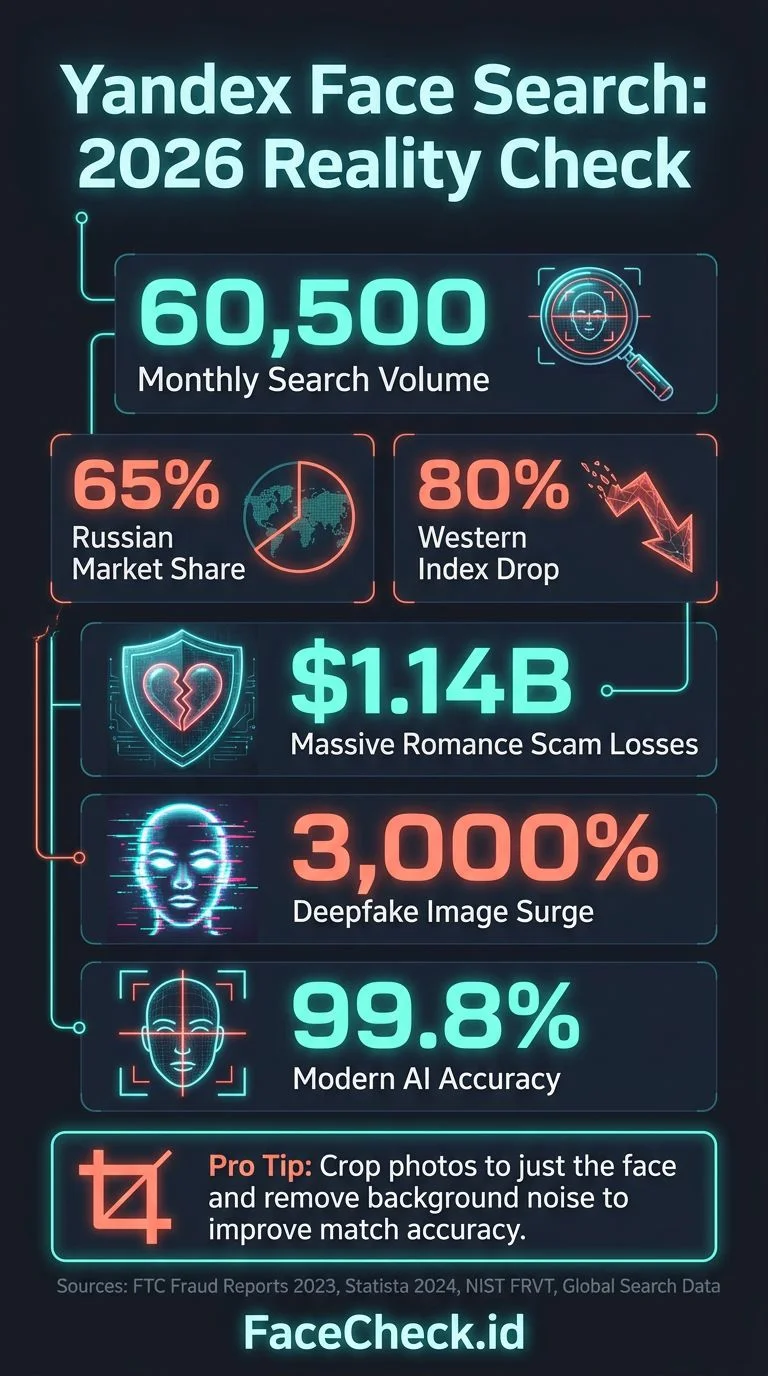
Yandex, Russia's dominant search engine (holding about 65% of Russian search traffic), built its image search with a different philosophy than Google. Where Google prioritized matching objects, scenes, and text in images, Yandex invested heavily in facial recognition for its search index.
When you upload a photo to Yandex Images, the system:
- Analyzes the image for faces, objects, and visual patterns
- Runs facial feature extraction if a face is detected
- Matches against its indexed database of web images
- Returns visually similar results, with face matches weighted heavily
This made Yandex uniquely powerful for people-search. Upload a dating profile photo, and Yandex would often find that same person's VK profile, Instagram, or other social media accounts. Google couldn't touch this kind of result.
How to Use Yandex Search Image (Step-by-Step)
Getting started is straightforward:
- Go to yandex.com/images
- Click the camera icon in the search bar
- Upload your image or paste a URL
- Review the results under "Similar images" and "Sites with this image"
Pro tip: Yandex sometimes returns better results if you crop the image to just the face before uploading. Remove backgrounds, other people, and distracting elements. The cleaner the face crop, the better the match.
What the Results Look Like
Yandex splits results into categories:
- Other sizes of the same image (exact matches hosted elsewhere)
- Similar images (visually related, this is where face matches appear)
- Sites containing this image (pages where the exact image was found)
The "Similar images" section is where the magic happens for face searches. Yandex groups results by visual similarity, and faces from the same person tend to cluster together.
What Yandex Used to Be Great At (and What Changed)
Between 2018 and 2023, Yandex was the go-to recommendation in every OSINT community for face-based reverse image search. Here's why it worked so well:
- Massive VK indexing. VK (Russia's Facebook equivalent) has over 100 million users, and Yandex indexed their profile and uploaded photos aggressively.
- Less privacy filtering. Unlike Google, Yandex didn't strip facial recognition results or blur faces in search.
- Strong facial feature matching. Yandex's algorithm genuinely matched facial geometry, not just hair color or background.
What's Different in 2026
Several things have eroded Yandex's edge:
- Sanctions and infrastructure issues. Since 2022, Yandex has dealt with sanctions, corporate restructuring, and reduced crawling capacity outside Russia and CIS countries. Its index of Western social media (Instagram, Facebook, LinkedIn) has shrunk noticeably.
- VK privacy changes. VK tightened photo privacy defaults in 2024. Fewer public photos means fewer matches.
- Reduced face-matching accuracy. Users in OSINT forums have reported declining result quality for non-Russian subjects since mid-2024. Yandex still works well for Russian and Eastern European faces, but its global coverage has dropped.
- No API access. Yandex shut down its free image search API, making it harder to integrate into workflows.
The bottom line: Yandex image search still works, but it's no longer the reliable all-purpose face finder it once was. For Russian-language internet, it remains strong. For everything else, you need alternatives.
Yandex vs Google Reverse Image Search: How They Compare
| Feature | Yandex | |
|---|---|---|
| Face matching | Yes (degraded for non-Russian web) | Minimal (prioritizes objects/scenes) |
| Best coverage | Russian internet, VK, CIS sites | Global web, English-language sites |
| Exact match finding | Good | Excellent |
| Privacy filtering | Light | Heavy (filters faces from results) |
| Speed | Fast | Fast |
| Mobile support | Browser only | Built into Google Lens |
| Finding people by face | Decent (was great) | Poor |
Google wins for finding where an exact image appears online. Yandex wins for finding other photos of the same face. But neither is purpose-built for face search, which is where dedicated tools come in.
When Yandex Isn't Enough: Using FaceCheck.id for Face Search
Here's the thing about both Google and Yandex: image search is a side feature for them. They're search engines that happen to offer reverse image search. Neither one is specifically designed to find people by their face.
FaceCheck.id is built from the ground up for exactly that. Instead of general visual similarity, it uses dedicated facial recognition AI trained specifically on matching human faces across different photos, angles, lighting conditions, and even years apart.
What FaceCheck Does Differently
- Face-specific neural network. Not a general image matcher. FaceCheck's AI analyzes facial geometry (distance between eyes, jaw shape, nose bridge) rather than background, clothing, or hair.
- Cross-platform indexing. Searches across social media, news sites, mugshot databases, blogs, and forums. Not limited to one country's internet.
- Works with difficult photos. Sunglasses, different angles, age changes, low resolution. FaceCheck handles variations that break general-purpose image search.
- Results link to profiles. You get direct links to the social media accounts and web pages where matching faces appear.
How to Search for a Face with FaceCheck.id
- Go to FaceCheck.id
- Upload a clear photo of the face you want to search
- Wait 10-20 seconds for results
- Browse matched faces with confidence scores and source links
- Click through to verify the match on the source platform
When I tested the same photo across Yandex and FaceCheck, Yandex returned 3 visually similar results (one was actually the right person's VK page). FaceCheck returned 7 matches across Instagram, Facebook, LinkedIn, and a personal blog, all confirmed as the same individual. The difference was clear.
Best Strategy: Use Both Yandex and FaceCheck Together
Smart researchers don't pick one tool. They layer them:
- Start with FaceCheck.id for the most accurate face matches across global platforms
- Run the same photo through Yandex to catch Russian/CIS results that FaceCheck might not index
- Use Google reverse image search to find exact reposts of specific photos you've identified
- Check results against each other to build a complete picture
This layered approach catches matches that any single tool would miss. FaceCheck handles the face-matching heavy lifting, Yandex covers the Russian web, and Google finds exact copies.
Common Yandex Image Search Problems (and Fixes)
"Yandex says no similar images found"
Crop the image tighter around the face. Remove any borders, watermarks, or text overlays. Try both the original and a horizontally flipped version.
"Results are all random people who look nothing like my photo"
Yandex's general visual similarity is matching on hair color, skin tone, or background, not the face. This is a sign you need a face-specific tool like FaceCheck.id.
"Yandex is blocked or slow in my country"
Some ISPs throttle or block Yandex. Try a VPN with a European exit node. Or skip Yandex entirely and use FaceCheck, which works globally without restrictions.
"I only get results from Russian websites"
That's Yandex's strongest index. For English-language and global results, pair it with FaceCheck.id and Google.
Is Yandex Image Search Safe to Use?
Yandex is a legitimate search engine, and using its image search is legal in most jurisdictions, just like using Google. However, a few things to keep in mind:
- Your uploaded images may be stored. Yandex's privacy policy allows them to process uploaded images. If the photo is sensitive, consider the risk.
- Results may include private content. Yandex indexes content that Google filters out, including some content that was posted without consent.
- Using face search results ethically matters. Finding someone's photo online is legal. Stalking, harassment, or doxxing with that information is not. Use any face search tool responsibly.
FAQ
Is Yandex image search better than Google for finding people?
For finding people by face, Yandex has historically been better than Google because it actually performs facial recognition matching. Google deliberately limits face-matching in its image search. However, Yandex's coverage of non-Russian websites has declined since 2022, so for global searches, FaceCheck.id now gives more reliable results.
Can Yandex find someone's social media from a photo?
Sometimes. Yandex indexes VK profiles heavily and catches some Instagram and Facebook photos. But coverage depends on the person's online presence and privacy settings. For the best chance of finding social media profiles from a photo, use FaceCheck.id, which is specifically designed for this purpose.
Is Yandex reverse image search free?
Yes, Yandex image search is completely free to use with no account required. You can upload unlimited photos. FaceCheck.id also offers free searches, with premium options for higher-volume use.
Does Yandex image search work on mobile?
Yes, but there's no dedicated app. Open yandex.com/images in your mobile browser, tap the camera icon, and upload or take a photo. The mobile experience is functional but less polished than Google Lens.
Why does Yandex find faces better than Google?
Google made a deliberate choice to limit facial recognition in search results due to privacy concerns (they confirmed this publicly in 2011 and have maintained the position). Yandex never implemented those same restrictions, which is why it returns face matches that Google won't show. Purpose-built tools like FaceCheck.id go even further with dedicated facial recognition AI.
Ready to find someone by face? Start with FaceCheck.id for the most accurate results, then cross-reference with Yandex for Russian web coverage.

Read More on Search by Picture
Yilong Ma: Elon Musk's Doppelgänger or a Deepfake Masterpiece?
A Chinese TikToker looks almost exactly like Elon Musk—we're talking a 90% facial match—but he's never done an in-person interview and got banned from major platforms. Is Yilong Ma a real person or the most convincing real-time deepfake ever created? The evidence is surprisingly conflicting.
On the subject in other languages
 Pesquisa de imagens do Yandex: guia completo para encontrar rostos (2026)
 Yandex 图片搜索:人脸查找完整指南(2026年)
 Vyhledávání obrázků Yandex: Kompletní průvodce hledáním tváří (2026)
 Yandex-Bildersuche: Vollständiger Leitfaden zum Finden von Gesichtern (2026)
 Búsqueda de imágenes de Yandex: guía completa para encontrar rostros (2026)
 Recherche d’images Yandex : guide complet pour trouver des visages (2026)
 Ricerca immagini Yandex: guida completa per trovare volti (2026)
 Yandex画像検索:顔を見つけるための完全ガイド(2026年版)
 Yandex 이미지 검색: 얼굴 찾기 완벽 가이드(2026년)
 Wyszukiwanie obrazem w Yandex: kompletny przewodnik po znajdowaniu twarzy (2026)
 Поиск по изображениям в Yandex: полное руководство по поиску лиц (2026)
 البحث بالصور في Yandex: الدليل الكامل للعثور على الوجوه (2026)
 Yandex Görsel Arama: Yüz Bulmak İçin Eksiksiz Rehber (2026)
Popular Topics
API Identity Social Media Image Search Find Social Media Facial Recognition Social Media Account How To Facebook Instagram Social Media Profiles Face Recognition AI Find Someone LinkedIn Mugshots Yandex Images Reverse Image Search Free Google Lens Face Search Face Match Exact Match Similar Images Osint Vk WatermarkingPimEyes vs FaceCheck: 2026 Comparison