Face Recognition Search
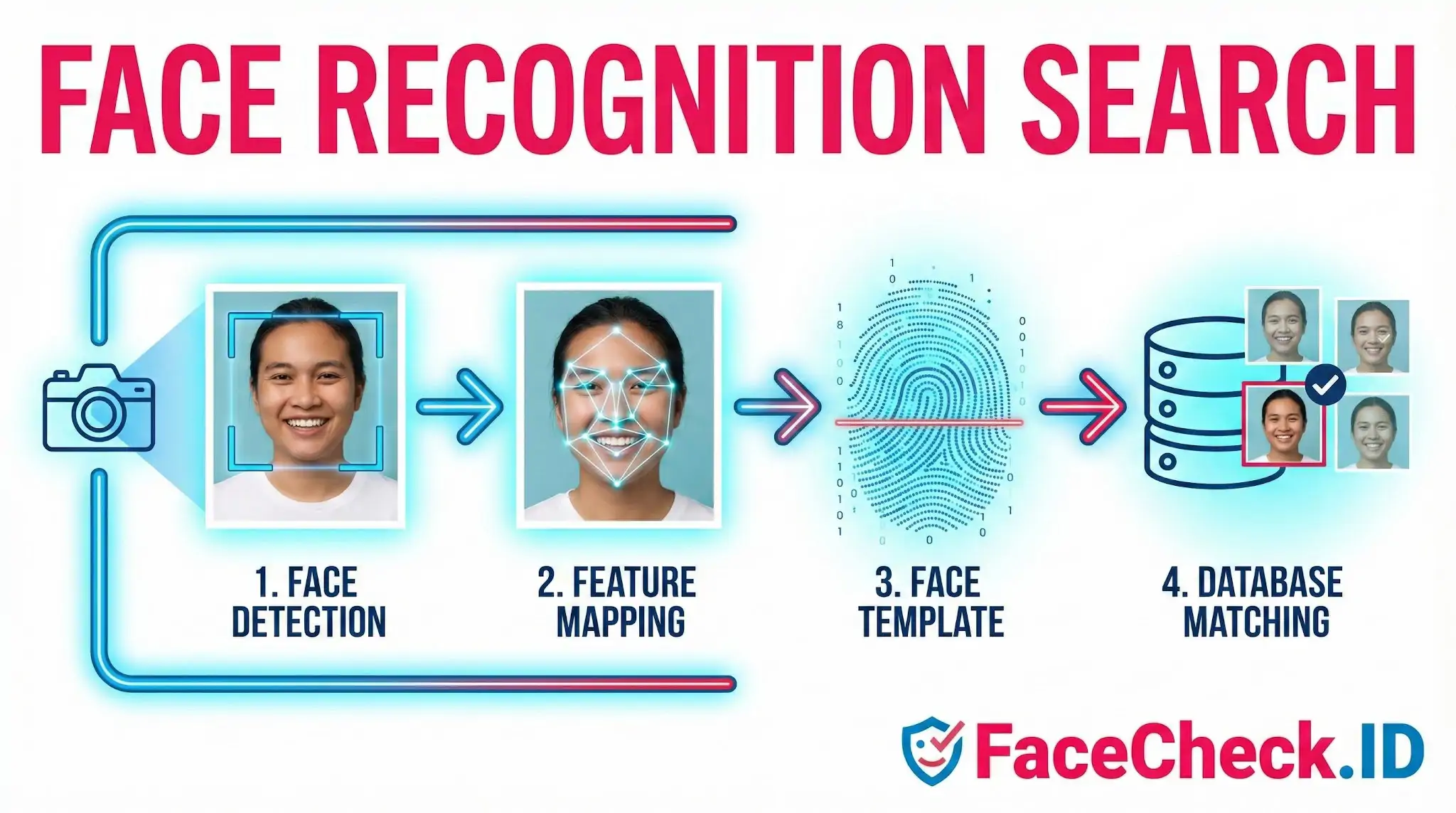
Face recognition search flips the usual logic of online lookup: instead of typing a name to find photos, you upload a photo to find where that person appears across the public web. For anyone vetting a dating match, investigating a suspicious profile, or trying to confirm whether a stranger's images have been scraped and reused, this is the only search method that works when all you have is a face.
How a face search engine differs from generic image search
Reverse image search tools like Google Images compare pixel patterns, so they tend to find exact or near-duplicate copies of the same file. Face recognition search works differently. It detects the face inside the image, converts the geometry of that face into a numeric vector (often called an embedding or faceprint), and then searches an index of faces extracted from billions of public web pages. The match is based on facial structure, not on the photo itself.
That distinction matters in practice. A generic reverse image search will miss a scammer who cropped, recolored, or mirrored a stolen profile photo. A face recognition system will still surface the original because the underlying face geometry is unchanged. It can also link photos taken years apart, in different lighting, with different hairstyles, or even with glasses added or removed, as long as the core facial landmarks remain recognizable.
What affects match confidence on real-world photos
The biggest variable is image quality at the face level, not at the file level. A 4K group photo where the target's face occupies 60 pixels will perform worse than a low-resolution selfie where the face fills the frame. In production face-search systems, results are typically ranked by a similarity score, and a few patterns show up consistently:
- Front-facing, well-lit portraits like LinkedIn headshots and verified social profiles tend to produce the highest confidence matches.
- Sunglasses, masks, heavy filters, and extreme angles suppress key landmark data and lower the score, sometimes enough to push real matches below the threshold.
- Age gap between the query photo and the indexed photo degrades accuracy, especially across childhood-to-adult or major weight or facial-hair changes.
- Duplicate or stock-image faces can return false positives if a face is genuinely common-looking, particularly for younger adults photographed in similar studio conditions.
Anyone reading the results should treat the similarity score as a hypothesis, not a verdict. A score in the high 90s combined with multiple independent sources pointing to the same identity is strong evidence. A single match in the 70s on a low-resolution image is a lead worth investigating, not a confirmation.
Common use cases for FaceCheck-style searches
The everyday users of face recognition search aren't government agencies — they're people trying to verify other people online. Common scenarios include checking whether a dating-app match is using their real photos, confirming that a remote job recruiter actually exists, identifying the person behind a harassing anonymous account, finding leaked or stolen photos of yourself, and confirming whether a "long-lost relative" message is from who they claim to be. Investigators and journalists use the same tools to attribute photos in news stories, identify subjects of mugshot reposts, or trace a single face across multiple aliases on different platforms.
What a face search result does not prove
A high-confidence match tells you that two photos almost certainly show the same person. It does not tell you that the name attached to either photo is correct, that the account is currently active, or that the person controlling the account is the person in the picture. Catfishers steal photos from strangers; that means a face match to a real Instagram profile may identify the victim of identity theft, not the scammer behind the message.
Face recognition search also has hard limits. It cannot find photos that aren't indexed, won't penetrate private accounts, and may miss recent uploads. Treating it as one strong signal among several — alongside reverse image search, profile metadata, and writing-style analysis — produces far more reliable conclusions than relying on a single match score in isolation.
FAQ
What is “Face Recognition Search” and what is it used for?
Face Recognition Search is the use of facial features in a photo to search for visually similar faces across an index of images or web pages. Common uses include identifying where a person’s photos appear online, finding impersonation or scam profiles, and monitoring public exposure of images—depending on local laws and the service’s terms.
How is face recognition search different from face verification or face identification in a closed database?
Face verification checks whether two faces are likely the same person (1:1 comparison). Closed-database identification tries to find a match within a specific enrolled list (1:N). Face recognition search typically queries a large, open-ended index (often web-sourced) to return possible matches and related pages, usually with varying confidence rather than a single definitive identity.
What results should I expect from a face recognition search engine?
Results commonly include links to pages where similar-looking faces appear, thumbnails of matched images, and a relevance or confidence indicator. You may see the same person across different ages, angles, or lighting, but you can also get visually similar people (look-alikes), duplicates, cropped versions, or images that contain multiple faces where the wrong face is matched.
How can I use face recognition search responsibly and reduce the chance of harming someone?
Use it for legitimate purposes (e.g., protecting yourself from impersonation) and avoid using results to make accusations or decisions without independent confirmation. Cross-check multiple sources, verify context (date, location, account ownership), and treat matches as leads rather than proof. If the search involves sensitive situations, follow applicable privacy laws and the platform’s rules.
Does FaceCheck.ID support face recognition search, and what should users keep in mind when using it?
FaceCheck.ID is an example of a face recognition search engine that returns potential matches and the pages where similar faces appear. Users should treat matches as informational, review the surrounding page context, and use available reporting/removal channels if results are incorrect or harmful, while complying with local laws and FaceCheck.ID’s terms.


Recommended Posts Related to face-recognition-search
-
Demystifying Image Search: The Difference Between Reverse Image Search, Visual Search, and Face Recognition Search
Among these tools, Reverse Image Search, Visual Search, and Face Recognition Search stand out for their unique capabilities. Face Recognition Search. Face Recognition Search is a specific subset of visual search that uses biometric technology to identify or verify a person's identity using their face.
-
How to Run Background Check Using Face Recognition Search Engine
Face recognition search engine to run a background check. A face recognition search engine FaceCheck is an great alternative or a value addition to a regular background check. Background Check Using Face Recognition Search Engine.
-
Best Facial Recognition Search Engines (2026)
Except most "facial recognition search engines" don't actually recognize faces. Real facial recognition search is different. How Facial Recognition Search Actually Works.
-
How to Find Someone on Fansly by Photo in 4 Easy Steps
FaceCheck.ID is a facial recognition search tool that can help you look for public profiles using an image. How accurate are face recognition search results? Many facial recognition search platforms provide a way to request removal from their index.
-
Top 7 Reverse Image Search Engines for Face Search Compared
FaceCheck.ID, Yandex, and PimEyes are face recognition search engines and return good results when searching for people by face. PimEyes is a great facial recognition search engine that's designed for finding your own photo on the Internet.