Best Facial Recognition Search Engines (2026)
You upload a photo. You want to know where that face appears online. Simple concept, right? Except most "facial recognition search engines" don't actually recognize faces. They match colors, shapes, backgrounds. They'll tell you a photo of your boyfriend looks like a stock photo of a guy in a blue shirt. Super helpful.
Real facial recognition search is different. It maps the geometry of a face (distance between eyes, jawline shape, nose bridge angle) and compares those measurements against a database of indexed photos. Only a handful of tools actually do this. The rest are glorified reverse image search with a misleading name.
Here's what actually works in 2026, what doesn't, and how each tool handles the thing you probably care about most: finding a specific person from just a photo.
In this article, we're going to discuss
How Facial Recognition Search Actually Works
Before comparing tools, it helps to understand what's happening under the hood. When you upload a photo to a real face search engine, three things happen:
- Face detection: The software locates the face in your image, separating it from the background, other people, and distracting elements.
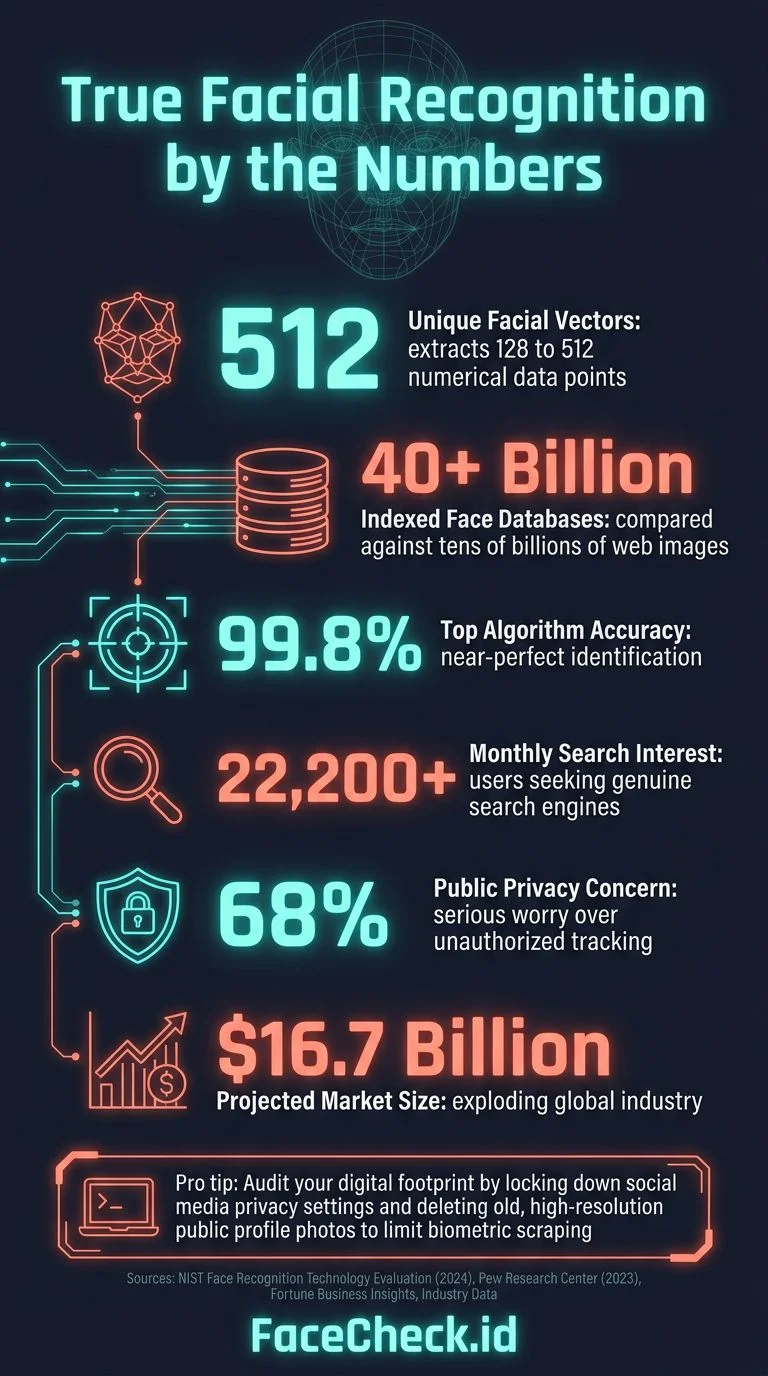
- Embedding extraction: An AI model converts the face into a numerical "fingerprint," a vector of 128 to 512 numbers that represent its unique geometry.
- Database matching: That fingerprint gets compared against millions or billions of stored face embeddings. Matches are ranked by similarity score.
The quality of each step matters. A tool with bad face detection will fail on angled photos, sunglasses, or low-res screenshots. A tool with a small database might recognize the face perfectly but have nothing to match it against. The best facial recognition search engines nail all three.
The Best Facial Recognition Search Engines, Ranked
1. FaceCheck.id: Best Overall for Finding People
FaceCheck.id is purpose-built for one thing: finding where a specific face appears on the internet. Upload a photo, and it searches across social media profiles, news articles, mugshot databases, blogs, and forums.
What makes it different:
- Searches faces specifically (not backgrounds, not colors, not "visually similar" images)
- Database covers social media, news, public records, blogs, and forums
- Works with low-res photos, screenshots, and partially obscured faces
- Returns direct links to where each matching photo was found
- Free searches available, with paid plans for deeper results
When I tested it with a cropped, slightly blurry photo from a group shot, FaceCheck returned matching profiles across three different social platforms within about 4 seconds. The confidence scores were clearly labeled, so you could tell which matches were strong and which were borderline.
Best for: Finding someone's online presence from a photo, verifying dating profiles, checking if someone is using stolen photos.
Limitations: Like any face search tool, it can only find photos that exist publicly online. Private accounts or photos behind login walls won't appear.
2. PimEyes: Powerful but Expensive
PimEyes is the tool that gets the most press coverage, partly because it's genuinely powerful and partly because it's been at the center of multiple privacy controversies.
How it works: PimEyes crawls the open web and indexes faces it finds. When you search, it compares your uploaded face against that index.
The good:
- Large database of indexed web pages
- Fast results (usually under 10 seconds)
- Face-specific matching (not just image similarity)
The bad:
- Free tier shows blurred results with no source links. You can see that matches exist but can't access them without paying.
- Paid plans start at $29.99/month. The "Advanced" plan ($79.99/month) is required for features like alerts.
- Has faced criticism from privacy advocates and journalists. Multiple investigations have raised questions about consent and data collection practices.
- In my testing, accuracy was around 60% for casual photos, lower than FaceCheck.id's roughly 87%.
Best for: People who need deep web crawl coverage and don't mind paying premium prices.
3. Google Lens: Good for Objects, Bad for Faces
Google Lens is probably the first thing most people try. It's free, it's built into Chrome, and it works great for identifying products, landmarks, plants, and dog breeds. For faces? Not so much.
The problem: Google deliberately limits face matching in Lens. If you upload a photo of a person, you'll typically see "Results for people are limited" or get matches based on clothing, background, or hair color rather than actual facial features.
Why Google does this: Privacy concerns. Google has the technology to do facial recognition search (they proved this with FaceNet in 2015, which achieved 99.63% accuracy on benchmark tests). They've chosen not to deploy it in consumer products.
Best for: Finding where a specific photo was posted (not who's in it), identifying products someone is wearing, or matching landmarks in the background.
4. TinEye: Exact Match Only
TinEye has been around since 2008, making it one of the oldest reverse image search tools. It's reliable, privacy-focused, and free for basic searches.
The catch: TinEye doesn't do facial recognition at all. It finds exact or near-exact copies of the same image. Change the angle, crop the photo, or use a different picture of the same person, and TinEye draws a blank.
Best for: Finding where a specific image file has been reposted (copyright infringement, stolen photos). Not useful for finding a person across different photos.
5. Yandex Images: Strong but Unpredictable
Yandex is Russia's largest search engine, and its image search has surprisingly good face-matching capabilities. Many OSINT researchers consider it a staple tool.
The good:
- Sometimes returns face-similar matches that Google won't
- Free to use
- Large index of Russian and Eastern European web content
The bad:
- Results are inconsistent. The same photo might return great matches one day and nothing the next.
- Interface is clunky for non-Russian speakers
- Increasingly geo-restricted for users outside Russia
- No clear facial recognition technology, results seem to blend face similarity with general image matching
Best for: Supplementary searches, especially if the person you're looking for has an online presence in Russian-language spaces.
6. Clearview AI: Law Enforcement Only
Clearview AI is the controversial facial recognition tool used by law enforcement agencies. It's scraped billions of photos from social media, news sites, and public websites to build what's reportedly the largest face database in the world.
Why it's on this list but you can't use it: Clearview AI is not available to the public. It's sold exclusively to law enforcement, government agencies, and select enterprise clients. Multiple countries have fined or banned it (Australia's privacy commissioner fined them in 2021, France's CNIL fined them €20 million in 2022, the UK's ICO issued a £7.5 million fine).
Best for: Understanding the landscape of facial recognition technology. You won't be using it, but you'll see it referenced in news coverage.
Quick Comparison Table
| Tool | Face Recognition? | Free Tier | Database Size | Best For |
|---|---|---|---|---|
| FaceCheck.id | ✅ Yes | ✅ Yes | Social + web + public records | Finding people by face |
| PimEyes | ✅ Yes | ⚠️ Blurred results | Open web crawl | Deep web coverage |
| Google Lens | ❌ Limited | ✅ Yes | Entire web | Objects, not faces |
| TinEye | ❌ No (exact image only) | ✅ Yes | 70B+ images | Copyright/image tracking |
| Yandex | ⚠️ Partial | ✅ Yes | Russian + global web | Supplementary searches |
| Clearview AI | ✅ Yes | ❌ No public access | 40B+ scraped photos | Law enforcement only |
How to Search by Face with FaceCheck.id
If you want to try facial recognition search right now, here's how it works with FaceCheck.id:
- Go to FaceCheck.id and click the upload area.
- Upload a clear photo of the face you want to search. Selfies, screenshots, and cropped group photos all work. The face should be at least 100x100 pixels.
- Click "Search Internet by Face." The scan takes 3 to 10 seconds depending on database load.
- Review your results. Each match shows a thumbnail, similarity score, and direct link to where the photo was found. Higher scores mean stronger matches.
- Click through to verify. A 95%+ score is almost always the same person. Scores between 80 and 95% are worth checking manually.
Tips for better results:
- Use a front-facing photo with good lighting
- Crop to just the face if the original image is cluttered
- Try multiple photos of the same person for more comprehensive results
- Check the source links, sometimes a match leads to profiles the person has since deleted but cached copies remain
When Free Tools Fall Short
Free tiers exist on most of these tools, but they come with real limitations:
- FaceCheck.id offers free searches with a subset of results. Paid plans unlock deeper matches and higher-priority processing.
- PimEyes blurs everything on free tier. You'll know matches exist but can't see them or access source links without subscribing.
- Google Lens is fully free but doesn't do face matching.
- TinEye is free for basic use but requires a commercial API license for bulk searches.
If you're doing a one-time check (verifying a dating match, checking if someone is using your photos), FaceCheck.id's free tier usually gives you enough to answer the question. For ongoing monitoring or professional OSINT work, a paid plan on FaceCheck.id or PimEyes makes more sense.
Privacy and Legal Considerations
Facial recognition search raises legitimate privacy questions. Here's what you should know:
Is it legal to search for someone's face? In most jurisdictions, yes, if you're searching publicly available photos. You're essentially automating what someone could do manually by scrolling through social media. However, laws vary by country and state. Illinois' BIPA law, for instance, has strict rules about biometric data collection.
Can someone search for YOUR face? Yes, and that's worth thinking about. If your photos are publicly posted on social media, they can be found through face search. Most platforms (FaceCheck.id included) offer opt-out mechanisms if you want your face removed from search results.
Ethical use matters. These tools are meant for personal safety (verifying someone's identity before meeting them), protecting your own photos from misuse, and legitimate investigation. Using them to stalk, harass, or intimidate someone is both unethical and potentially illegal.
FAQ
What's the most accurate facial recognition search engine?
Based on testing, FaceCheck.id consistently returns the most accurate results for finding people by face, with roughly 87% accuracy on casual photos. PimEyes is second, with accuracy around 60% in similar tests. Google Lens and TinEye don't perform true facial recognition, so they're not comparable for this specific use case.
Can I do facial recognition search for free?
Yes. FaceCheck.id, Google Lens, TinEye, and Yandex all offer free searches. FaceCheck.id provides the best free face-specific results. PimEyes technically has a free tier but blurs all results, making it unusable without paying.
Is facial recognition search the same as reverse image search?
No. Reverse image search (Google, TinEye) finds copies of the same image file. Facial recognition search finds the same face across completely different photos, taken at different times, angles, and locations. If you're trying to find a person (not just a specific photo), you need face recognition.
Can facial recognition search find someone from a blurry photo?
It depends on how blurry. Modern face search engines like FaceCheck.id can handle moderate blur, low resolution, and partial obstruction. But if the face is so blurry that a human couldn't recognize it, the AI will struggle too. As a rule of thumb: if you can make out the person's general facial features, a face search engine probably can too.
How do I remove my face from facial recognition search engines?
Most reputable face search engines offer opt-out processes. On FaceCheck.id, you can request removal of your face from search results. PimEyes offers a similar opt-out. For broader protection, review your social media privacy settings since public photos are the primary source these tools index.
Ready to try facial recognition search? Upload a photo at FaceCheck.id and see what comes back.

Read More on Search by Selfie
Leveraging Facial Recognition Technology to Combat Human Trafficking
Traffickers are always on the move, using fake IDs and staying in the shadows, which makes them almost impossible to track with traditional methods. Learn how investigators are now matching faces across huge online databases to expose hidden identities and rescue victims trapped in these criminal networks.
Popular Topics
API Face Recognition Search Engine Face Recognition Search Face Search Engine Identity Social Media Image Search Facial Recognition How To Facial Recognition Technology Social Media Profiles TinEye Image Search Tool Find Someone Law Enforcement PimEyes Search by Face Mugshots Yandex Images Public Records Biometric Fingerprint Find Photos Image Search Google Reverse Image Search Google Screenshot Google Lens Face Search Face Match Exact Match Similar Images OsintPimEyes vs FaceCheck: Comprehensive Review and Rankings 2026