Reverse Image Search - Social Catfish vs FaceCheck.ID
Explore the Power of Image-Based Search with Social Catfish and FaceCheck.ID for Safe Online Connections
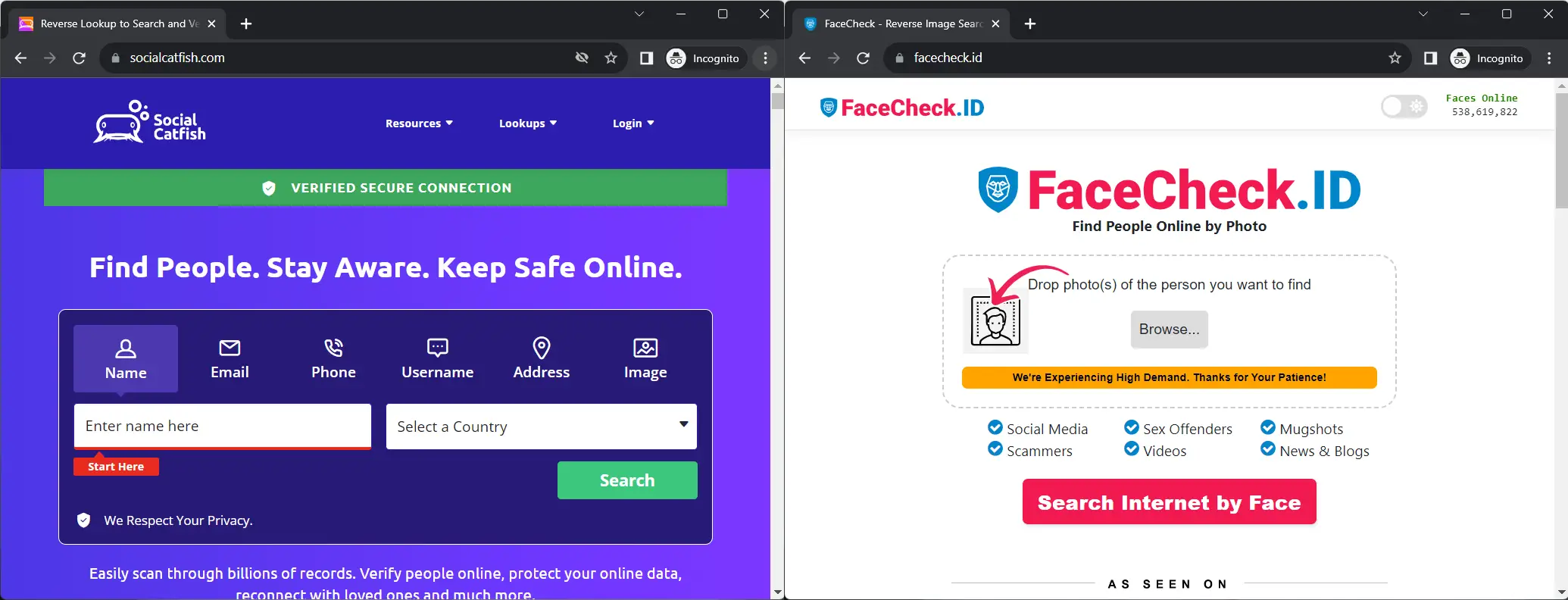
In this article, we're going to discuss
- Two Leading Reverse Image Search Tools Compared
- Social Catfish
- Overview
- Features
- User Experience
- FaceCheck.ID Overview
- FaceCheck.ID, The Best Reverse Image Search for People?
- Features
- User Experience
- Complementing Each Other: Social Catfish and FaceCheck
- Final Verdict
- Bottom line
- How to use the image search on Socialcatfish.com
- Reverse Image Search with me
- User Reviews of Socialcatfish.com
Two Leading Reverse Image Search Tools Compared
You matched with someone whose photos look a little too polished. Their bio mentions an offshore oil rig. You have questions. Or maybe it's gentler than that — you found an old group photo and want to track down the friend you lost contact with after college.
Either way, you want to know who's actually on the other end of the screen. That's where reverse image search tools earn their keep. Two of the better-known options are Social Catfish and FaceCheck.ID, and they work in pretty different ways. Here's how they stack up.
Social Catfish
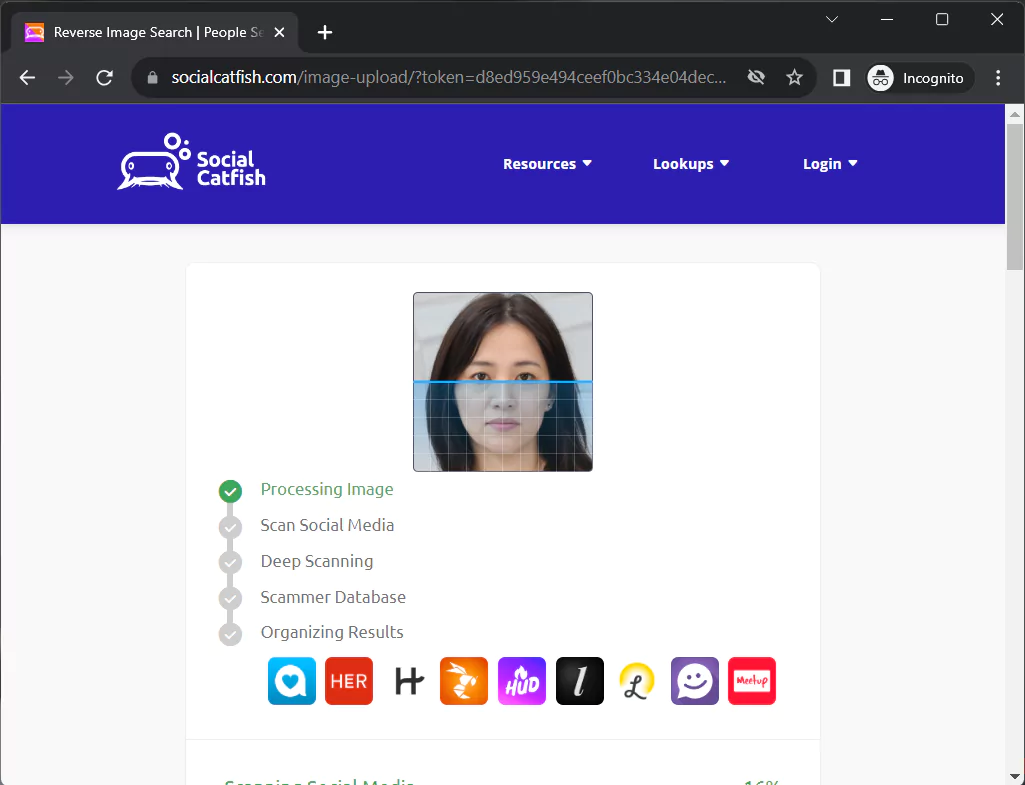
*The Reverse Image Search Visualization by Social Catfish provides users with a representation of the search process. Upon uploading an image for reverse search, the screen displays a progress bar or animation that illustrates the ongoing analysis. This visualization not only adds an interactive element to the search but also keeps users informed about the stage of the process. As the system scans through various databases and online sources, the progress is incrementally updated, often accompanied by descriptive text or icons that indicate specific actions being taken, such as matching the image with profiles or identifying potential connections.*
Overview
Social Catfish is a multi-input identity lookup tool. You give it whatever scrap of information you have on someone — a name, an email, a phone number, a username, an address, or a photo — and it tries to build a picture from public records and online sources.
Features
Reverse Lookups
The pitch is that you don't need a photo to get started. Got a Gmail address and a first name? That's enough to begin. This makes Social Catfish useful when all you've got is the breadcrumbs someone left in a conversation.
Catfishing Resources
Beyond the search tools, there's a sizable library of articles on romance scams, sextortion, and the various ways strangers online try to separate you from your money. It's the part of the site you wish you'd read before wiring anyone funds for a plane ticket.
Global Reach
Searches aren't locked to a single country. Useful, given that the person claiming to be a widowed architect in Denver may in fact be operating from somewhere considerably farther away.
User Experience
The interface is straightforward — pick your search type, enter what you've got, wait. No steep learning curve, no buried menus.
That's Social Catfish. Now for the other half of the toolkit.
FaceCheck.ID Overview
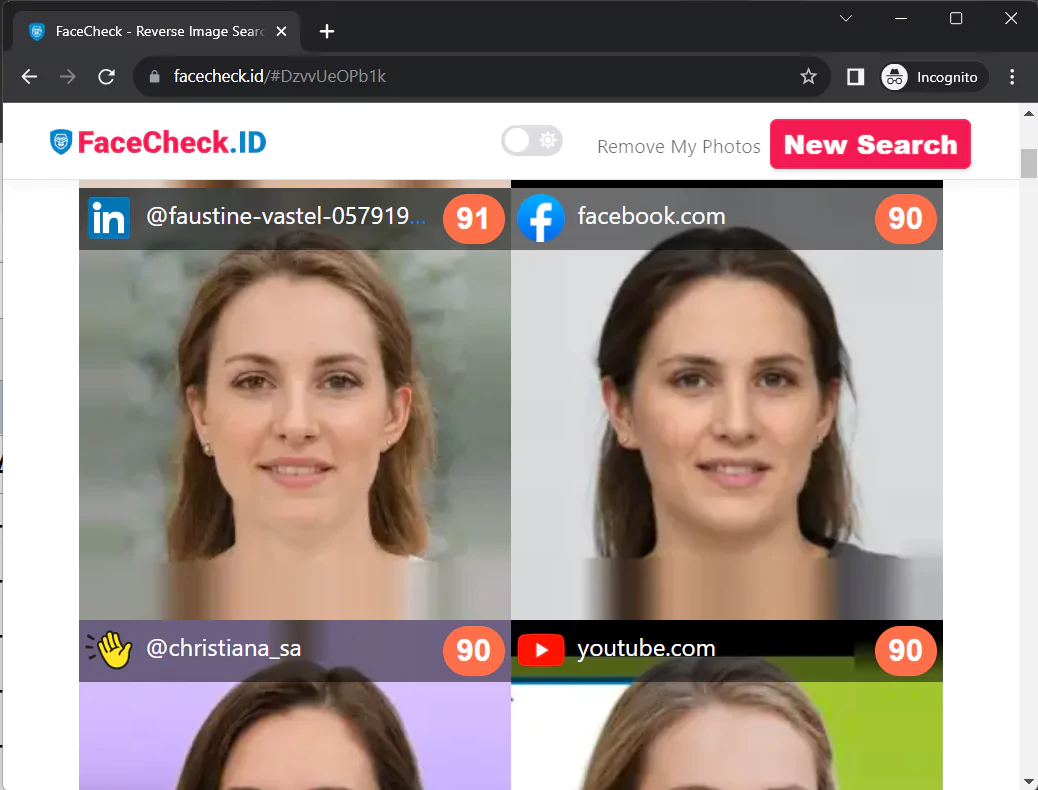
*Facecheck.id's reverse image search results screen displays the corresponding color-coded match scores ranging from 0 to 100, indicating how well the image matches the source photo. These scores provide an immediate visual cue to the user, allowing for quick assessment of the relevance and accuracy of each match.*
FaceCheck.ID, The Best Reverse Image Search for People?
FaceCheck.ID does one thing and does it well: you upload a face, and it goes looking for that face elsewhere on the internet. It's built specifically around facial recognition rather than general image matching, which is the difference between "did this exact JPEG appear anywhere else" and "does this person appear anywhere else."
Features
Face Recognition Search
Upload a photo, get back a list of matches with confidence scores from 0 to 100, color-coded so you can tell at a glance whether you're looking at a strong hit or a coincidence. The matches pull from social media, news sites, public profiles, and — more on this in a second — criminal records.
Safety Precautions
The tool is explicitly framed as a safety check, not a curiosity machine. If your match shows up alongside a fraud warning or a mugshot, you'd want to know that before the second date.
Removal Requests
If you find yourself in the index and you'd rather not be, there's a process to request removal. Worth knowing, both as a user and as a person who might one day be searched.
Criminal Checks
FaceCheck cross-references against mugshot databases and registries. This is the feature that distinguishes it from a standard image search — it's not just telling you where a photo has appeared, it's flagging whether the person in it has a record.
User Experience
Clean upload, fast results, color-coded scoring. You don't need a tutorial.
Complementing Each Other: Social Catfish and FaceCheck
These two aren't really competitors. They're answering different questions.
- Casting the Widest Net: Use Social Catfish when your starting point is text — a name, an email, a username. Use FaceCheck when your starting point is a face.
- Enhanced Safety: Running both is overkill for casual curiosity and exactly right when something already feels off.
- Optimized User Experience: They're easy to use in tandem. Find a name through one, run the photo through the other, see if the stories match.
Final Verdict
If you've got a name or an email, Social Catfish is the better starting point — that's what its search is built around. If you've got a photo, go straight to FaceCheck. The color-coded match scores tell you how confident the system is in each result, which spares you the squinting-at-pixels routine. And the criminal database overlay is the part you didn't know you wanted until you needed it.
Bottom line
Social Catfish for names and emails, FaceCheck for photos. Use the right one for the input you have, and use both when the stakes are higher than a coffee date.
How to use the image search on Socialcatfish.com
Reverse Image Search with me
*Meet John, a self-proclaimed 'expert' in assembling IKEA furniture, with only a 27% success rate and a dating profile that once accidentally featured a picture of his neighbor's cat instead of him. (He still got a date out of it, but they were both disappointed for different reasons.) When he's not tangled in a web of incomprehensible instructions, spare screws, or awkward online dates, John enjoys attempting to cook gourmet meals using only a microwave and walking his goldfish (seriously, don't ask). With a knack for turning ordinary life into an extraordinary comedy, John's adventures are fueled by endless curiosity, an inexplicable love for mismatched socks, and an uncanny ability to find humor in the most unexpected places.*
User Reviews of Socialcatfish.com
Socialcatfish.com has garnered a variety of user reviews on Trustpilot, reflecting different experiences with the platform. With a current TrustScore of 4.2, the service has been commended by many for its responsive customer service, while some users have expressed dissatisfaction with certain functionalities. The following insights are drawn from the most recent reviews on Trustpilot, providing a snapshot of public sentiment towards the platform.
Social Catfish Reviews
Crystal Morris (5 stars, Aug 5, 2023): "Great Customer Service - I didn't have good results on this site but their customer service was awesome! CHESCA responded to my request to cancel my membership within minutes. I was pleasantly surprised as I was expecting to have some challenges with it. Thanks again CHESCA!"
Brennan Nelson (5 stars, Aug 4, 2023): "Great experience! - Chesca was fabulous at assisting me promptly! There were no questions asked when I requested to cancel my membership and she was very friendly. It was a great experience overall and I would not hesitate to sign up again when/if the need arises. Its actually a really neat app :)"
Pat Gundry (5 stars, Jul 27, 2023): "Legit company - Makala was exceptionally helpful when I couldn't access my reports. She actually found my imposter and provided 3 reports. I was also impressed that this company had an actual person answer instead of an automated response."
Mike (3 stars, Feb 14, 2023): "Their search doesn't seem to work well at all for dating sites. I searched emails that I know for sure are linked to dating accounts and SocialCatfish doesn't bring back anything on it. They do however bring back generic results that you can find online yourself if you dig hard enough."
Allicit (1 star, Mar 14, 2023): "Fake site, deceptively trying to extort money from users - I tested this site using a variety of images with various results. Interestingly I used AI to produce a fake, non-existent person that was totally original. Strangely I received 31 hits on the profile image that had never been shared anywhere and was not even real. It suggested and flagged that the profile was connected with explicit imagery and that it was high risk to encourage me to pay to uncover more details. The site it fake, it does not do what it says it does, it fabricates details to gain money by deception."
Sharon Thomas (5 stars, May 27, 2023): "Bri was a constant and great help. She also sent me many links for my knowledge."
Carolyn Greco (5 stars, Updated Mar 20, 2023): "Excellent results. Very fast and affordable for most. Definitely required in today's dating society. Even if you're just becoming friends with someone you really should try this site. It's amazing. They found the guy I finally after 16 years decided to take a chance on dating again only to learn he was a scammer with several aliases worldwide. I'm so glad. Socialcatfishing.com saved me a lot of heartache and probably saved me my entire livelihood too."
FAQ
What's the actual difference between reverse image search and facial recognition search?
Reverse image search looks for the same image file (or near-duplicates) across the web — same crop, same JPEG, same edits. Facial recognition search, which is what FaceCheck.ID uses, looks for the same person regardless of which photo it is. That means FaceCheck can find someone in a totally different picture they've never posted before, while a standard reverse image tool like Google Images mostly finds copies of the file you uploaded.
How accurate are FaceCheck.ID's color-coded match scores?
Scores above 80 generally indicate the same person with high confidence, 70–80 is a probable match worth verifying, and below 70 starts catching look-alikes and false positives. The system rates each result 0–100 based on facial geometry, not photo metadata, so a strong score from a different angle, different lighting, or years apart is more meaningful than the same number on a near-duplicate photo.
Why did a reverse image search return hits on a photo I know was AI-generated?
Because facial recognition matches on features, not file origin — an AI-generated face often resembles real people whose photos trained the model, producing legitimate-looking partial matches. Some critical reviews of these tools cite this as proof they "fabricate" results, but it's actually the algorithm working as designed on an unusual input. The takeaway: don't run synthetic faces as a test, and treat unexpected hits below 80 skeptically.
Can someone find my own profile on these sites, and can I remove myself?
Yes — if your face appears on any indexed public site, you're likely searchable, and FaceCheck.ID offers a removal request process for people who'd rather not be in the index. Social Catfish aggregates from public records and online sources, so removal there usually means contacting the original source (the data broker, the social profile, the public registry) rather than the search tool itself.
Is using these tools legal, and is it legal to act on what you find?
Searching publicly available images and records is legal in the US and most jurisdictions — these tools only index what's already public. What can get you in trouble is what you do next: contacting someone's employer, harassing them, or using results for hiring, tenant screening, or credit decisions, which falls under the Fair Credit Reporting Act and requires a different class of vetted service. These tools are explicitly not FCRA-compliant.
Why didn't Social Catfish find anything on an email I know is on dating sites?
Dating platforms are one of Social Catfish's weakest indexing areas — most major dating apps don't expose profiles to public crawlers, so an email tied to a Tinder or Hinge account often returns nothing. The tool performs much better on emails linked to social media, forum posts, data breaches, and public records. If you're specifically trying to confirm someone's on a dating site, a facial recognition search against their profile photo usually works better than an email lookup.
How much do Social Catfish and FaceCheck.ID actually cost?
FaceCheck.ID lets you run free searches that show blurred previews, with paid credits (roughly $5–$25 depending on volume) needed to unblur results and see source URLs. Social Catfish uses a subscription model — typically around $6 for a trial week that auto-renews into a monthly plan near $28, which is the auto-renewal that drives most of the cancellation requests visible in their reviews. Cancel before the trial ends if you only need one lookup, especially if you arrived through a face search referral funnel.
What should I do if a search turns up a mugshot or fraud warning on someone I'm talking to?
Treat it as a flag, not a verdict, and verify before confronting them. Mugshot databases include arrests that never led to convictions, expunged records that weren't scrubbed, and occasional misidentifications — so cross-check the name and date against the actual county court records, which are free and authoritative. If the criminal hit is real and recent, the safer move is to disengage quietly rather than tip them off that you searched.
Can these tools identify someone from a single low-quality or partially obscured photo?
Sometimes, but the failure rate climbs sharply below about 200 pixels of face width or when sunglasses, masks, or extreme angles obscure key landmarks (eyes, nose bridge, jawline). FaceCheck.ID needs a roughly front-facing shot with both eyes visible to produce reliable scores. Group photos work if you crop to the target face first; blurry profile pictures, screenshots of video calls, and heavily filtered selfies are where these tools genuinely can't help.

Read More on Reverse Image Search
How to Find Someone Using a Screenshot
Got a screenshot but can't figure out who's in it? Regular reverse image searches won't help because they completely ignore facial features. Here's a workaround that uses facial recognition to match any screenshot—even blurry or low-quality ones—to real social media profiles.
On the subject in other languages
 Pesquisa de Imagem Reversa - Social Catfish vs FaceCheck.ID
 反向图像搜索 - Social Catfish vs FaceCheck.ID
 Vyhledávání obrázků zpět - Social Catfish vs FaceCheck.ID
 Reverse Bildsuche - Social Catfish vs FaceCheck.ID
 Búsqueda Inversa de Imágenes - Social Catfish vs FaceCheck.ID
 Recherche d'Image Inversée - Social Catfish vs FaceCheck.ID
 Ricerca di Immagini Invertita - Social Catfish vs FaceCheck.ID
 逆画像検索 - Social Catfish対FaceCheck.ID
 이미지 역방향 검색 - 소셜 캣피쉬 vs FaceCheck.ID
 Wyszukiwanie odwrotne obrazów - Social Catfish vs FaceCheck.ID
 Поиск по изображениям - Social Catfish vs FaceCheck.ID
 البحث العكسي عن الصور - القط الاجتماعي ضد FaceCheck.ID
 Ters Görüntü Arama - Social Catfish vs FaceCheck.ID
Popular Topics
Face Recognition Search Identity Social Media Image Search Facial Recognition How To Google Images Image Search Tool Find Someone LinkedIn Scammers Catfishing Romance Scam Mugshots Public Records Reverse Search Screenshot Photo Lookup Face SearchBattle of the Face Search Engines: PimEyes and FaceCheck Compared