Tutorial: Reverse Image Search for Instagram
You're scrolling Instagram, you spot a face you swear you know, and your brain refuses to cough up a name. Or worse — a profile pings your weirdo radar and you're not sure if the person in the photos is real. Instagram has no built-in reverse image search. Google's face search is, charitably, not a thing. That's the gap FaceCheck.ID fills. Here's how to use it.
In this article, we're going to discuss
- How to Reverse Image Search Instagram
- The Need for a Dedicated Face Search Engine for Instagram
- FaceCheck.ID: The Solution for Instagram Image Searches
- Why FaceCheck.ID?
- How Can I Find Someone's Instagram With Their Picture?
- How To Find Someone On Instagram?
- How To Find Someone's Instagram Without Knowing Their Username?
- How To Find Someone On Instagram Without Knowing Anything About Them?
- Can You Trace Someone From Instagram?
- Is There a Reverse Image Search That Searches Instagram?
- How Can I Find a Person On Instagram With Just a Picture?
- Maximizing Your Instagram Search: Tips and Tricks for FaceCheck.ID
- Safety First: Navigating the Digital Landscape
- Real-life Testimonials: FaceCheck.ID in Action
- The Evolution of Face Searching
- How to Search Someone on Instagram by Image
How to Reverse Image Search Instagram
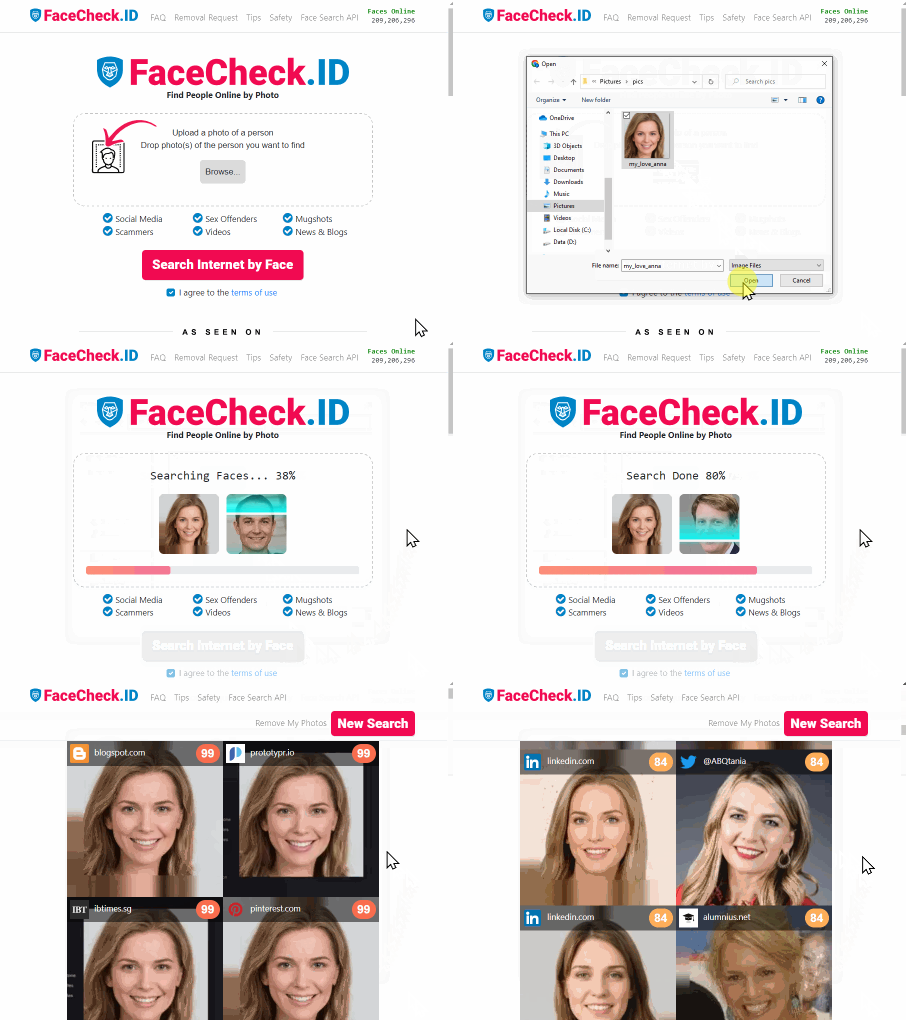
Three steps: head to FaceCheck.ID, upload a photo, hit search.
The Need for a Dedicated Face Search Engine for Instagram
Instagram has over a billion users, which is roughly the population of "everyone you've ever met, plus their cousin." A regular image search isn't built to navigate that. A face-specific one is:
- Profile Verification: Something off about a profile? Drop the photo into FaceCheck.ID and see whether the face actually belongs to the person using it, or whether it was lifted from a Brazilian model's account in 2019.
- Finding Lost Connections: The summer camp friend. The coworker from a job two jobs ago. The guy who lent you a charger at an airport. Sometimes a face is all you remember, and a face is enough.
- Professional Networking: You met someone at a conference, lost the business card in the laundry, and only have a group photo to show for it. A face search can salvage the introduction.
- Dating and Relationships: Before you spend three weeks DM-ing someone, it's worth knowing whether their photos belong to them. A two-minute check now beats a much longer conversation later.
FaceCheck.ID: The Solution for Instagram Image Searches
Instagram is an ocean. FaceCheck.ID is built to fish in it.
Why FaceCheck.ID?
A few things set it apart from generic reverse-image tools:
- Face-Specific Algorithms: It's tuned for facial recognition, not for matching a photo of a couch to other photos of couches. That focus is the whole game.
- Tailored for Instagram: Most search tools cast a wide net across the web. This one aims at Instagram specifically, which means the matches you get are the matches you wanted.
- User-Friendly Interface: Upload, search, scroll. There's no tutorial because there's nothing to learn.
- Privacy-Centric: Encrypted data, no retention. Your searches aren't sitting in a folder somewhere with your name on it.
How Can I Find Someone's Instagram With Their Picture?
Use a reverse image search tool built for Instagram, like FaceCheck.ID. Upload the photo, and it scans Instagram profiles for matches.
How To Find Someone On Instagram?
A few angles, depending on what you've got:
- Search Bar: Type the name or username into Instagram's search.
- Contacts Sync: Sync your phone contacts and see who's already there.
- Facebook Friends: If your accounts are linked, Instagram will surface mutuals.
- Reverse Image Search: When all you have is a photo, FaceCheck.ID does the work.
How To Find Someone's Instagram Without Knowing Their Username?
No username? You still have options:
- Search their full name.
- Sync contacts in case they're listed under something cryptic like
xX_void_Xx. - Use FaceCheck.ID if you have a photo.
How To Find Someone On Instagram Without Knowing Anything About Them?
If a photo is the only thing you've got, that's actually enough. Upload it to FaceCheck.ID and let the matches come back.
Can You Trace Someone From Instagram?
Instagram shows you public stuff — username, bio, posts. It does not hand out IP addresses or locations to regular users, and that's a good thing. If there's a real legal issue, law enforcement can request specifics through the proper channels. For everyone else: respect the privacy line.
Is There a Reverse Image Search That Searches Instagram?
Yes. Generic search engines won't crawl Instagram in a useful way, but FaceCheck.ID is built specifically for it.
How Can I Find a Person On Instagram With Just a Picture?
Upload the image to FaceCheck.ID. It searches Instagram for faces that match and gives you the closest profiles.
Maximizing Your Instagram Search: Tips and Tricks for FaceCheck.ID
A few things that actually move the needle on results:
1. Image Quality Matters:
Sharper photo, better match. A 240p screenshot of a screenshot will get you 240p results. Use the clearest version you have.
2. Optimal Face Shots:
FaceCheck.ID handles angles fairly well, but a straight-on shot wins. Sunglasses, hats, and masks all make the algorithm's job harder — which makes sense, because they'd make yours harder too.
4. Review All Results:
The top matches are usually the right ones, but scroll through everything. The exact profile sometimes hides a few rows down, especially if the person has fan pages or alt accounts.
Safety First: Navigating the Digital Landscape
FaceCheck.ID is built with privacy in mind, but a few habits on your end help:
- Anonymous Searching: Searches are anonymous. Don't undo that by oversharing elsewhere.
- Clear Your Cache: On a shared or public machine, wipe the browser when you're done.
- Stay Informed: Glance at the privacy policy and terms now and then so you know what you've agreed to.
Real-life Testimonials: FaceCheck.ID in Action
Three quick stories from people who've actually used it:
1. Bridging the Gap of Time
Jake's Experience - "I had this black and white photo of my grandfather from his youth. On a whim I ran it through FaceCheck.ID, and it pointed me to an Instagram account dedicated to historical photos of our town. There he was, in colored photos I'd never seen. It felt like time travel."
2. The Authenticity Check
Mira's Tale - "Online dating is tricky. A match sent me his Instagram and something about it felt staged. FaceCheck.ID showed his photos belonged to a completely different person. Saved me a lot of wasted texting."
3. Protecting Artistic Integrity
Photographer Anaya's Journey - "My portraits are my livelihood. I ran a search almost as a test, and it turned up an influencer using my work with no credit. I was able to push back and protect my own photos."
The Evolution of Face Searching
The tech is moving fast, and FaceCheck.ID is moving with it.
- Improved Algorithms: As models get better, matches get sharper.
- Broader Platform Integration: Instagram is the current focus, but other platforms aren't off the table.
- Enhanced User Features: Collaborative searches, AR integrations, and a few ideas that aren't ready to talk about yet.
Instagram is a place where anyone can be anyone, which is part of the fun and part of the problem. A tool that quietly answers "is this person who they say they are" or "is this the friend I'm thinking of" is the kind of thing you don't realize you need until you need it. FaceCheck.ID is built to be that tool.
How to Search Someone on Instagram by Image
FAQ
Does FaceCheck.ID actually search inside Instagram, or just the public web?
FaceCheck.ID indexes faces from publicly accessible profile photos and posts across the indexed web, which includes a substantial chunk of public Instagram content — but not private accounts, Stories, or Reels behind login walls. If a target's profile is set to private and they've never appeared in a public post or tagged photo, no face search tool can surface them. The results lean toward users with public-facing presences.
How accurate is a face match if the person is wearing sunglasses or a mask?
Accuracy drops sharply once more than about 30–40% of the face is obscured. Sunglasses alone usually still produce usable matches because the nose, mouth, and jawline give the algorithm enough to work with. A mask covering the lower face plus sunglasses is generally a dead end — facial recognition relies heavily on the distance and geometry between eyes, nose, and mouth, and removing two of three landmarks kills the signal.
Why doesn't Google or Bing reverse image search work for finding someone on Instagram?
Because Instagram blocks search engine crawlers from indexing most profile content, and because Google Images was rebuilt around object/scene matching rather than face matching after the 2011 PimEyes-era backlash. If you drop a portrait into Google Lens, it'll find shirts that look like the shirt — not the person wearing it. Face-specific engines like FaceCheck.ID exist precisely because the big search engines deliberately won't do this.
Is it legal to reverse image search someone's photo without their permission?
In most jurisdictions, yes — running a publicly available photo through a search tool is legal, the same way Googling someone's name is legal. The legal lines start moving when you cross into Illinois (BIPA), Texas, or the EU under GDPR, where biometric processing has stricter consent rules that apply more to the service operator than the individual user. Using results to stalk, harass, or impersonate someone is illegal regardless of how the photo was obtained.
What's the difference between FaceCheck.ID and PimEyes for Instagram searches?
PimEyes casts a wider net across the open web — news sites, blogs, archived pages — and tends to surface more professional/public-figure results. FaceCheck.ID skews more toward social media profiles, which makes it the stronger pick when your target is a regular Instagram user rather than someone with press coverage. Pricing models differ too: both gate full results behind paid tiers, but the free preview behavior is different. For dating-profile verification, FaceCheck tends to return more directly relevant hits.
Can a face search find someone's Instagram if their account uses a heavily filtered or AI-edited photo?
Often no. Aggressive beauty filters that reshape the jawline, enlarge the eyes, or smooth facial geometry can shift the face's measurable landmarks enough that the algorithm treats it as a different person. The same goes for FaceApp-style age filters and most "AI portrait" apps. If you only have a filtered version of the target's face, try matching it against an unfiltered candidate photo rather than the other way around.
How many matches should I scroll through before giving up?
Look at the top 10–15 results minimum, even when the confidence score for #1 looks strong. The correct profile occasionally appears at position 4 or 7 because a fan page, a tagged group photo, or a higher-resolution duplicate ranked above the actual owner's account. If nothing past the first page looks remotely like the person, the face probably isn't in the index — running the search again won't change that.
What should I do if I find my own photos on a stranger's Instagram profile?
Report the account directly through Instagram's impersonation form (Settings → Help → Report a Problem → Impersonation), which doesn't require you to have an account matching the stolen identity. Include a government ID if you're reporting impersonation of yourself; Instagram typically responds within 48 hours to verified ID submissions. Screenshot everything before reporting — accounts often get deleted by the impersonator the moment they sense pressure, which destroys your evidence trail.
Will the person I search for know I looked them up?
No. FaceCheck.ID searches don't notify the matched user, don't appear in Instagram's "profile views" or activity log, and don't leave any footprint on the target's account. Instagram itself doesn't show profile visitors to regular users at all (that's a persistent myth driven by sketchy third-party apps). The search is one-directional and invisible to the person on the other end.
Does FaceCheck.ID work for finding minors or children's accounts?
It shouldn't, and reputable face search engines actively filter out matches that appear to be under 18. FaceCheck.ID's policy excludes results for minors, which means if you upload a child's photo you'll typically get no usable returns — by design, not by failure. If you're a parent trying to locate a child's secret account, you're better off using Instagram's family supervision tools or, in serious safety situations, contacting law enforcement who can compel direct platform cooperation.

Read More on Facial Recognition Search
How to Reverse Image Search from Android in 4 Steps
Got a mysterious photo on your Android but no clue who's in it? Regular tools can identify landmarks and objects just fine, but faces? They're frustratingly unsearchable. Here's a simple 4-step method that turns your phone into a powerful people-finding tool.
On the subject in other languages
 Tutorial: Pesquisa de Imagem Reversa para Instagram
 教程:Instagram的反向图像搜索
 Návod: Vyhledávání obrázků na Instagramu
 Tutorial: Rückwärtssuche von Bildern für Instagram
 Tutorial: Búsqueda inversa de imágenes para Instagram
 Tutoriel : Recherche d'image inversée pour Instagram
 Tutorial: Ricerca inversa di immagini per Instagram
 チュートリアル:Instagramのための逆画像検索
 튜토리얼: 인스타그램을 위한 역방향 이미지 검색
 Samouczek: Wyszukiwanie Obrazów w Przeciwnym Kierunku dla Instagrama
 Учебник: Обратный поиск изображений для Instagram
 دليل: البحث العكسي عن الصور لإنستاجرام
 Öğretici: Instagram için Ters Resim Arama
Popular Topics
Face Search Engine Identity Social Media Image Search Facial Recognition Search Instagram How To Facebook Instagram Google Images Social Media Profiles Image Search Tool Find Someone LinkedIn Law Enforcement PimEyes Online Dating YouTube Biometric How to Find Someone Image Search Google Reverse Image Search Google Image Search Instagram Screenshot Stolen Identity Google Lens Face Search Face Match ImpersonationFaceCheck and PimEyes: Expert Review and Test Scores