Exact Match Explained: Control Keyword Targeting
Definition
Exact match is a matching option in digital advertising and keyword targeting that shows your ads only when a user’s search has the same meaning as your chosen keyword. It is designed to keep traffic tightly aligned with what you intend to target.
How Exact Match Works
With exact match, your ad can trigger when the search query matches your keyword in meaning, even if the wording is slightly different. This may include:
- Singular and plural versions
- Misspellings
- Abbreviations
- Reordered words
- Close variations that keep the same intent
Exact match typically does not include searches that change the meaning of your keyword.
Example
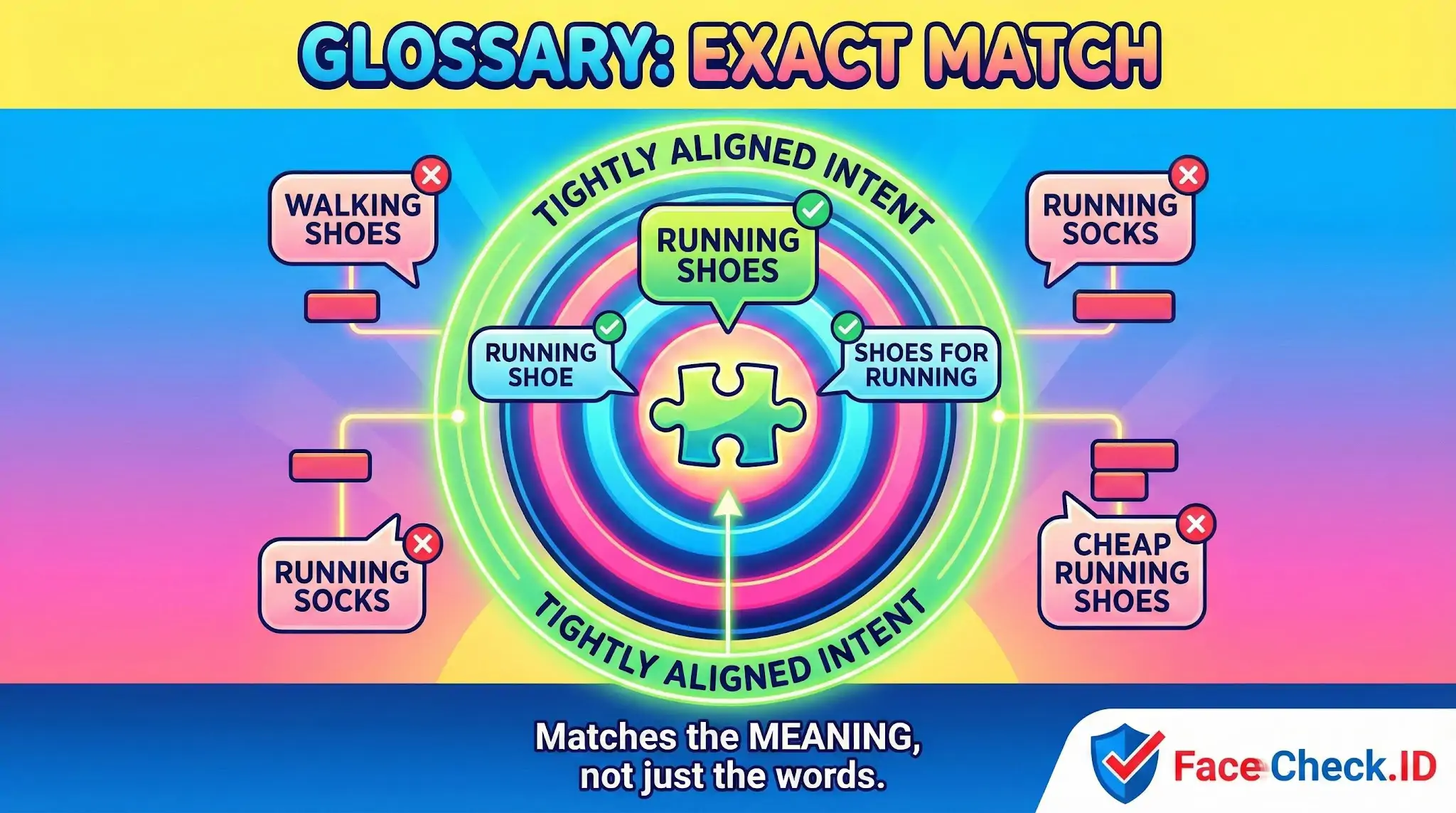
If your exact match keyword is:
- [running shoes]
Your ad may show for:
- running shoe
- shoes for running
- runing shoes
Your ad usually will not show for:
- walking shoes
- running socks
- cheap running shoes (if the added word changes the meaning you want to target)
Where Exact Match Is Used
Exact match is most commonly used in:
- Google Ads search campaigns
- Microsoft Advertising search campaigns
It can also be referenced in other platforms or tools that offer strict keyword matching.
Why Exact Match Matters
Exact match helps you:
- Control which searches trigger your ads
- Reduce irrelevant clicks
- Improve the quality of traffic
- Keep ad copy and landing pages closely aligned to the query
- Allocate budget to the most important, high intent terms
Benefits
- High relevance between keyword and query
- Stronger control over spend and targeting
- Easier performance analysis because traffic is more specific
Limitations
- Lower reach compared to broader match types
- You can miss valuable variations if the platform does not consider them the same meaning
- Still requires monitoring because close variants can bring in unexpected queries
Best Practices
- Use exact match for your most valuable products, services, or high converting terms
- Pair exact match with phrase match or broad match in separate ad groups or campaigns when you also need discovery
- Review search term reports regularly and add negative keywords to block unwanted traffic
- Keep ad and landing page messaging tightly aligned with the exact match keyword theme
FAQ
What does “Exact Match” mean in a face recognition search engine?
In face recognition search, “Exact Match” usually means the result is treated as the same person as the query face (a same-identity match), not just a similar-looking face. It does not necessarily mean the image file is an identical duplicate—only that the system believes the face belongs to the same individual under its matching threshold.
How is “Exact Match” different from an identical/duplicate photo match in regular reverse image search?
A regular reverse image search is strongest at finding the same or near-duplicate image (same pixels with crops/resizes/compression). An “Exact Match” in face recognition focuses on the face identity and can match different photos of the same person (different camera, angle, lighting, haircut), even when the overall image is not a duplicate.
What makes an “Exact Match” decision unreliable or misleading in face search results?
“Exact Match” can be wrong when the input face is low quality (blur, heavy compression, side profile), partially occluded (mask, glasses, hair), heavily edited/filtered, AI-generated, or taken under extreme lighting. These conditions can push the system toward near-look-alikes, causing a false same-person label even if the faces appear close.
How can I verify an “Exact Match” result before assuming it’s the same person?
Treat “Exact Match” as a lead: open the source page, check multiple photos on that page, and compare stable facial features across images (ear shape, eye spacing, nose/philtrum, jawline), not just hairstyle or makeup. Cross-check with additional independent sources (another site, another photo of the person, or another search tool) and look for consistent context (same name/handle, timeline, location cues) rather than relying on one hit.
If FaceCheck.ID shows an “Exact Match,” what is the safest way to interpret and use it?
Interpret it as a high-confidence similarity signal, not proof of identity. Use it to find candidate pages, then verify through the linked sources and corroborating evidence, and avoid sharing or acting on sensitive conclusions (e.g., accusations) based on one match. If the context is high-risk (mugshots, adult content, scam reports), apply extra verification and assume the possibility of wrong-person matches.


Recommended Posts Related to exact match
-
How to Find Anyone Online: A Comprehensive Guide to Internet Sleuthing
Start by entering the person's full name in quotation marks (e.g., "John Smith") to search for exact matches. Quotation marks: Use quotation marks around a phrase to search for exact matches.
-
How to Use Reverse Image Search to Find LinkedIn Profiles by a Photo
TinEye is a reverse image search engine that specializes in finding exact matches of an image. This can be helpful when searching for a LinkedIn profile since you want to find an exact match of the person in the photo.
-
Yandex Image Search: Complete Guide to Finding Faces (2026)
Other sizes of the same image (exact matches hosted elsewhere). Exact match findingGoodExcellent.
-
Reverse Image Search FAQ: The Ultimate Guide for 2025
Different search engines use different proprietary algorithms, with some specializing in exact matches (TinEye), others in finding similar images (Google), and others in specific content types like faces (FaceCheck.ID) or products. TinEye (specializes in exact matches and original sources). TinEye is best for finding exact matches and original sources.
-
How to Search Facebook by Photo
TinEye is another reverse image search engine that specializes in finding exact matches of an image, which is useful when you need to locate the original source of the image.
-
How to Find and Remove Nude Deepfakes With FaceCheck.ID
- Exact match limitations: If someone takes your face and places it into explicit content, Google and Bing won't connect these images because everything except your face has changed.
-
Tutorial: Reverse Image Search for Instagram
Sometimes, the exact match or a relevant profile might be further down the list, especially if the face in question has multiple profiles or fan pages.
-
What is The Most Accurate Reverse Image Search?
This will display similar or exact matches across various websites.
-
Best Reverse Image Search Engines Ranked (2026)
TinEye — Great for Exact Matches, Useless for Faces.
-
Top 6 Reverse Image Search Mobile Sites to Find People, Products, and Places
Strengths: Specializes in finding exact matches and can track where an image appears online.
-
Best Facial Recognition Search Engines (2026)
TinEye: Exact Match Only.
-
How to Spot a Catfish Online in Under 60 Seconds with FaceCheck.ID
No (exact match only).