Unknown Person: No Match in Face Search Results
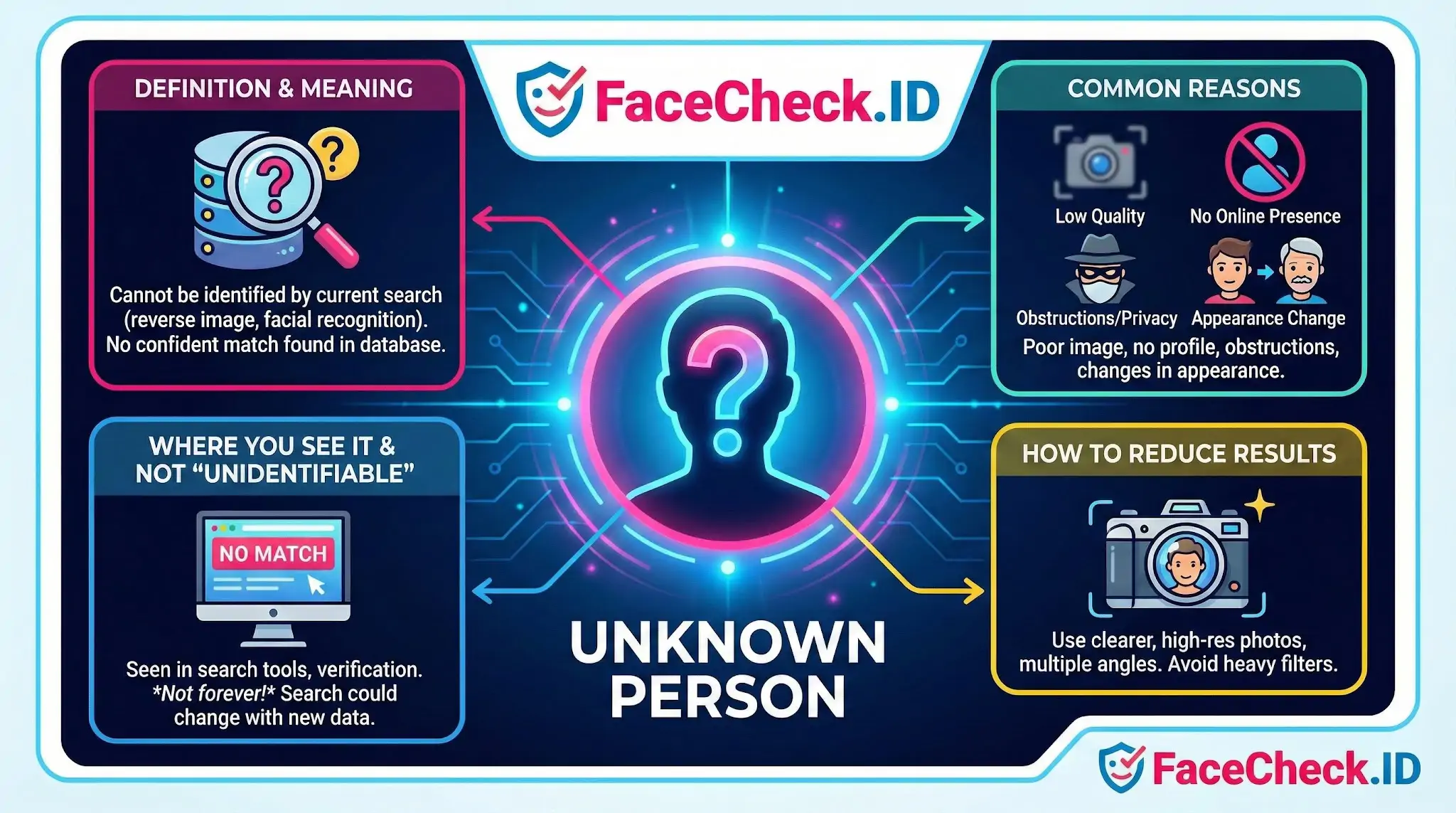
In a face-search context, an Unknown Person is a face that the system cannot confidently link to any indexed page, profile, or public record. It is one of the most common outcomes in reverse face search, and how you interpret it matters as much as a positive match.
What an Unknown Person result actually means
When FaceCheck.ID returns no usable matches, it does not mean the person is hiding or fake. It means the crawler has not found a public web page containing a face similar enough to clear the confidence threshold. The web is large but uneven. A graduate student with a single tagged Facebook photo from 2014 may be effectively invisible to face search, while a podcaster with three hundred reused headshots will surface within seconds.
A useful way to think about it: a face-search index is only as deep as the public images it has crawled. If the subject's photos sit behind privacy settings, on platforms that block scrapers, or simply do not exist online, the result will read as Unknown even though the person is perfectly identifiable in real life.
Why a face stays Unknown
Most Unknown results trace back to one of three problems: the query image, the subject's online footprint, or both.
- Query image issues: low resolution, motion blur, harsh shadows, extreme yaw or pitch, sunglasses, masks, heavy makeup, or aggressive filters. Anything that distorts the geometry the matcher relies on will lower confidence below the cutoff.
- Limited public presence: people who avoid social media, use pseudonymous accounts with no face photo, or only appear in private group chats and closed forums.
- Platform coverage gaps: dating apps, private Instagram accounts, region-locked sites, and certain professional networks are partially or fully outside what any reverse face engine can index.
- Appearance change: a photo from ten years ago, a different hairstyle, weight change, or facial hair can drop a real match below threshold even when the same person is online.
- Image reuse by someone else: if the photo is a stock image or a stolen catfish profile picture, the match may surface the original owner instead of the person you are investigating.
Practical steps when you keep getting Unknown
Before concluding that someone has no online presence, try to improve the query rather than the search.
- Use the sharpest, most front-facing photo you have. Crop tightly to the face but leave some margin around the jawline and hairline.
- Run multiple photos separately, including different angles, ages, and lighting conditions. Each photo queries the index independently.
- Strip filters and beauty-mode edits. Smoothed skin and warped features confuse the matcher.
- If you have a group photo, crop each face into its own search rather than uploading the whole frame.
- Re-run the search after a few weeks. Indexes update, and a profile that was private last month may be public now.
Investigative meaning of an Unknown result
In scam and catfish investigations, Unknown is a data point, not a verdict. A romance scammer using a stolen model photo will usually produce strong matches to the original owner's social accounts, so a clean Unknown on a supposed model or executive is itself a red flag worth weighing. On the other hand, a normal private person should often return Unknown, and treating that as suspicious would misread the result.
Limits of the Unknown label
Unknown does not prove a person is fake, anonymous, or hiding. It does not prove the photo is AI-generated, even though that is a growing cause of unmatched faces. It also does not prove the person is unidentifiable through other means. Public records, mutual contacts, EXIF data, background details in the photo, and reverse image search on the full picture rather than the cropped face can still produce leads. Face search is one input into an identity question, and the absence of a match should sharpen the next question rather than close the case.
FAQ
What does “Unknown Person” mean in the context of a face recognition search engine?
“Unknown Person” typically means the tool can detect and compare a face, but it cannot reliably attach a verified real-world name or identity to that face. Results are usually “possible matches” (similar faces and/or pages where that face appears), not confirmation of who the person is.
How should I interpret results when my query is an “Unknown Person”?
Treat results as investigative leads: review the source pages, compare multiple photos, and look for corroborating context (same username, consistent biographical details, same location/timeframe, multiple independent sources). Avoid concluding identity from a single match or a single website.
What are common reasons an “Unknown Person” face search returns many mixed matches?
Mixed matches often happen when the input photo is low quality (blur, compression, heavy filters), the face is partially occluded (mask, sunglasses, angle), lighting or age differs, or the person resembles many others. It can also happen if the person has limited public photos online or if many reposts/screenshots exist.
How can I reduce the risk of misidentifying an “Unknown Person” from face search results?
Use a clear, front-facing image with good lighting; crop to include the full face; run more than one photo if available; compare multiple independent matches; and verify with non-face clues (same handle, consistent friends/affiliations, timestamps, and cross-platform consistency). If consequences are serious, do not rely on face search alone.
How can FaceCheck.ID be useful when searching for an “Unknown Person” and what should I keep in mind?
FaceCheck.ID (like other face search tools) can help locate webpages where a similar face appears, which may reveal reposts, impersonation, or additional photos. Keep in mind that a “match” is not proof of identity—always open the source pages, verify context, and assume errors are possible, especially when results are close look-alikes or low-confidence matches.


Recommended Posts Related to unknown-person
-
How to Find an Unknown Person's Name and Details With Just a Picture
Whether you are trying to identify a person from a photograph you found or are seeking more details about someone you just met, this step-by-step guide will walk you through the process of finding an unknown person's name and details using just a picture. Find an Unknown Person's NameWith Just a Picture. To leverage Websleuths for identifying an unknown person from a picture, follow these steps:.
-
How to Use Reverse Image Search to Find LinkedIn Profiles by a Photo
Find Unknown Person Name and Details With Just a Pictures. Find Unknown Person Name and Details With Just a Pictures.
-
Searching Instagram by Photo: A Guide to Finding People and Accounts
Find Unknown Person Name and Details With Just a Pictures. Find Unknown Person Name and Details With Just a Pictures.
-
PimEyes Free Alternatives That Actually Work (2026)
For identifying an unknown person from a dating app?