Facial Recognition Software
Facial recognition software is the engine behind reverse face search tools like FaceCheck.ID. Instead of matching keywords or filenames, it reads the geometry of a face in an uploaded photo and looks for the same person across publicly indexed images on the web, including social profiles, news articles, blogs, dating sites, and mugshot databases.
How facial recognition software powers face search
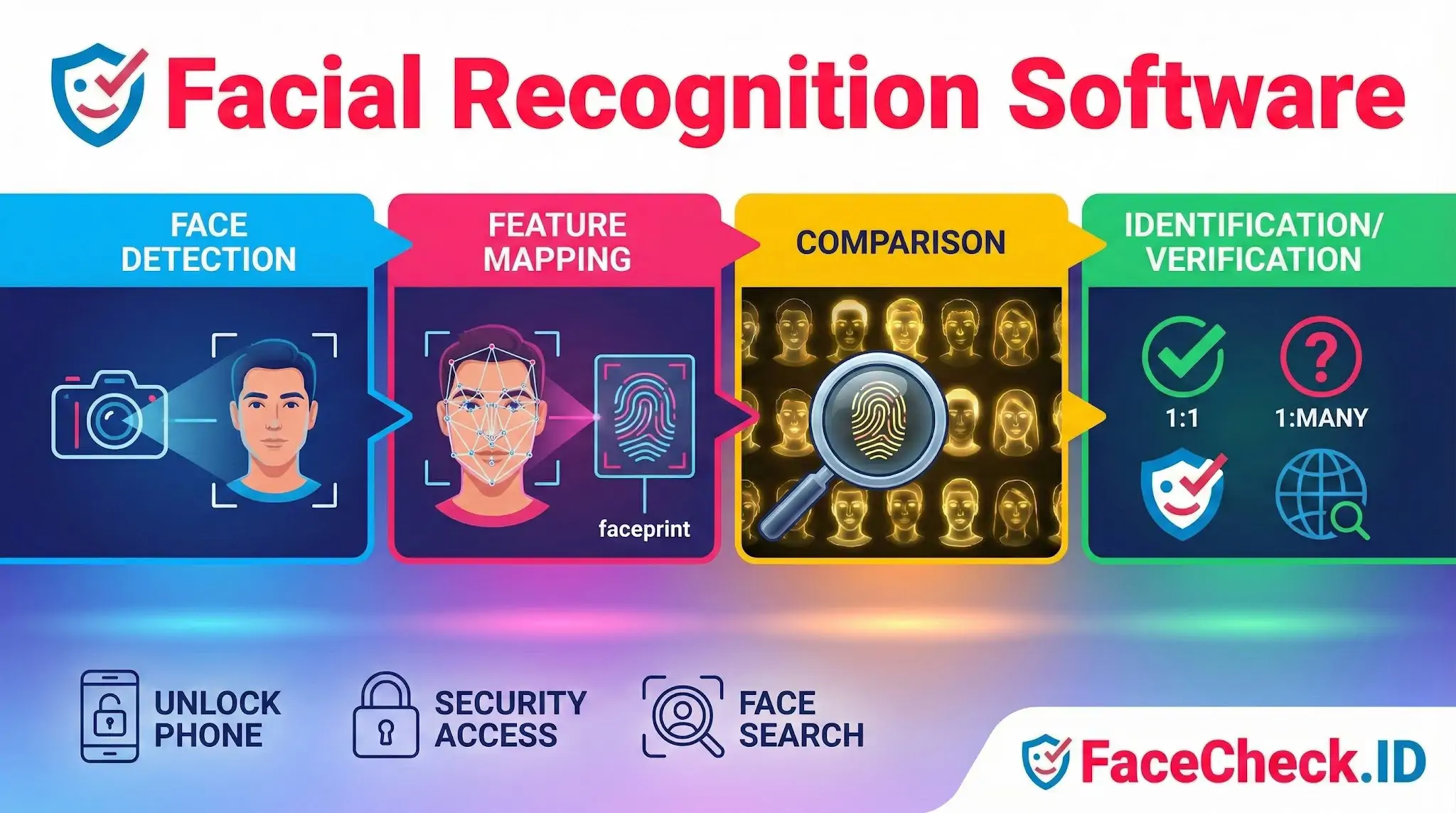
A reverse face search starts with detection. The system isolates the face in the uploaded image, ignoring the background, clothing, and other people in the frame. It then converts the visible facial structure into a numeric template, often called an embedding or faceprint. That template encodes relationships between features such as the distance between the eyes, the shape of the jawline, and the contours around the nose and mouth.
Once the template exists, the software compares it against templates extracted from a large index of public images. Each comparison returns a similarity score. Results above a certain threshold get returned as candidate matches, usually ranked by confidence. A high score suggests the same person appears in both photos. A medium score might mean a relative, a lookalike, or the same person under bad lighting.
Two operating modes matter here:
- Verification (1:1) asks whether two specific photos show the same person. This is what your phone does at unlock.
- Identification (1:many) asks who an unknown face might be by searching a large pool of images. This is what FaceCheck.ID and similar tools do.
The 1:many problem is harder. The bigger the index, the more chances for false positives, especially with common face shapes or low-quality query images.
What affects match quality
Real-world face search rarely delivers clean results from a perfect studio portrait. The query image usually comes from a screenshot, a dating profile, a Telegram avatar, or a cropped group photo. Several factors decide whether the software returns useful matches:
- Face angle. Frontal or near-frontal shots produce stronger embeddings than profile or three-quarter views.
- Resolution. A face occupying fewer than around 100 pixels across loses detail the model relies on.
- Lighting. Harsh shadows, backlighting, and heavy filters distort feature relationships.
- Occlusions. Sunglasses, masks, hats, and hair across the face cut accuracy.
- Age gap. A current photo may not match a profile picture taken ten years earlier.
- Editing. Heavy beautification filters, AI face smoothing, and face-swap apps can pull a real person far from their actual faceprint.
Image source also matters for what gets found. LinkedIn headshots tend to surface cleanly because they are well-lit, frontal, and reused across employer pages, conference sites, and press releases. A blurry nightclub selfie may match nothing even if the person has a heavy online footprint.
Where facial recognition fits in identity investigations
People use face search for catfish detection, verifying dating app matches, checking if a photo was stolen from someone else, locating old accounts, researching scammers who reuse stock or stolen images, and identifying people from screenshots. The software does not read names. It returns image links, and the investigator works backward from those pages to figure out who the person is and whether the context lines up.
This is also where false positives become dangerous. A 90-something similarity score on a single result is not proof. Two unrelated people can share enough facial structure to confuse a model, particularly across different ethnicities the model was less trained on, or when the query photo is poor.
What facial recognition software cannot prove
A match shows that two faces look extremely similar. It does not prove the same person posted both images, that the account is current, or that the person on the other end of a chat is who their photo claims to be. Stolen photos, recycled stock images, and AI-generated faces all show up in real searches. A photo on a fraud-report blog does not automatically mean the matched person is a fraudster, and a clean-looking LinkedIn profile does not rule out an impersonator.
Treat results as leads. Confirm identity through multiple matching pages, consistent usernames, and context that holds together across sources, rather than a single high-confidence row in a results list.
FAQ
What is Facial Recognition Software in the context of a face recognition search engine?
In face recognition search engines, Facial Recognition Software is the technology that detects a face in a photo, converts it into a mathematical representation (often called an embedding or face template), and then compares that representation against an indexed set of other faces to retrieve visually similar matches.
How does Facial Recognition Software decide what to show first in face search results?
Most face search tools rank results by similarity between the uploaded face’s embedding and candidate embeddings in their index. Higher-ranked results usually share more facial-feature geometry in the model’s feature space, but ranking can also be influenced by image quality (sharpness, lighting, pose) and whether the engine groups near-duplicates or multiple sightings from the same source.
What are the biggest limitations of Facial Recognition Software for open-web face search?
Open-web face search is limited by what is actually indexed and accessible (many pages are private, blocked, or not crawled), and by image conditions (low resolution, heavy compression, extreme angles, masks, and occlusions). Even strong models can return look-alikes, outdated images, or unrelated people when the query photo is low quality or when many similar-looking faces exist.
How can Facial Recognition Software be misused, and what safe-usage rules should I follow?
It can be misused for stalking, harassment, doxxing, or making unverified accusations. Safer practice is to treat results as investigative leads, not proof of identity; verify using multiple independent signals (consistent usernames, timestamps, locations, corroborating photos, and context); avoid publishing personal data; and follow applicable privacy laws, site terms, and consent norms—especially when the subject could be a private individual.
If I use a tool like FaceCheck.ID, what does Facial Recognition Software actually do with my photo and results?
In tools such as FaceCheck.ID, the facial recognition component typically extracts a face embedding from your uploaded image and searches the service’s indexed sources for similar embeddings, returning links or source pages where similar faces appear. You should assume uploads and search logs may create privacy risk, so only upload images you have the right to use, minimize sensitive metadata (crop to the face, remove backgrounds when possible), and use any available opt-out/removal channels if your own face appears in results.


Recommended Posts Related to facial-recognition-software
-
Leveraging Facial Recognition Technology to Combat Human Trafficking
Facial recognition software, such as FaceCheck.ID's facial search engine, plays a critical role in these investigations by analyzing facial features and comparing them with social media profiles, escort workers, and wanted criminals. Facial Recognition Software.
-
Facial Recognition Resources
Amazon Pauses Police Use of Its Facial Recognition Software. The announcement was a striking change for Amazon, a prominent supplier of facial recognition software to law enforcement. The New York Times has developed a tool called Who The Hill that uses facial recognition software to identify members of Congress.
-
Google's Image Search vs. Yandex's Image Search: A Detailed Look
Facial Recognition Software: Use and Databases. Facial recognition software is now widely available.
-
Is There a FREE Facial Recognition Site?
I tried Amazon's controversial facial recognition software. I tried Amazon's controversial facial recognition software.
-
Find YouTubers by Photo using Facial Recognition
The site uses facial recognition software to search for matches.