Face Search Explained: How It Works, Uses & Privacy
Definition
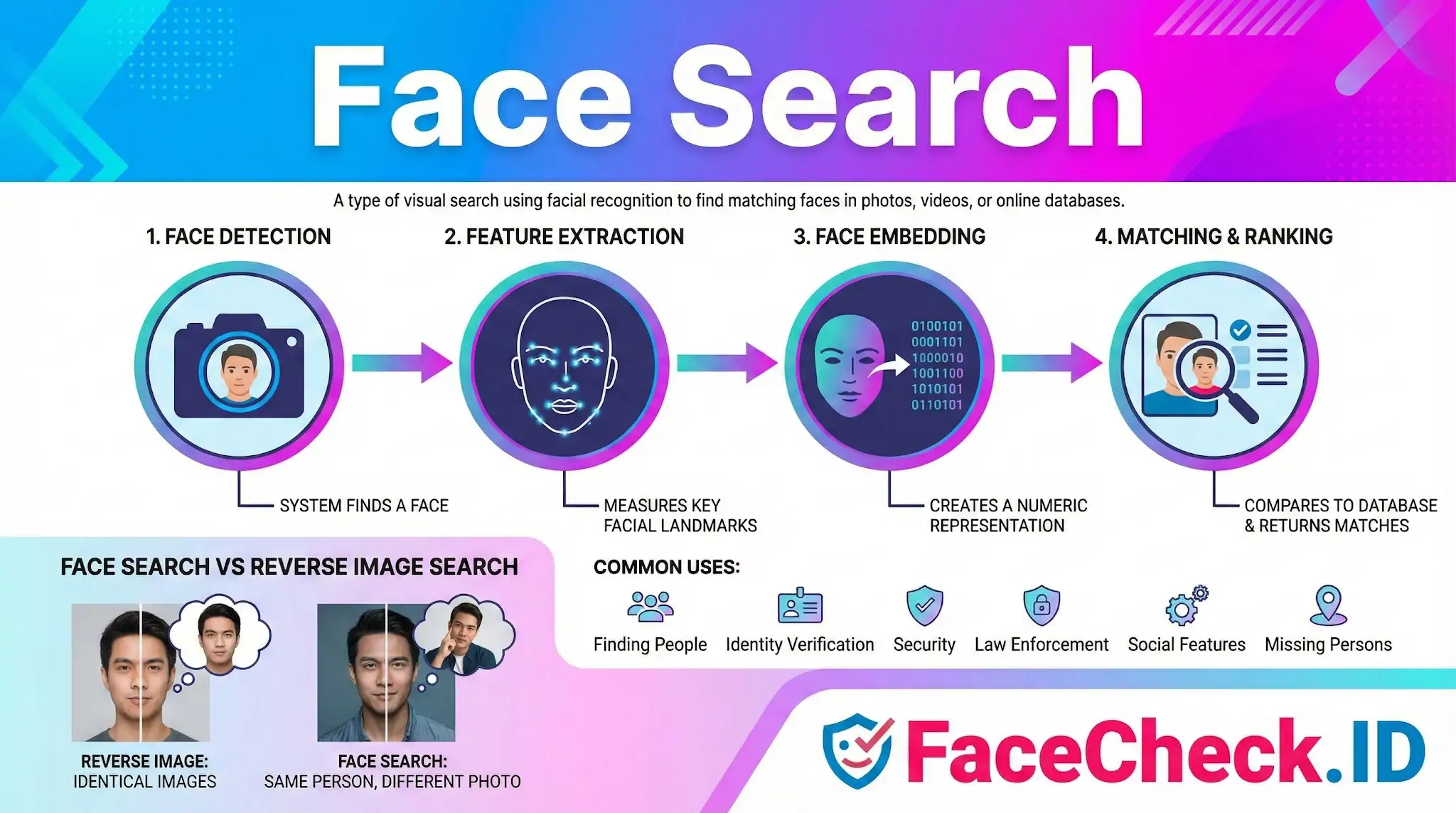
Face search is a type of visual search that uses facial recognition to find a person or matching faces in photos, videos, or online databases. Instead of typing a name, you upload an image or capture a face with a camera, and the system returns results based on facial features.
How face search works
Face search tools typically follow a few steps:
- Face detection
The system finds a face in an image or video frame.
- Feature extraction
It measures key facial landmarks and patterns, such as the distance between eyes, nose shape, jawline, and overall face geometry.
- Face embedding creation
Those measurements are converted into a numeric representation that can be compared with other faces.
- Matching and ranking
The tool compares the face embedding to a database and returns the closest matches, usually sorted by similarity score.
Common uses of face search
- Finding a person in large photo libraries such as personal cloud storage or company media archives
- Identity verification for account access, check ins, or fraud prevention
- Security and surveillance to locate known individuals in camera feeds
- Law enforcement investigations to match faces against records, depending on local laws
- Social and networking features like photo tagging suggestions, when enabled
- Missing person searches in approved programs using verified databases
Face search vs reverse image search
Reverse image search looks for identical or very similar images across the web. Face search focuses on the face itself, so it can sometimes find the same person even if the photo is different, cropped, edited, or taken from another angle.
Accuracy factors
Results can vary based on:
- Image quality, lighting, and resolution
- Face angle and expression changes
- Occlusions like masks, sunglasses, or hair covering the face
- Age differences between photos
- Dataset coverage and how up to date the database is
- Bias and performance differences across demographics, depending on the model and training data
Privacy and legal considerations
Face search can be sensitive because it involves biometric data. Many regions regulate how facial data can be collected, stored, and used. If you use face search tools, follow local laws, get consent when required, and understand the tool’s data retention and sharing policies.
Practical tips for better face search results
- Use a clear, front facing photo with good lighting
- Avoid heavy filters or extreme edits
- Choose an image where the face is not blurry and both eyes are visible
- If possible, try multiple photos from different angles
FAQ
What is “Face Search” in the context of face recognition search engines?
“Face Search” is the process of submitting a face photo (or face crop) to a face-recognition system that compares the face’s visual features against an indexed collection of images to find likely matches. Unlike keyword search, it relies on facial similarity rather than names, captions, or tags.
What is the difference between “same-person matches” and “similar-face matches” in Face Search?
Same-person matches aim to find other photos of the exact same individual, even if the images differ (angle, lighting, aging). Similar-face matches return people who look alike but may be different individuals. Many tools mix both types in results, so users should treat matches as leads and verify using non-face context (source, timeline, corroborating identifiers).
What are common legitimate use cases for Face Search, and what uses should be avoided?
Legitimate uses can include checking whether your own images are being reused without consent, investigating impersonation or stolen profile photos, and basic due-diligence for fraud prevention. Uses to avoid include stalking, harassment, doxxing, or trying to “identify” someone in a way that could cause harm without strong independent verification.
Why can Face Search results change over time even for the same uploaded photo?
Results can change because the search engine’s index changes (new pages added, old pages removed, links updated), ranking and filtering rules are adjusted, or the underlying recognition model is updated. As a result, repeated searches may surface new matches or reorder prior matches.
If I find my face in results on a face search tool (e.g., FaceCheck.ID), what should I do?
First, open the result source page to confirm it really contains your image and isn’t a look-alike or mislinked page. Then document the URL(s) and context (screenshots, timestamps). Next, use the site’s removal/opt-out and the original hosting site’s takedown/reporting process where applicable; many tools (including FaceCheck.ID) typically provide guidance or mechanisms for reporting or requesting removal. If the use is abusive (impersonation, extortion), consider reporting to the relevant platform and, if necessary, local authorities.


Recommended Posts Related to face search
-
The 4 Simple Steps To Find Someone Using Face Search Engine
With the release of FaceCheck.ID new face search engine, people are wondering how this technology works and what implications it may have. A face search engine is a powerful tool that can be used to find almost anyone online. What is a face search engine?
-
Uncover the Truth Before Your First Date
How a Face Search Engine Can Save You from Scammers and Sex Offenders in Online Dating. One such precaution is using a face search engine to vet your date and avoid potentially dangerous situations with scammers or sex offenders. Advantages of Using a Face Search Engine.
-
How to Reverse Face Search: Find Anyone by Photo (2026)
What you need is a reverse face search: a tool built specifically to match human faces across the internet. What Is a Reverse Face Search (And How Is It Different)? A reverse face search flips the approach entirely.
-
Instagram Image Search to Find Instagram Profile by Photo using Face Search Engine
We'll show you how to use a face search engine to do an Instagram image search and find an Instagram profile by photo. Even so, if the profile is not private you may be able to find the profile using a 3rd party face search engine FaceCheck.ID. This is also known as a face search engine.
-
Find OnlyFans Profile by Photo using Face Search Engine
With a new reverse image search tool called FaceCheck.ID face search engine, you can now find an OnlyFans profile by photo using the power of facial recognition. However, there is a 3rd party tool called FaceCheck.ID face search engine that can search OnlyFans and other social media websites. This may take a few moments since the facial search engine is searching millions of OnlyFans profile pics and posts for your person of interest.
-
Why Google Images Fails at Face Searches
Google Images isn't designed for facial recognition and even blocks face searches. Here's the scoop: Google Images isn't designed for facial recognition and even blocks face searches. Let's break down why Google Images flops for face searches and how FaceCheck.ID swoops in to save the day with a fun, friendly, and super-smart approach.
-
Find Twitter Profiles by Photo using Search by Face Engine
This can be done with the help of a face search engine called FaceCheck.ID. However, you can use a 3rd party face search engine FaceCheck.ID to search for Twitter profiles by image. But with Face Search Engine, you can effortlessly search for Twitter profiles by photo.
-
Image Search to Find Facebook Profiles by Photo using Face Search Engine
The short answer is: Yes, you can find a person's profile on Facebook given just a photo with a 3rd party face search engine called FaceCheck.ID. No, the Facebook app does not have a face search engine. However, there are several face search engines available online, and you can use one of these to find someone's profile by searching for their photo.
-
Facebook Face Search: Find People by Photo (2026)
No face search on Facebook. A few specialized face search engines index publicly available photos from social media platforms, including Facebook. PimEyes is another face search engine that crawls publicly available images.
-
LinkedIn Reverse Image Search to Find LinkedIn Profiles by Photo Using Facial Recognition
With the new face search engine FaceCheck.ID, you can search for LinkedIn profiles by photo using the latest facial recognition technology. What is a Reverse Image Face Search? A reverse image face search is simply a search engine that takes an image as input and then searches the internet for similar images.
-
PimEyes Review: Is It Worth the Price in 2026?
It's one of the most talked-about face search engines on the internet, and for good reason: it genuinely works. PimEyes is a face search engine built on facial recognition technology. If someone has very few public photos online, no face search engine will find them.
-
How to Find Someone by Doing Reverse Face Search
A reverse face search is a great way to find a person of interest. Google Photos reverse face search is useful when spotting stolen or fake images. Yandex reverse face search features a good face recognition algorithm that can match faces in photographs.
-
How to Search Arrest Records and Mugshots by a Photo of a Person
With FaceCheck.ID you can upload a photo of a person's face, and our reverse face search engine will scour the darkest corners of the Internet for matching mugshots, arrests, and criminals featured in the news. FaceCheck facial search engine allows you to upload a picture of the person's face, which can be helpful if you don't know their name. FaceCheck face search engine website specializes in finding people by face photo.
-
Top 4 Benefits of Facial Recognition in Online Dating with FaceCheck.ID
With its advanced technology, FaceCheck.ID face search engine is helping to increase the confidence and safety of online daters everywhere. In short, FaceCheck.ID face search helps increase the safety of online dating by checking someone's pic against a database of scammers and providing more information about their background, allowing users to make informed decisions about who they are communicating with and reducing the risk of being scammed or catfished. Using FaceCheck.ID face search engine can also help build trust and lead to deeper connections between online daters.
-
Doppelgänger Effect in Facial Recognition Technology
How to Ensure Accurate Results and Minimize False Positive Matches in Facial Searches. Users of facial recognition systems should be aware of the Doppelgänger Effect when performing facial searches, as it can impact the accuracy of the results. Use multiple data sources: To increase the accuracy of the results, users should use multiple data sources when performing facial searches.
-
Tutorial: Reverse Image Search for Instagram
While Instagram doesn't offer a built-in reverse image search feature, and Google's face search capabilities are non-existent, there's a specialized solution that bridges this gap: FaceCheck.ID. The Need for a Dedicated Face Search Engine for Instagram. Here's why a dedicated face search engine for Instagram is more than just a luxury:.
-
Searching Instagram by Photo: A Guide to Finding People and Accounts
While Instagram itself does not provide a built-in reverse image search feature, FaceCheck.ID is the only facial search engine built specifically for searching Instagram. With FaceCheck.ID, you can also leverage its powerful facial search capabilities to find them on Instagram, especially if they use the same profile picture across different platforms. By uploading a photo of the person, the facial search engine will scan Instagram profiles to find a match, making it one of the most effective tools for locating someone on the platform.
-
Best Reverse Image Search Engines Ranked (2026)
FaceCheck.id is purpose-built for face search. It's fine for products, landmarks, and finding image sources, but returns the same "visually similar but wrong person" results for face searches. What's the difference between reverse image search and face search?
-
Social Catfish Review: Is It Actually Worth Your Money in 2026?
Run their photo through a face search first, and let the results tell you whether you're dealing with a real person or a fabricated identity. FaceCheck.id also won't find a matching identity (because the person doesn't exist), but it has an important advantage: when a face search returns zero results across the entire indexed web, that itself is a strong signal. Where Social Catfish Beats Face Search.
-
How to Use Reverse Image Search to Find LinkedIn Profiles by a Photo
In this article, we will guide you through the process and recommend the best facial search engine for your needs. Why FaceCheck.ID is the Best Facial Search Engine for LinkedIn.