Face Recognition Search Engine: How It Works
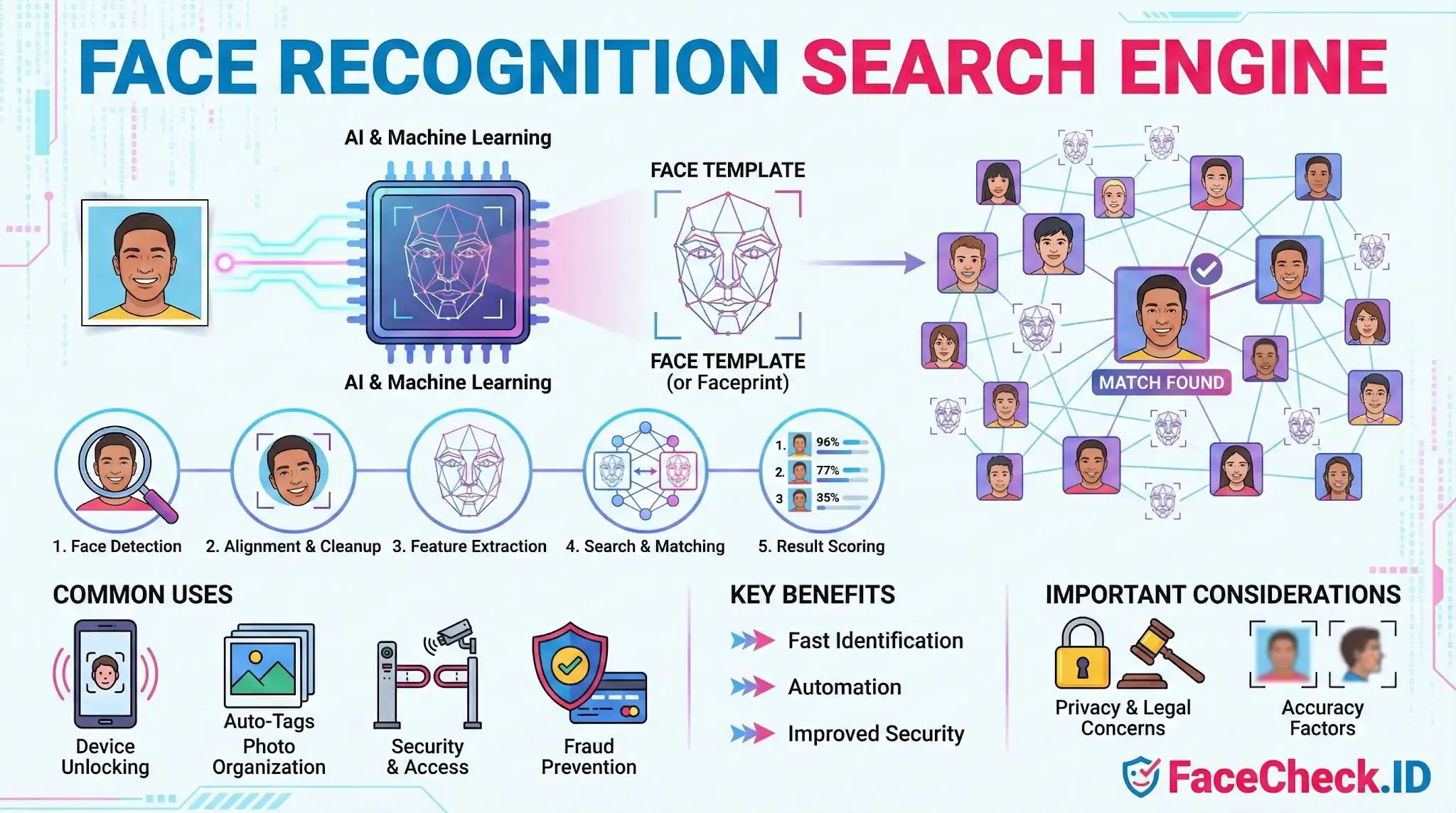
A face recognition search engine is a software tool that uses AI and machine learning to detect, analyze, and match faces found in photos or video frames. It turns a face into a mathematical pattern called a face template (or faceprint) based on features like eye spacing, nose shape, and jawline, then searches a database to find the same person or similar faces.
How a Face Recognition Search Engine Works
- Face detection: Finds a face in an image or video frame.
- Face alignment and cleanup: Adjusts for lighting, angle, and position to improve accuracy.
- Feature extraction: Creates a unique template that represents the face.
- Search and matching: Compares the template against stored templates in a database.
- Result scoring: Returns likely matches ranked by similarity score.
Common Uses
- Phone and device unlocking using biometric login
- Photo organization and auto tagging in galleries and social platforms
- Security and access control for buildings, airports, and events
- Fraud prevention in banking, payments, and account verification
- Identity verification for onboarding and KYC workflows
Key Benefits
- Fast identification across large image collections
- Automation that reduces manual review time
- Improved security when combined with strong access policies
Important Considerations
Face recognition can raise privacy and legal concerns. Accuracy can also vary based on image quality, camera angles, and dataset limitations. Many organizations add safeguards like user consent, clear retention policies, and human review for high risk decisions.
FAQ
What is a face recognition search engine, and how is it different from a regular image search?
A face recognition search engine lets you upload a face photo and searches for visually similar faces across indexed images, using facial features rather than keywords, filenames, or surrounding text. Regular image search primarily relies on text signals (captions, metadata, page content) and general visual similarity, not a dedicated face-embedding match.
What kind of photo works best for a face recognition search?
Use a clear, front-facing image with good lighting, minimal blur, and the full face visible (especially eyes, nose, and mouth). Avoid heavy filters, strong angles, extreme facial expressions, low resolution, and images where the face is partially covered by sunglasses, masks, hands, or hair.
Where do face recognition search engines get the images they search?
They typically search images from sources they have indexed, such as publicly accessible web pages, social networks that allow crawling, news sites, forums, and other online repositories. The exact coverage depends on each service’s crawling/indexing methods, partnerships, and policies, so results vary between platforms (including services like FaceCheck.ID).
Do face recognition search engines store my uploaded photo or biometric data?
It depends on the provider. Some services may temporarily process your image to create a face template (embedding) for matching, and may retain the upload, derived template, or search logs for security, debugging, abuse prevention, or product improvement. Always check the service’s privacy policy and retention settings; if available, prefer options that minimize storage and allow deletion.
How can I request removal or opt out if my face appears in search results?
First identify the specific result URLs where the image appears. Then use the search engine’s removal/opt-out process (if provided) and also contact the original website hosting the image to request deletion or restriction, because search results often reappear if the source remains online. Some face search services, including FaceCheck.ID, may offer a takedown or opt-out mechanism you can follow for their index.


Recommended Posts Related to face recognition search engine
-
How to Run Background Check Using Face Recognition Search Engine
Face recognition search engine to run a background check. A face recognition search engine FaceCheck is an great alternative or a value addition to a regular background check. Background Check Using Face Recognition Search Engine.
-
How can I find a person with just a picture?
This journey led me to a tool that seemed like the answer to my prayers: FaceCheck.ID, a face recognition search engine. My search for answers led me to an intriguing discovery: FaceCheck.ID, a face recognition search engine that seemed to offer a solution to my predicament.
-
New Search-by-Face Tool for Investigative Journalists
Among the array of tools available to journalists today, FaceCheck.ID, a facial recognition search engine, stands out for its potential to significantly enhance investigative work. At its core, FaceCheck.ID is a facial recognition search engine.
-
How to Search Instagram by Image
I've been there too, and that's why I turned to FaceCheck.ID, a facial recognition search engine that's reshaping how we search for people on Instagram.
-
How to Find Pictures of Your Girlfriend Online
FaceCheck.ID is a popular facial recognition search engine that allows you to find pictures of your girlfriend online by uploading her photo.
-
How to Spot a Catfish Online in Under 60 Seconds with FaceCheck.ID
But there's a fast, effective defense against romance fraud: FaceCheck.ID, a specialized facial recognition search engine built specifically to combat catfishing and identity deception.
-
LinkedIn Reverse Image Search to Find LinkedIn Profiles by Photo Using Facial Recognition
Facial Recognition Search Engine for LinkedIn. If you're looking for someone on LinkedIn, but all you have is a picture of them, you can still find their profile using the facial recognition search engine FaceCheck.ID.
-
How to Use Reverse Image Search to Find LinkedIn Profiles by a Photo
PimEyes is a facial recognition search engine that allows users to search for images of thier own photo. FaceCheck.ID is a facial recognition search engine that specializes in finding social media profiles.
-
How to Find People on VK.com by Photo
FaceCheck.ID is a facial recognition search engine that matches photos to public profiles on VK.com.
-
How to Search Facebook by Photo
PimEyes is a facial recognition search engine that uses AI algorithms to find people online. FaceCheck.ID is a facial recognition search engine designed specifically for finding social media profiles using a photo.
-
Leveraging Facial Recognition Technology to Combat Human Trafficking
FaceCheck.ID: A specialized facial recognition search engine for finding social media accounts, escort ads, or mugshots of both perpetrators and victims of human trafficking.
-
Instagram Image Search to Find Instagram Profile by Photo using Face Search Engine
By using the facial recognition search engine FaceCheck.ID, you can find just about any Instagram profile by searching for a photo of a person's face.
-
Top 7 Reverse Image Search Engines for Face Search Compared
PimEyes is a great facial recognition search engine that's designed for finding your own photo on the Internet.
-
Elder Fraud Statistics 2025: FTC Reports $2.4 Billion Lost to Scams Targeting Seniors
FaceCheck.ID — facial recognition search engine.
-
Can You Reverse Image Search a Face?
PimEyes is a facial recognition search engine that creates a "face print" from uploaded photos and searches the web for similar images.
-
Yilong Ma: Elon Musk's Doppelgänger or a Deepfake Masterpiece?
An intriguing aspect of the Yilong Ma controversy is the results obtained from the facial recognition search engine, FaceCheck.ID.
-
How to Find Someone by Doing Reverse Face Search
FaceCheck is a cutting-edge face recognition search engine, providing the quickest, simplest, and most accurate way to run a due diligence check on someone.
-
How to Find Someone on Instagram Using a Picture
PimEyes: PimEyes is an advanced facial recognition search engine that allows users to upload a photo and search for matching faces across the internet.
-
Best Reverse Image Search Engines Ranked (2026)
PimEyes is a facial recognition search engine similar to FaceCheck.id.