Similar Images Explained: What Counts as Visually Related
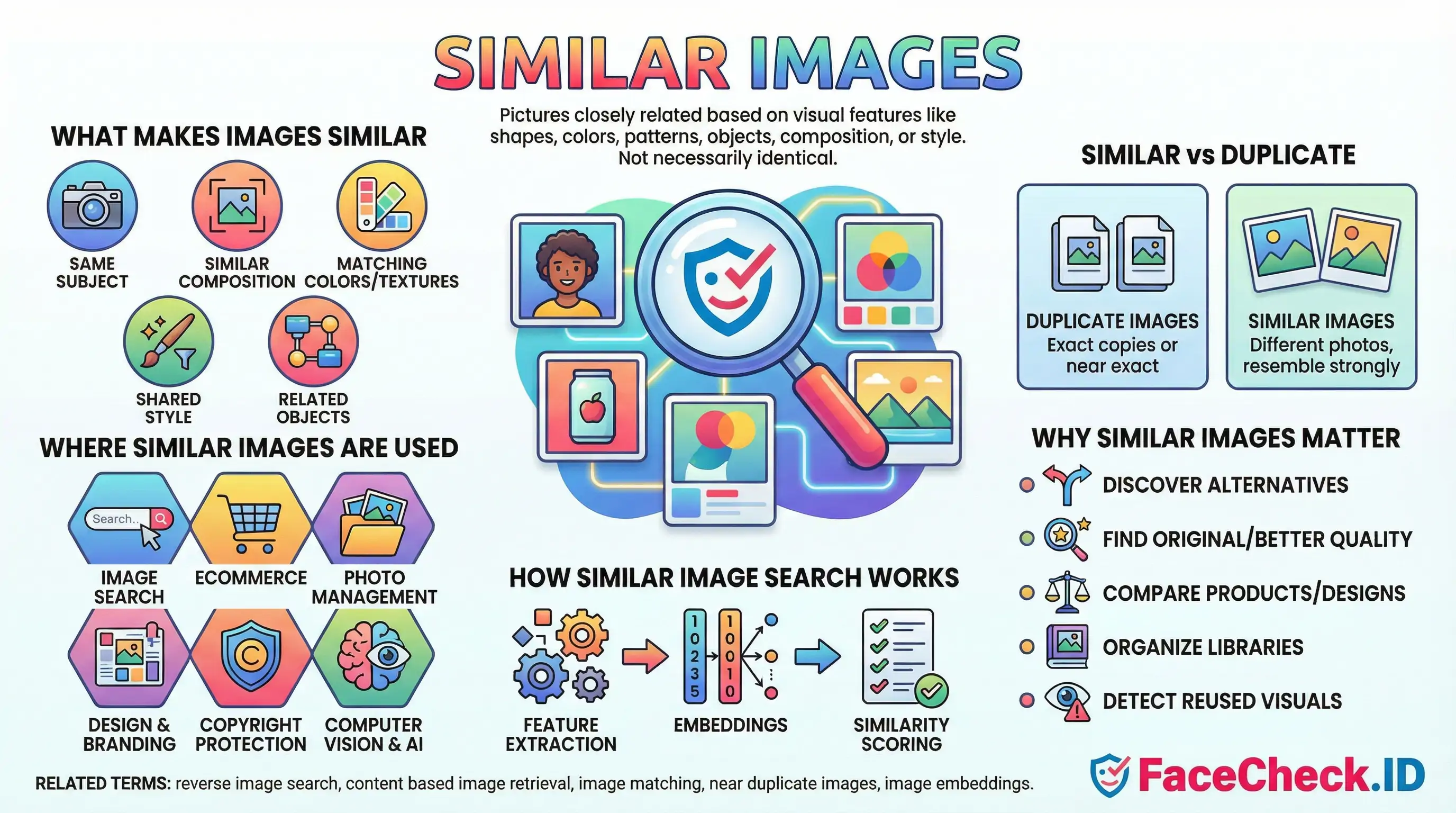
Similar images are pictures that look closely related to another image based on visual features such as shapes, colors, patterns, objects, composition, or style. They are not necessarily identical copies. Instead, they share enough visual similarity that a tool or a person can group them together as related.
What makes images similar
Similar images usually match in one or more of these ways:
- Same subject: the same product, person, place, or landmark photographed from a different angle or at a different time
- Similar composition: framing, perspective, and layout look alike
- Matching colors and textures: similar color palettes, lighting, or surface detail
- Shared style: same illustration style, filter, aesthetic, or design theme
- Related objects: items that commonly appear together, like a phone and its case
Similar images vs duplicate images
- Duplicate images are exact or near exact copies, often the same file saved again, resized, or slightly edited.
- Similar images may be different photos or graphics, but they resemble each other strongly in content or appearance.
Where similar images are used
- Image search: finding visually related results when you click or upload an image
- Ecommerce: showing alternative products or different color options based on a product photo
- Photo management: grouping lookalike shots to help you choose the best one and remove near duplicates
- Design and branding: finding visuals that match a specific look for mood boards and campaigns
- Copyright and brand protection: spotting images that are visually close to protected assets
- Computer vision and AI: training and evaluating models for recognition, retrieval, and classification
How similar image search works
Most systems use visual similarity rather than filenames or captions. Common approaches include:
- Feature extraction: detecting edges, shapes, and textures
- Embeddings: converting images into numeric vectors so similar pictures end up close together
- Similarity scoring: ranking results by how closely they match the query image
Why similar images matter
Similar images help people quickly:
- discover alternatives and variations
- find the original source or higher quality versions
- compare products and designs
- organize large photo libraries
- detect lookalike or reused visuals
FAQ
What does “Similar Images” mean in a face recognition search engine?
“Similar Images” usually means the engine is returning photos whose faces have a close visual similarity to the uploaded face (based on facial features/embeddings), not necessarily the exact same photo and not necessarily the same person.
How are “Similar Images” different from exact (duplicate) reverse image search results?
Exact reverse image search focuses on the whole image and tends to find identical or near-duplicate copies (same photo, crop, resize, or slight edits). “Similar Images” in face search focuses on the face region and can return different photos (different camera, pose, lighting, time) that the model believes depict the same or a very similar-looking face.
Why can “Similar Images” include different people who look alike?
Face search similarity is based on how close two face representations are in the model’s feature space. Look-alikes can land close together due to shared facial structure, similar hairstyle/makeup, comparable lighting/angle, low-resolution images, heavy compression, filters, or AI-generated/edited faces—so the engine may rank a different person highly.
How can I refine “Similar Images” results to reduce wrong-person matches?
Use a clearer input (front-facing, sharp, well-lit, minimal blur), crop tightly to one face, avoid screenshots with overlays, and try multiple photos of the same person (different angles/expressions) to see which results repeat. Then validate candidates by checking non-face cues (tattoos, scars, age, context, consistent usernames, linked profiles, and cross-site consistency) before assuming a match is the same individual.
How should I interpret “Similar Images” results on FaceCheck.ID or similar tools?
Treat “Similar Images” as investigative leads, not identity proof. On tools like FaceCheck.ID, use the results to discover where similar-looking faces appear online, then verify by opening the source pages, checking whether multiple independent sources consistently point to the same person, and confirming with additional evidence (dates, context, other photos, and corroborating identifiers) before taking any action.


Recommended Posts Related to similar images
-
Demystifying Image Search: The Difference Between Reverse Image Search, Visual Search, and Face Recognition Search
Simply upload an image (or provide an image URL) to a search engine, which uses algorithms to find similar images on the web. Visual Search represents a more advanced technology that not only finds similar images but also understands the content within the image to provide more contextually relevant search results.
-
AI Face Search: How It Works and Best Tools (2026)
Google Images uses perceptual hashing and object recognition to find visually similar images. Google Lens will tell you the photo contains "a person" and suggest visually similar images. Reverse image search (Google, TinEye) finds copies or visually similar images by matching pixel patterns.
-
Search Instagram by Photo with Reverse Image Instagram Search Engine
When you upload a picture, the search engine looks for visually similar images on the internet and returns results that match the image. The search engine will show you visually similar images, so you'll need to compare them to the original image to find the right one.
-
Reverse Image Search FAQ: The Ultimate Guide for 2025
Finding visually similar images. Finding identical or visually similar images. The system returns visually similar images.
-
Top 7 Reverse Image Search Engines for Face Search Compared
TinEye is another popular choice that's known for its ability to find similar images, Yandex Images, and Image Raider are other options. Google Images reverse image search is a handy tool that can be used to find additional information about an image or to find similar images. Once you've done that, Google will show you results for similar images, as well as any information that it has about the image itself.
-
How to Find Images on the Web
Free reverse image search is a great tool to use when you need to find a similar image on the web. To find a similar image, you need to copy and paste the URL of the image in the web browser. With this feature, you can find similar images with similar backgrounds, all for free!
-
LinkedIn Reverse Image Search to Find LinkedIn Profiles by Photo Using Facial Recognition
A reverse image face search is simply a search engine that takes an image as input and then searches the internet for similar images. TinEye will return any similar images it finds and the websites where those images appear. Google Images will return any similar images it finds.
-
Yandex Image Search: Complete Guide to Finding Faces (2026)
Review the results under "Similar images" and "Sites with this image". Similar images (visually related, this is where face matches appear). The "Similar images" section is where the magic happens for face searches.
-
How to Search Facebook by Photo
The search engine will show you visually similar images, so you'll need to compare them to the original image to find the right one. You can upload a picture to a search engine, which then searches for similar images.
-
Searching Instagram by Photo: A Guide to Finding People and Accounts
By uploading an image to FaceCheck.ID, you can potentially find Instagram accounts associated with that photo or similar images. Google offers similar images and detailed identification.
-
Free Reverse Image Search Tools That Actually Work (2026)
You'll get "visually similar" images that match hair color or background, not the actual person. Check the "Similar images" section for face-like matches.
-
How to Find Someone on Instagram Using a Picture
They are designed to find similar images or sources of an image rather than identifying individuals in a photo. It has been noted for its ability to recognize faces and similar images, which can be useful in identifying profiles on social media platforms like Instagram.
-
How to Find Stolen Images on the Internet
Even the best systems aren’t perfect; results depend on the quality of the uploaded photo and the presence of similar images online.
-
Google's Image Search vs. Yandex's Image Search: A Detailed Look
Google Reverse Image search finds visually similar images, while Yandex uses facial recognition to identify similar faces.
-
Facial Recognition and Reverse Search on Facebook: A Deep Dive into FaceCheck
FaceCheck.ID will analyze your image, using facial recognition and smart algorithms to sift through Facebook for matching or similar images.
-
How to Find Someone with a Photo?
The results will show all the web pages that have a similar image. Apart from finding similar images, it also has features like Inspiration, Create, and Collection to allow you to play around with it. In our case, Tin Eye was able to find 30 search results, including identical and somewhat similar images.
-
How to Use Reverse Image Search to Find LinkedIn Profiles by a Photo
It uses AI algorithms to analyze facial features and search for similar images on the internet.
-
Should I reverse image search myself?
It then searches for similar images across the web. Simply put, you can upload a picture to find similar images online.
-
Can You Reverse Image Search a Face?
PimEyes is a facial recognition search engine that creates a "face print" from uploaded photos and searches the web for similar images.
-
How to Find Someone by Doing Reverse Face Search
Similar images are stored in Google Images and can be searched using a reverse image search.