Face Recognition Online: What Actually Works in 2026
A photographer named Jess found out someone was using her headshots on Tinder, Bumble, and at least three sugar daddy sites. A friend sent her a screenshot: her face, her smile, someone else's name. "Emily, 24, loves hiking." Jess is 31 and has never hiked a day in her life.
She needed to find every fake profile using her photos. Fast. Not tomorrow, not after signing up for a monthly subscription. Right now, from her browser.
That search taught her something most people learn the hard way: almost every "face recognition online" tool you'll find through Google is either broken, fake, or hiding behind a paywall thicker than the results it delivers.
Here's what she found, and what you should know before you waste an afternoon on the same dead ends.
In this article, we're going to discuss
The Tools That Wasted Her Time
Google Lens
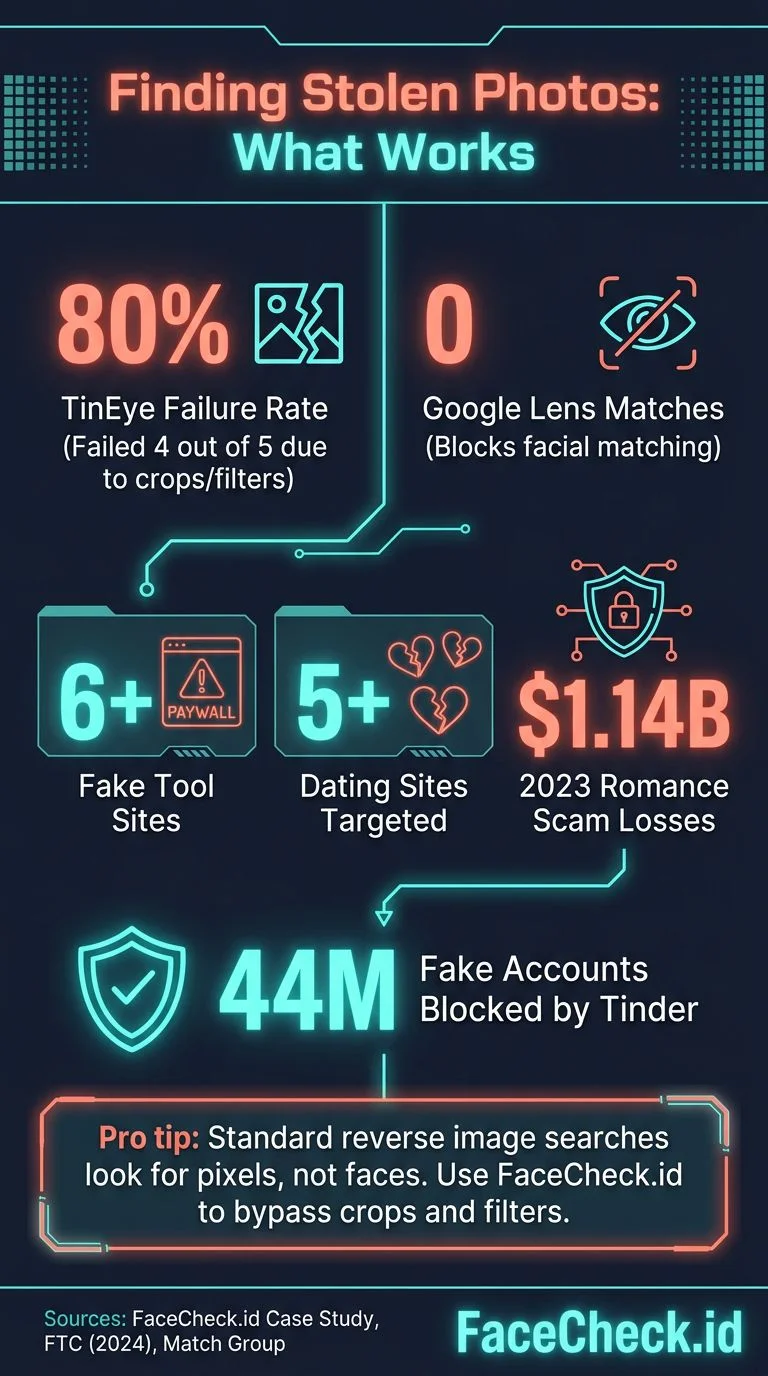
First instinct for most people. Upload a photo, let Google figure it out. The problem: Google explicitly blocks face matching. It will match your photo to visually similar images (same background, same color shirt) but it will not connect one face to another face across different photos. Jess uploaded her headshot and got results for "woman smiling" stock photography. Useless for finding stolen photos on dating sites.
For a detailed breakdown of why this happens, see why Google doesn't do face search.
TinEye
TinEye finds exact copies of images, or near-copies with minor cropping. If someone used Jess's photo without changing it at all, TinEye might catch it. But the scammer had cropped her photos, applied filters, and mirrored some of them. TinEye returned zero results for 4 out of 5 photos. The one match it found was her own portfolio site. More on TinEye's limitations in our TinEye review.
Random "Free Face Recognition" Sites
Jess found at least six sites that promised free online face recognition. The pattern was identical every time: upload your photo, watch a fake progress bar fill up, then get asked to create an account or pay $9.99 to "unlock results." Two of them didn't even have results to unlock. They just harvested the uploaded photo and email address. If a face recognition site looks like it was built in 2019 and asks for your email before showing anything, close the tab.
Yandex
Yandex used to be the underground favorite for face searching. It still has some facial recognition capability, but its effectiveness has dropped significantly since 2022. For Jess's photos, Yandex found one match on VKontakte (a Russian social network she'd never used). The profile was another fake, but it confirmed the scammer was operating across platforms. Yandex is worth a quick check, but it won't find profiles on American dating apps.
What Actually Worked
FaceCheck.id
Jess uploaded one of her headshots to FaceCheck.id and got results in under 10 seconds. Seven matches. Three were her own accounts (Instagram, LinkedIn, her portfolio). Four were profiles she'd never seen: two dating sites, one escort listing, and one fake Instagram account with 400 followers that was catfishing people using her photos.
The difference between FaceCheck and everything else she tried: it actually searches for the face, not the image. Cropped photos, filtered photos, even photos where the scammer had added a different background still matched because the geometry of her face stayed the same.
She ran her other headshots through one at a time. By the end of the hour, she had a list of 11 fake profiles using her photos across 8 different platforms.
PimEyes (Partial)
PimEyes found three of the same fake profiles FaceCheck caught, plus one FaceCheck missed (a small forum). But PimEyes blurred the results behind its paywall, and Jess needed the $29.99/month plan to actually see the URLs. For someone dealing with an active impersonation situation, the per-search pricing on FaceCheck made more sense than a monthly commitment. See our PimEyes comparison for the full breakdown.
After You Find the Fakes: What Jess Did Next
Finding the profiles was step one. Getting them removed was step two, and it required a different kind of persistence.
Screenshot Everything First
Before reporting anything, Jess screenshotted every fake profile with timestamps. Full page captures, not just the photo. The profile bio, the location, the username. Some platforms remove reported profiles quickly, and once they're gone, the evidence is gone too.
Report on Each Platform
Every major platform has an impersonation report form. The process varies:
- Dating apps (Tinder, Bumble): Report through the app's safety feature. Usually resolved in 24-48 hours.
- Instagram: File an impersonation report with a photo of your ID. Takes 3-7 days.
- Escort/adult sites: Harder. Most require a DMCA takedown notice sent to their hosting provider. Jess used a template from the Copyright Office website and emailed it to the site's abuse address.
File a Report with the IC3
If someone is using your photos for financial scams (catfishing people for money), you can report it to the FBI's Internet Crime Complaint Center at ic3.gov. This matters especially if you later need a paper trail for legal action.
Set Up Ongoing Monitoring
Jess now runs her main headshot through FaceCheck once a month. Takes 30 seconds. She's caught two new fake profiles since the initial cleanup. The scammer (or someone with access to her photos) keeps creating new accounts. Face recognition is the only way to catch these that doesn't involve manually searching every dating site on the internet.
Why Most "Face Recognition Online" Tools Don't Work
The phrase "face recognition online" returns millions of search results, but genuinely functional tools are rare for a few reasons:
Face matching is computationally expensive. Comparing a face against billions of indexed photos requires serious infrastructure. Most free tools don't have it. They either run a basic reverse image lookup (which matches pixels, not faces) or they fake the process entirely.
Legal liability scares companies away. Face recognition is regulated in the EU under GDPR, in Illinois under BIPA, and increasingly in other jurisdictions. Many companies that could build face search tools choose not to because the legal exposure is massive. The tools that do exist either operate in jurisdictions with lighter regulation or have built compliance frameworks from the ground up.
"Free" doesn't pay for GPU clusters. Running neural networks that extract facial geometry and compare it against a database of billions of photos costs real money per query. Any tool offering unlimited free face recognition is either subsidized by something else (your data, usually) or isn't doing real face matching at all.
How to Tell If a Face Recognition Tool Is Real
Before uploading your photo anywhere, check for these signals:
- Does it show results without asking for payment first? Real tools let you see at least thumbnail results before paying. If you see a progress bar followed immediately by a paywall, the "search" was theater.
- Does it find the same face in different photos? Upload two different photos of the same person. A real face recognition tool matches both to the same results. A pixel-matcher won't.
- Does the company have a privacy policy that addresses biometric data? Any legitimate face search tool will explain how it handles the photos you upload, how long they're stored, and whether they're added to any database.
- Does it work on non-celebrities? Many tools demonstrate impressive results with famous faces (because those photos are everywhere) but return nothing for ordinary people. Test with a non-famous face to see real performance.
FAQ
Is online face recognition legal to use?
In most countries, yes, for personal use. You're searching publicly available photos. However, using results to stalk, harass, or discriminate against someone is illegal everywhere. Some US states (Illinois, Texas, Washington) have biometric privacy laws that restrict how companies collect and store face data, but these regulate the tool providers, not individual users.
Can someone tell if I search for their face?
No. Tools like FaceCheck.id and PimEyes don't notify the person being searched. You're searching against publicly indexed photos, not accessing anyone's private account.
Will free face recognition tools steal my photo?
Some will. The sketchy "free" sites Jess encountered likely harvested uploaded photos. Stick to established tools with clear privacy policies. FaceCheck.id states it doesn't store uploaded photos after the search completes. PimEyes has faced scrutiny over its data practices but has an opt-out mechanism (behind a paid tier).
How accurate is online face recognition?
It depends entirely on the tool and the photo quality. With a clear, front-facing photo, FaceCheck.id finds matching results the majority of the time. Sunglasses, heavy makeup, and extreme angles reduce accuracy across all tools. No face recognition tool is 100% accurate, and false positives happen, so always verify results manually.
Can face recognition find someone on dating apps?
Not directly inside the apps (dating profiles aren't publicly indexed in real time). But if someone has used the same photo on a dating profile AND on any publicly accessible page, face recognition can find the public version, which often links back to their real identity.
The Bottom Line
Most "face recognition online" tools are junk. Google Lens doesn't do faces. TinEye only finds identical copies. Free sites are usually scams. The tools that genuinely work, FaceCheck.id and PimEyes, use actual neural networks to match facial geometry across billions of photos.
If you're in Jess's situation, or if you just need to verify someone is who they claim to be, start with FaceCheck. Upload a clear photo and see what comes back.

More on Facial Recognition Search
How to Find Someone by Doing Reverse Face Search
Got a photo but no name? Traditional image searches fall short when you need to match a face to a real identity. Find out which reverse face search tools actually work and which ones have serious limitations that could leave you with nothing.
Popular Topics
Identity Facial Recognition Free Facial Recognition How To Instagram TinEye Find Someone LinkedIn Scammers Catfishing Fake Profiles PimEyes Biometric Privacy Laws Screenshot Google Lens Reverse Image Lookup Image Lookup Face Search Face Match Similar Images Vkontakte ImpersonationThe Ultimate Face Search Battle: PimEyes vs FaceCheck - Who Comes Out on Top in 2026?