How to Find Someone on Instagram by Photo (2026)
You have a photo of someone. Maybe it's a screenshot from a dating app, a picture a friend sent you, or a face you spotted in a group photo. You want to find their Instagram. The problem? Instagram has no reverse image search. You can't upload a photo and get a profile back. The platform is designed around usernames, not faces. So what do you actually do?
In this article, we're going to discuss
Why Instagram's Built-In Search Won't Help You
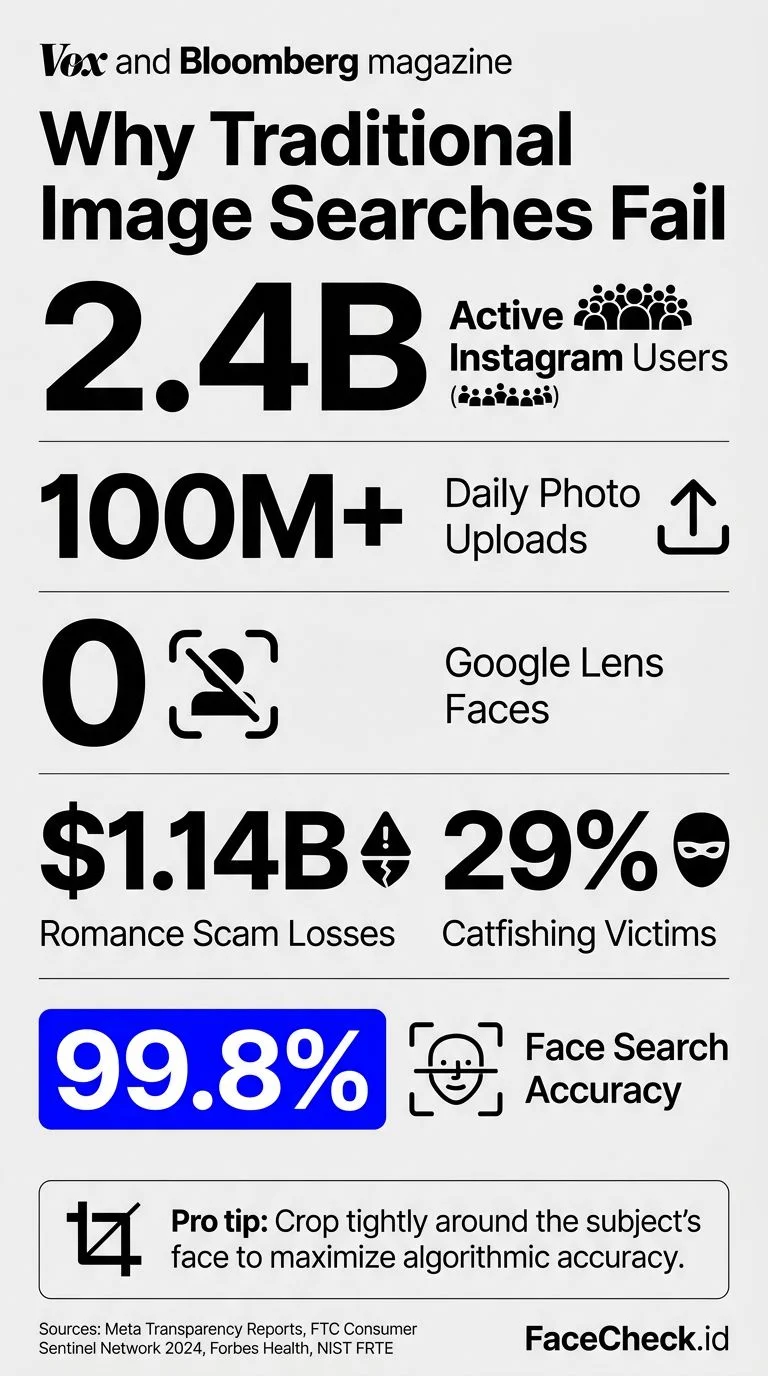
Instagram's search bar works with usernames, hashtags, and locations. That's it. If you don't know the person's handle, you're stuck scrolling through followers lists or hoping a mutual friend tags them. For a platform with over 2 billion monthly active users, that's like finding a specific grain of sand on a beach.
Google reverse image search won't save you either. Google Lens is decent at finding products and landmarks, but it actively avoids matching faces. Google removed face-matching from its image search years ago over privacy concerns. So even if someone's Instagram photos are indexed by Google, uploading their face won't surface the profile.
TinEye has the same problem. It finds exact image copies, not face matches. If the person posted that exact photo on Instagram, TinEye might find it. But if you have a different photo of the same person? Nothing.
The Method That Actually Works: Reverse Face Search
Here's what most guides won't tell you: the only reliable way to find someone on Instagram using a photo is a dedicated face search engine. These tools use facial recognition technology to match the geometry of a face across millions of indexed photos, including public Instagram profile pictures and posts.
FaceCheck.id is built specifically for this. Unlike general reverse image search tools, it's designed to match faces, not objects, scenes, or exact image duplicates. Upload a clear photo of someone's face, and it scans its index of public social media photos, including Instagram, Facebook, Twitter/X, LinkedIn, and dozens of other platforms.
The results come back with links to the profiles where matching photos were found. If that person has a public Instagram account with visible photos, there's a strong chance FaceCheck will surface it.
What About PimEyes?
PimEyes is another face search tool, but it focuses on web results broadly, not social media profiles specifically. It's also significantly more expensive ($29.99/month for basic access). PimEyes tends to surface news articles, blogs, and random web pages rather than direct social media links. For finding an Instagram profile specifically, FaceCheck.id is the more targeted option.
How to Find Someone's Instagram with FaceCheck.id
Here's the step-by-step process:
- Go to FaceCheck.id and upload a clear photo of the person's face. Front-facing photos with good lighting work best. Avoid group shots where the face is small or partially obscured.
- Click search and wait a few seconds. FaceCheck scans its database of publicly indexed social media photos and web images.
- Review the results. Each match shows a thumbnail, a confidence percentage, and a link to the source. Look for results from instagram.com specifically.
- Click through to the Instagram profile. If the person has public photos that were indexed, you'll get a direct link to their profile or the specific post where the matching photo appears.
- Verify the match. Check other photos on the profile to confirm it's the right person. One matching photo is a good sign; multiple matches across different posts is near-certain.
Tips for better results:
- Crop the photo so the face takes up most of the frame
- Use the highest resolution version you have
- Try multiple photos if the first one doesn't return strong matches
- If the person wears glasses in some photos but not others, try both versions
When This Won't Work (and What to Try Instead)
Face search isn't magic. There are situations where it comes up short:
Private accounts with no public photos. If someone's Instagram is set to private and they don't appear in any publicly indexed photos elsewhere on the web, face search tools won't find them. The technology can only match against images it has indexed.
Very few online photos. Some people barely have an online presence. If there are only a handful of photos of them anywhere on the internet, the odds of a match drop.
Low-quality source photos. Blurry, dark, or extremely low-resolution photos make facial geometry harder to map. The clearer your source image, the better your results.
Heavy filters or face alterations. Snapchat filters, heavy makeup that changes facial structure, or significantly different ages between photos can reduce match accuracy.
Alternative Approaches When Face Search Falls Short
If FaceCheck.id doesn't turn up the Instagram profile you're looking for, there are a few manual methods worth trying:
- Location-based Instagram search. If you know where the photo was taken, search Instagram by location tag. People often tag restaurants, gyms, events, and landmarks.
- Mutual connections. Check the followers lists of people you know are connected to the person. Instagram's "Suggested for You" feature sometimes surfaces people in overlapping social circles.
- Reverse search the image on Yandex. Yandex is more aggressive with face matching than Google. It won't give you a direct Instagram link, but it might surface the same photo on another platform where a username is visible.
- Check other platforms first. Sometimes it's easier to find someone on Facebook or LinkedIn (where real names are more common), then search that name on Instagram.
Is It Legal to Search for Someone's Instagram by Photo?
Yes, searching for publicly available information is legal in most countries. Face search tools like FaceCheck.id only index photos that are already publicly visible on the internet. You're not accessing anything private or hacking into accounts.
That said, what you do with the information matters. Using a tool to find someone's profile and then harassing or stalking them is illegal regardless of how you found the profile. The tool is neutral. Your intentions aren't.
If you're using face search because you're concerned about a scam, verifying someone's identity before a date, or trying to reconnect with a lost contact, you're using it exactly as intended.
FAQ
Can I search Instagram by photo without an account?
Instagram itself doesn't offer photo-based search at all, whether you have an account or not. To find someone on Instagram by photo, you need an external tool like FaceCheck.id that indexes public Instagram content.
Does Google reverse image search work for finding Instagram profiles?
Rarely. Google indexes some Instagram content, but Google Lens deliberately avoids face matching. You might get lucky if someone posted the exact same image publicly, but for face-based searches, dedicated tools work far better.
How accurate is FaceCheck.id for finding Instagram accounts?
Accuracy depends on whether the person has publicly visible photos indexed by FaceCheck. For people with active, public Instagram accounts, the match rate is high. FaceCheck returns confidence scores with each result so you can judge match quality yourself.
Can someone tell if I searched for them using face search?
No. Face search tools search against publicly indexed images. The person whose photo you searched is not notified. It's no different from Googling someone's name.
What if the person I'm looking for has a private Instagram?
If their profile is private and none of their photos appear publicly elsewhere, face search tools won't find a match. In that case, try searching other platforms (Facebook, LinkedIn, Twitter/X) where they might have a public presence, then search their name on Instagram.
Ready to find that Instagram profile? Upload a photo at FaceCheck.id and see what comes back.

Read More on Facial Recognition Search
How to Find and Remove Nude Deepfakes With FaceCheck.ID
Deepfake nudes are blowing up online - and 99% of victims are women. The worst part? Google and Bing can't help you find them because they're completely face-blind. Learn the detection method that actually works and the exact removal process to reclaim your image.
Popular Topics
Face Search Engine Identity Social Media Image Search Facial Recognition Reverse Face Search Search Instagram How To Facebook Instagram Facial Recognition Technology Social Media Profiles Twitter TinEye Image Search Tool Find Someone LinkedIn PimEyes Reverse Search How to Find Someone Find Instagram Profiles Screenshot Google Lens Face Search Face MatchFaceCheck vs PimEyes: Which Search Engine Reigns Supreme in 2026?